A WordPress website costs $3,000 to $10,000 for a professional theme-based build, or roughly $15,000 to $40,000 for a custom marketing site in the experience I have reviewing US studio proposals. My example stack adds $721 a year in managed hosting, domain renewal and licenses before maintenance; leaner or more extension-heavy stacks will differ. For a self-hosted business site, managed hosting can start at $336 a year, while the WordPress.com plan cards show Business at $40 monthly or $25 a month on the displayed annual term. Those are different operating models, not two prices for the same product.
If you are comparing B2B web design teams for lead-generation sites, ask each one to separate the build, software and update labor. I also keep an editorial directory of website design partners so buyers can compare delivery evidence before discussing WordPress line items. A cheap theme and expensive rebuild can come from the same initial brief when scope is unclear.
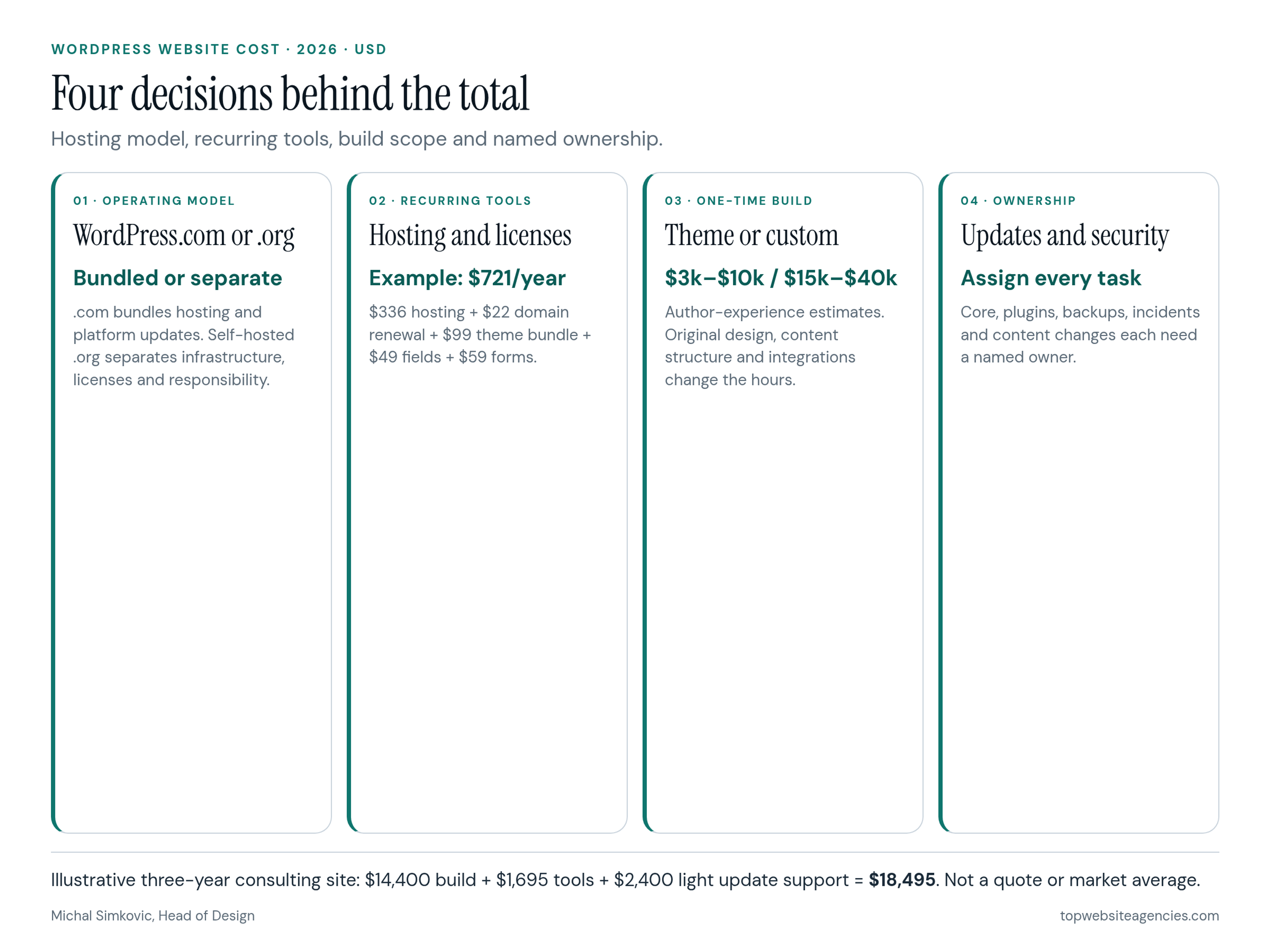
WordPress.com or Self-Hosted WordPress.org?
This fork changes both the invoice and the person responsible for the website.
WordPress.com is a managed hosting product. Its plans include hosting, SSL, a CDN, security protection and managed WordPress core updates. The free plan uses a WordPress.com subdomain and carries platform ads. Annual and multi-year paid plans include a custom domain for the first year. The current pricing page also says plugin installation is available on paid plans, which removes an old reason to assume every paid site requires Business.
Business is still the cleaner example for a team that wants developer access, real-time backups and a staging site. On November 6, 2026, the official card showed $40 monthly, with $25, $20 and $17.50 monthly equivalents for longer commitments. Check the selected billing term and renewal checkout before using any of those equivalents in a forecast.
Self-hosted WordPress.org is open-source software on infrastructure you choose. There is no WordPress software license bill. You buy hosting and a domain, select a theme and plugins, and decide how backups, security, testing and updates happen. A managed host can cover several of those jobs, but it does not automatically own your content changes or every plugin conflict.
Choose .com when a bundled operating model matters more than controlling the server and deployment workflow. Choose self-hosted .org when the project needs a custom theme, unusual integrations, particular compliance controls or freedom to change hosts. If the unresolved question is WordPress versus another CMS, use the Webflow and WordPress platform decision guide. The budget below assumes you have already chosen WordPress.
The Recurring WordPress Lines to Budget
Treat renewal as the default, not the introductory offer. These are concrete vendor examples checked on November 6, 2026, not claims that every business needs the same stack.
Hosting and domain
On self-hosted WordPress, WP Engine's Essential plan displayed a regular price of $28 a month billed annually, or $336 upfront. It includes daily backups, SSL and managed WordPress, PHP and MySQL updates. Automated plugin and theme updates with visual checks are an optional Essential add-on, so do not assume that a managed server means all application updates are tested for you.
A domain is small but easy to misprice. DreamHost's domain table displayed .com registration at $10.99 on sale and renewal at $21.99. Using $22 a year for an existing .com is more honest than carrying a first-year promotion through a multi-year model. Your registrar and extension may differ.
Hosting support also has a boundary. It normally covers infrastructure and the host's own platform. It does not necessarily repair a form after a plugin update, replace a discontinued extension or redesign a page. Write those responsibilities into the proposal.
Theme and plugin licenses
A free theme and free plugins can be a rational choice for a small site. Paid licenses become relevant when the team needs vendor support, structured content fields or form integrations.
Three current examples show why the recurring column matters:
- GeneratePress One: $99 a year for one site. Its bundle includes GP Premium, GenerateBlocks Pro and the vendor's other listed tools. It renews yearly.
- Advanced Custom Fields PRO Personal: $49 a year for one website. This is useful when editors need controlled fields rather than a page built from unstructured blocks.
- Gravity Forms Basic: $59 a year for one site. It covers the form plugin and listed basic add-ons; Pro or Elite is a separate decision when the integration requirements justify it.
That example stack is $207 a year before hosting and domain. It is not a mandatory shopping list. A custom theme may already implement fields without a paid field plugin, and another form product may fit better. Check whether the license pays for updates, support or both, and who owns the account after handoff.
Theme Customization or a Custom WordPress Build?
The build line is where a WordPress budget changes by an order of magnitude. The estimates below reflect scopes I see while reviewing US design and development proposals. They are not vendor quotes or a market-rate survey. For context beyond WordPress, see the broader website budget framework; here the distinction is specifically how much WordPress design and code you are buying.
Theme-based professional build: estimate $3,000 to $10,000
This scope starts with an established theme or block framework. The team applies brand styles, configures page layouts, sets up forms and analytics, adds approved content and tests the launch. It works when the theme already supports the intended information architecture.
Ask what happens when a design requirement conflicts with the theme. That answer separates a genuine theme-based scope from an underpriced custom build.
Custom theme and marketing site: estimate $15,000 to $40,000
This scope includes discovery, wireframes, original visual design, a custom WordPress theme or block library, structured content types, QA and launch. It fits a business whose page system and differentiation matter more than getting online quickly.
Custom does not remove recurring WordPress work. It changes the work from adapting a third-party theme to maintaining code written for your site. Ask for documentation, a repository handoff and a defined process for core and plugin upgrades.
Complex integrations: scope them separately
Multilingual content, gated resources, complex search, account areas or business-system integrations add discovery and testing beyond the ranges above. Price those requirements explicitly rather than hiding them inside an hourly contingency. This article stays with content-led marketing sites and does not model checkout or store operations.
Who Owns Security, Backups and Updates?
My design leadership work at Around and later at Amazon Web Services reinforced a simple handoff rule: a task without a named owner tends to become an emergency later. Put an owner beside each item before approving a WordPress build.
- WordPress core and PHP: on managed .com, the platform handles these. On managed self-hosting, confirm exactly which updates are automatic and which require approval.
- Theme and plugin updates: identify who applies them, where they are tested and how a failed update is rolled back. A backup is useful only when someone knows how to restore it.
- Plugin selection and removal: fewer dependencies mean fewer renewal and compatibility decisions. Remove abandoned plugins rather than leaving them installed because nobody remembers their purpose.
- Security incidents: hosting may provide infrastructure protection and malware detection. Establish who investigates compromised admin accounts, forms and third-party code.
- Content and small design changes: these are separate from patching. Name the internal editor or outside partner who does them.
For ongoing labor, add one WordPress maintenance budget line rather than treating updates as free hosting. The worked example uses a light annual allowance for routine checks and small fixes; larger content programs need their own scope.
A Content-Led Service Business: Three-Year WordPress Budget
This is an illustrative estimate, not a quote or a claimed average. The scenario is a US consulting business with roughly 15 pages, a blog, case studies, a contact form and no checkout. Two marketers publish content but have no developer on staff.
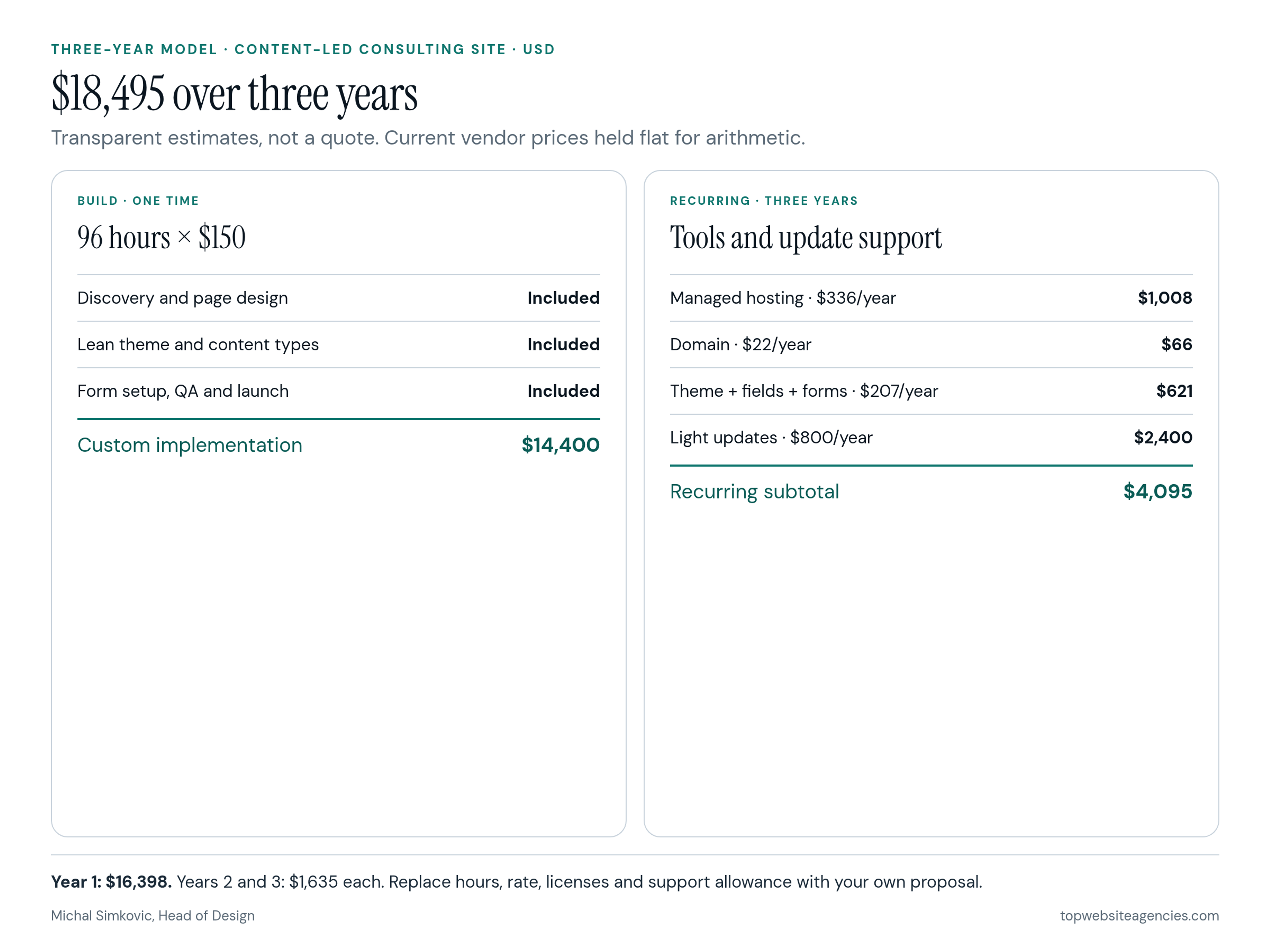
The custom build assumption is 96 hours × an illustrative $150 blended rate = $14,400. Hours cover discovery, page design, a lean custom theme, content types, form setup, QA and launch. Rescale both inputs to match real proposals.
Recurring assumptions use the sourced vendor examples above and hold them flat only to make the arithmetic auditable. Actual renewals can change.
- Year 1 build: $14,400 once.
- Managed hosting: $336 a year × 3 = $1,008.
- Existing .com renewal: $22 a year × 3 = $66.
- GeneratePress One: $99 a year × 3 = $297. This scenario uses its block system as a design starting point within the custom implementation.
- ACF PRO Personal: $49 a year × 3 = $147 for controlled case-study fields.
- Gravity Forms Basic: $59 a year × 3 = $177 for the inquiry form.
- Light update allowance: $800 a year × 3 = $2,400 for routine update testing and small fixes, not ongoing campaigns or a full redesign.
Three-year total: $14,400 + $1,008 + $66 + $297 + $147 + $177 + $2,400 = $18,495.
Year 1 is $16,398. Years 2 and 3 are $1,635 each before new content projects. Software, hosting and domain account for $1,695 across the period, while build and update labor account for $16,800. That split explains why negotiating a few dollars off hosting rarely changes the investment as much as clarifying page scope, content entry and update ownership.
If the business handles updates internally, subtract $2,400 and include the staff time instead. If the same site needs 150 build hours at $175, the build becomes $26,250 and the three-year total becomes $30,345. These substitutions are the useful part of the model: replace the assumptions rather than copying the total.
Frequently Asked Questions (FAQ)
Is WordPress itself free?
The self-hosted WordPress.org software is free to download and use. A working business website still needs hosting and a domain, and may need paid themes, plugins and labor. WordPress.com has a free hosted plan with platform limits, plus paid plans.
How much should a small business pay for a WordPress website?
For a professionally implemented theme-based site, my working estimate is $3,000 to $10,000 plus recurring tools and update labor. A custom content-led marketing build often falls around $15,000 to $40,000. Your actual quote depends on design scope, content entry, integrations and who maintains the result.
Are WordPress themes and plugins one-time purchases?
Some are, but many commercial licenses renew annually. GeneratePress One, ACF PRO Personal and Gravity Forms Basic are annual examples cited above. Confirm renewal amount, site limit and what stops when the license expires.
Does managed WordPress hosting include all maintenance?
No. Managed hosting commonly covers infrastructure, backups and some core updates. Plugin compatibility, custom code, content edits and recovery decisions may still belong to you or your development partner. Read the plan's responsibility boundary rather than relying on the word managed.
Why calculate a three-year WordPress cost?
It exposes renewals and labor that a launch quote leaves out. A three-year view also makes theme-based and custom scopes easier to compare on the same basis. Keep current vendor prices and your own hours separate so each can be updated independently.
Conclusion
A practical WordPress budget separates four decisions: hosted .com or self-hosted .org, infrastructure and domain, theme and plugin licenses, and the people responsible for building and updating the site. Current vendor prices make the recurring lines measurable, but they do not predict the build. Scope does. Write down the pages and content types, insist on named update owners, and model three years with your real hours and renewal quotes. The result will be more useful than any single WordPress cost figure.