A realistic website maintenance cost runs from about $50 a month for a simple hosted marketing site to $10,000 or more a month for a large headless build or a high-volume store. The launch invoice is not the last bill. Hosting, licenses, updates, fixes and small improvements keep running for as long as the site is live, and teams that leave them out of the budget usually pay more later.
As editor of the Top Website Agencies rankings, I read the support plans that studios attach to their build proposals, including those from the SaaS web design specialists we rank. The pattern I see most often is simple: a company spends $80,000 on a new site, signs no support plan, and eighteen months later the site is slower, a form has quietly stopped sending leads, and a plugin update has broken a template. Saving $1,500 a month turned into an emergency project.
Earlier, leading design teams at Copy.ai, Around, HackerRank, and AWS taught me that software is never finished. Dependencies change, browsers ship new versions, and integrations get deprecated whether you touch the site or not. This guide explains what maintenance covers, how the platform you pick changes the bill, which budget tier fits your site, how support plans are billed, and what to put in the contract.
Website Maintenance Cost at a Glance
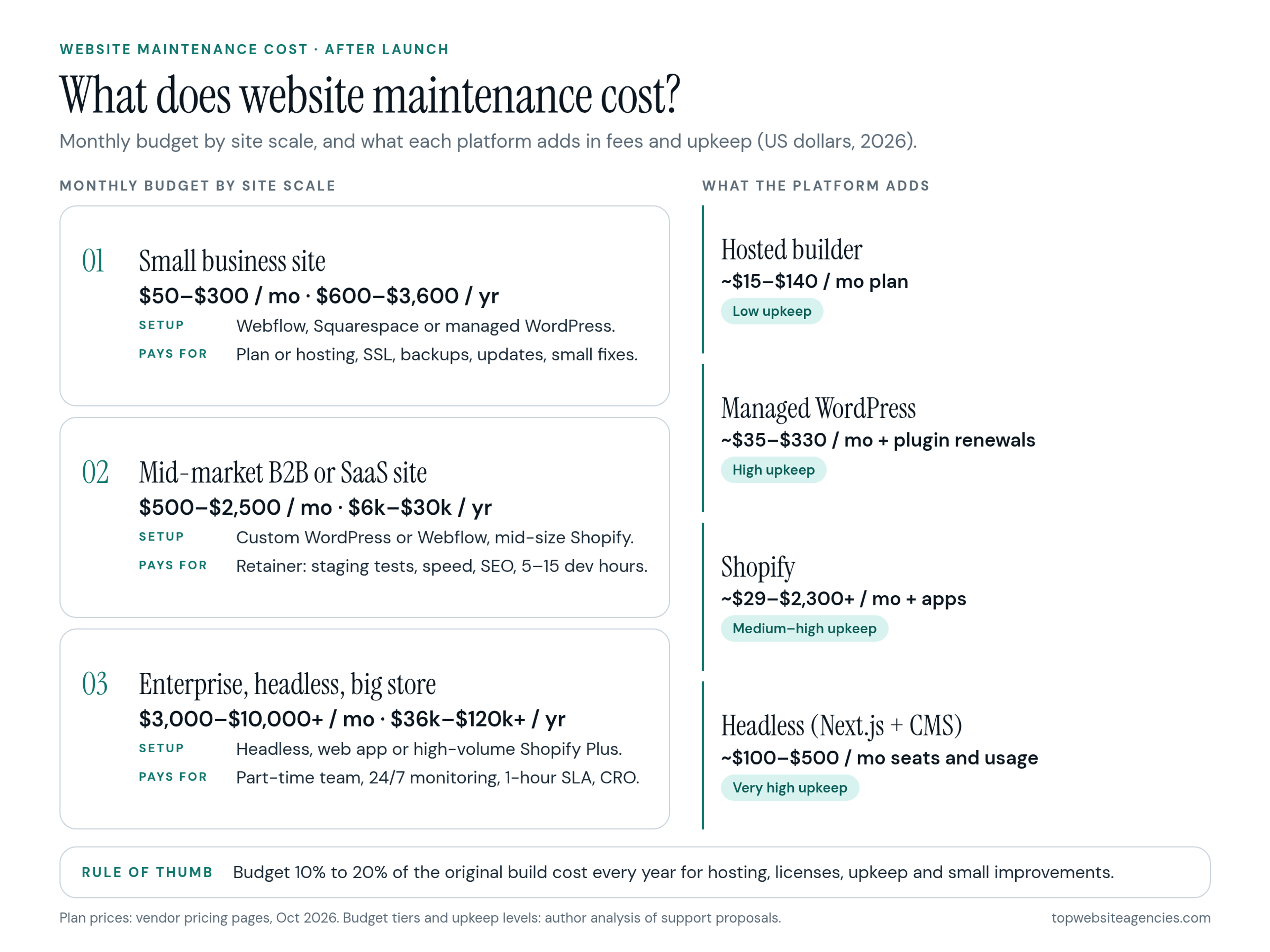
In the proposals and support plans I review, US maintenance budgets fall into three broad tiers:
- Small business and simple marketing sites: $50 to $300 a month, or $600 to $3,600 a year.
- Mid-market B2B and SaaS marketing sites: $500 to $2,500 a month, or $6,000 to $30,000 a year.
- Enterprise, headless and high-volume ecommerce: $3,000 to $10,000 or more a month, or $36,000 to $120,000 or more a year.
A useful rule of thumb: plan to spend 10% to 20% of the original build cost every year on hosting, licenses, upkeep and small improvements. A $60,000 site therefore needs roughly $6,000 to $12,000 a year just to stay healthy, before any new features.
What Website Maintenance Actually Covers
A monthly support fee pays for three different layers of work. Maintenance is a separate job from the build itself; if you are unsure where one ends and the other begins, this breakdown of what a design studio handles from discovery to handoff shows the full project scope.
1. Infrastructure and security
This layer keeps the site online, fast and safe.
- Hosting and CDN: server resources, bandwidth and edge caching.
- Domain and SSL: yearly domain renewals and automatic certificate renewal so every page loads over HTTPS.
- Security patching: applying updates to the CMS, plugins and server environment as soon as vulnerabilities are announced.
- Backups: automated daily snapshots of the database and files, stored somewhere separate from the live server, plus a tested restore process.
- Uptime monitoring: automated checks every minute or two that alert someone the moment the site goes down.
2. Technical upkeep and quality checks
Sites degrade even when nobody touches them, because everything around them keeps changing.
- Core and dependency updates: testing and installing new versions of WordPress core, Shopify apps or JavaScript packages without breaking layouts.
- Browser and device fixes: repairing layouts that break after a Safari or Chrome release or on a new phone size.
- Performance: watching page speed so the main content keeps loading in about 2.5 seconds or less on mobile.
- Accessibility: checking new pages for color contrast, keyboard navigation and screen reader labels.
- Technical SEO health: fixing crawl errors, 404 pages and redirect chains reported in Google Search Console.
3. Improvements and growth
This is where maintenance stops being defensive and starts paying for itself.
- Content support: building new landing pages, case studies and product announcements that need more than a text edit.
- Design adjustments: updating navigation, adding page sections and refining components.
- Conversion work: A/B tests on headlines and forms, and fixes to the paths that lead to a demo request or purchase.
- Analytics hygiene: keeping tag manager containers, conversion events and the cookie consent banner in working order.
Maintenance Costs by Platform and Stack
Your architecture decides how much of this work you buy as software and how much you buy as developer time. A hosted platform moves infrastructure work to the vendor. An open-source or headless stack moves it to your team or your agency.
Hosted website builders (Webflow, Squarespace)
Hosted builders handle servers, security patches and CMS updates for you, so the fixed cost is mostly the subscription. As of October 2026, Webflow site plans start at about $15 a month billed yearly, and the plan with the CMS costs about $25 a month. Squarespace's plans run from $19 to $99 a month billed annually, or $25 to $139 month to month.
- Outside help needed: low. You pay designers or developers only for new templates, larger CMS changes or custom code.
Open-source CMS (WordPress)
The WordPress core is free, but hosting, plugin compatibility, database cleanup and security are all on you. Plugin updates regularly conflict with custom themes, so every update should be tested in a staging copy before it reaches the live site.
Managed hosting removes part of that burden. WP Engine's managed hosting plans start at $35 a month for one site with 25,000 monthly visits and reach $330 a month for 30 sites; plans with isolated resources and an uptime SLA cost more. On top of hosting, a typical business site carries a handful of premium plugins (custom fields, forms, multilingual, security) that renew every year and add a few hundred dollars annually.
- Outside help needed: moderate to high. Someone has to update plugins every month, test forms and checkout after each update, and keep the PHP version current before the host forces an upgrade.
Ecommerce platforms (Shopify)
Shopify runs the infrastructure, checkout security and core updates. As of October 2026, standard Shopify plans cost about $29 to $299 a month billed yearly, and Shopify Plus starts at around $2,300 a month. The real maintenance load comes from the app stack: subscriptions, reviews, search, inventory sync and translations, each with its own fee and its own update cycle. For a full picture of how plan fees, card rates and apps add up over three years, see our ecommerce budget guide.
- Outside help needed: high. App updates often conflict with the theme or slow down pages, and support time goes to checkout fixes, seasonal campaigns and integration upkeep.
Headless and custom builds
A headless setup, such as a Next.js front end on Vercel connected to a headless CMS like Sanity or Contentful, is fast and secure, but every layout change becomes a code change. Platform fees are modest and usage-based: Vercel's Pro plan costs $20 a month per developer seat and includes $20 of usage credit, and Sanity's Growth plan costs $15 per seat a month, with a free tier for small projects and custom Enterprise pricing. For a team with three developers and five editors, that is about $135 a month before usage overages.
- Outside help needed: very high. Marketing teams cannot change front-end components on their own, so new sections, schema changes and dependency updates all need a developer and a deployment.
In short, the four stacks compare like this on a typical marketing site:
- Hosted builder: about $15 to $140 a month in plan fees; low technical upkeep; your marketing team can run day-to-day content.
- Managed WordPress: about $35 to $330 a month in hosting plus plugin renewals; high upkeep; every update needs staging tests.
- Shopify: about $29 to $2,300 or more a month in plan fees plus apps; medium to high upkeep driven by the app stack.
- Headless: roughly $100 to $500 a month in seats and usage for a small team; very high upkeep, because changes require developers.
Monthly and Annual Budget Tiers
When you compare support quotes, most will land in one of three tiers.
Tier 1: Small business and simple marketing sites
- Monthly budget: $50 to $300 ($600 to $3,600 a year).
- Typical setup: a Webflow, Squarespace or managed WordPress site with modest traffic and mostly static pages.
- What it pays for: the platform plan or hosting, domain and SSL, backups, plugin updates, and an occasional hour of paid help for a fix or a small change.
Tier 2: Mid-market B2B and SaaS marketing sites
- Monthly budget: $500 to $2,500 ($6,000 to $30,000 a year).
- Typical setup: a custom WordPress or Webflow site, or a mid-size Shopify store, supporting active campaigns.
- What it pays for: a support retainer with regular update checks, staging tests, speed tuning, monthly technical SEO cleanup, and 5 to 15 hours of design and development time for new landing pages and components.
Tier 3: Enterprise, headless and high-volume ecommerce
- Monthly budget: $3,000 to $10,000 or more ($36,000 to $120,000 or more a year).
- Typical setup: a headless build, a custom web application or a high-volume Shopify Plus store.
- What it pays for: a part-time team (front-end developer, designer, QA), round-the-clock monitoring, a written SLA with a one-hour response for critical outages, automated testing, and an ongoing conversion program.
How Support Plans Are Billed
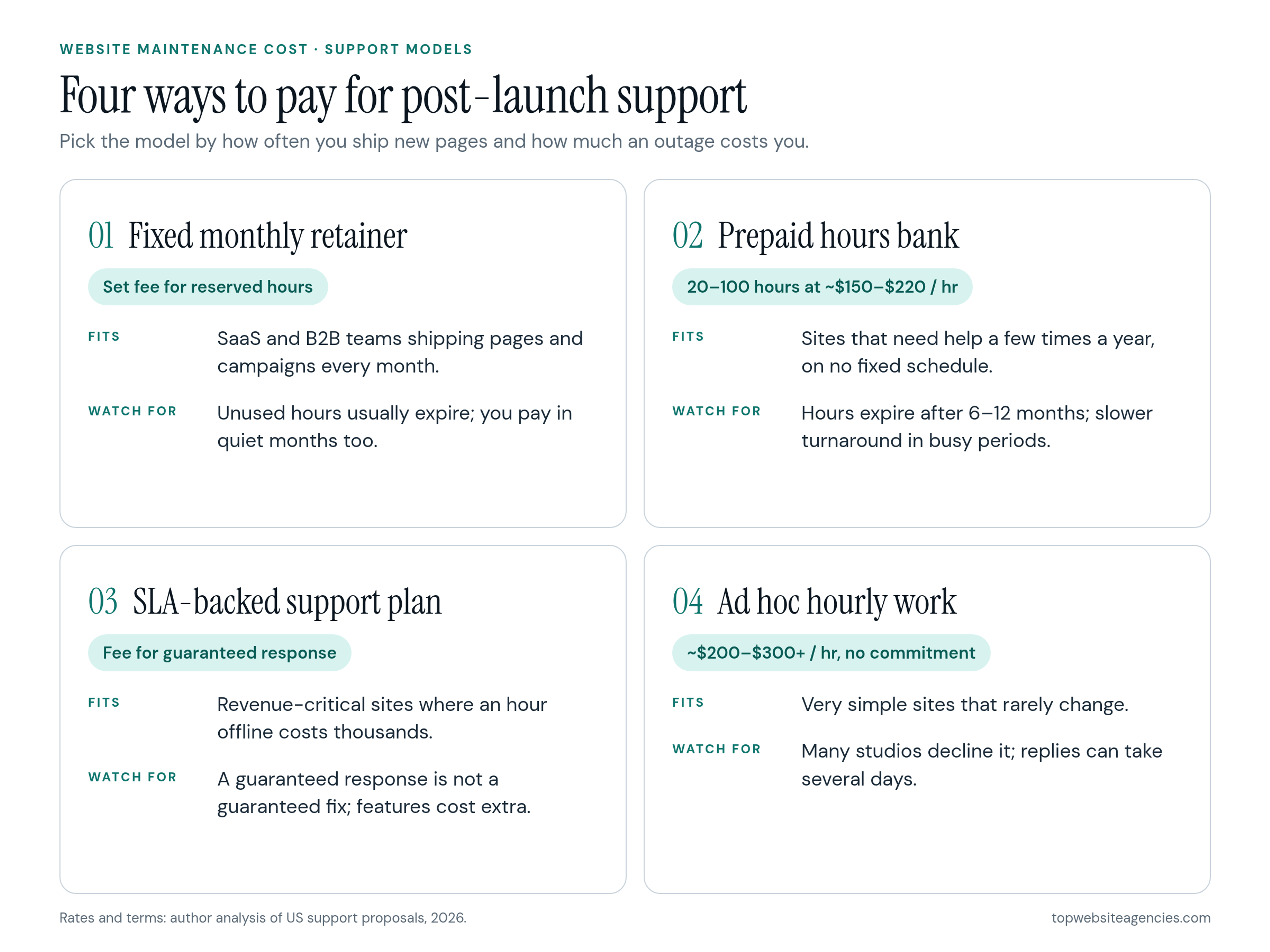
Studios package post-launch support in four ways. The right model depends on how often your team ships new pages and how much an outage costs you.
1. Fixed monthly retainer
You pay a set fee for a reserved block of design and development time each month. Unused hours usually do not roll over, but your requests get priority scheduling.
- Fits: SaaS and B2B marketing teams that launch pages and campaigns every month and want a predictable operating cost.
- Watch for: paying for hours you never use in quiet months.
2. Prepaid hours bank
You buy a block of time, often 20, 50 or 100 hours, at a blended rate that usually falls between $150 and $220 an hour, and the team logs time against your balance.
- Fits: companies that need help a few times a year, on no fixed schedule.
- Watch for: hours that expire after 6 or 12 months, and slower turnaround than retainer clients get in busy periods.
3. SLA-backed support plan
You pay mainly for guaranteed availability and response times, not for new features. This is common for enterprise sites and stores where downtime costs thousands of dollars an hour.
- Fits: revenue-critical sites that need contractual accountability during outages.
- Watch for: plans that guarantee a response but not a fix, and feature work billed separately at a higher rate.
4. Ad hoc hourly work
No monthly commitment: when something breaks, you email the team and pay its hourly rate.
- Fits: very simple sites that rarely change.
- Watch for: many established studios decline break-fix work on sites they do not maintain. Those that accept it often charge $200 to $300 or more an hour and may need several days to respond.
Hidden Costs and the Price of Neglect
Retainer fees are only part of the bill. Before signing off on a build, ask for a list of every paid tool and license the site depends on, with renewal dates and owners.
Common secondary costs
- Commercial web fonts: some font licenses are priced by monthly pageviews, so a traffic spike can move you into a higher tier.
- Plugin and extension renewals: premium WordPress plugins and Shopify apps renew monthly or yearly, and an expired license often means no more security updates.
- Search, forms and other APIs: hosted site search, form processors and scheduling tools usually charge by volume, so costs rise with traffic.
- Usage overages on headless hosting: bandwidth, image optimization and function calls above the included allowance are billed per unit.
What deferred maintenance really costs
Skipping upkeep feels like a saving until the bill arrives. Compare two scenarios over 36 months for a mid-size WordPress site:
- Routine maintenance: a $500-a-month retainer for 36 months comes to $18,000. The site stays patched, fast and stable, and can serve the business for five years or more.
- Deferred neglect: $0 a month for 36 months, then an emergency rebuild after the stack can no longer be patched, often $30,000 to $35,000 or more, plus lost leads and rankings while the site is broken.
The usual trigger is the server environment. When a WordPress site sits unpatched for two years, the host keeps upgrading PHP and the database while the site's plugins and theme stay frozen. Eventually the host retires the old PHP version, and outdated code breaks all at once. Fixing that often means a theme overhaul and a data migration rather than a few updates.
What Belongs in a Maintenance SLA
Do not sign a support plan based on a call and a two-page estimate. A written service level agreement protects the site and sets clear boundaries.
1. Response times by severity
The agreement should define severity levels and a response time for each:
- Severity 1, critical outage: the site is down, security is compromised, or the main lead form or checkout is broken. Response in under one hour.
- Severity 2, major bug: a key feature such as search or a secondary form fails, but the site is up. Response in under eight hours.
- Severity 3, minor change: text swaps, visual tweaks and small component requests. Response in two to three business days.
2. Scope boundaries and out-of-scope rates
Spell out what counts as maintenance (bug fixes, security updates, small layout changes) and what counts as a new project (a new portal, a host migration, a navigation rebuild). New projects should be quoted separately at an hourly rate stated in the contract.
3. Account ownership and access
This is the most important clause for a business owner. Your company should own the code repository, CMS workspace, domain registrar account, analytics properties and hosting account. The support team gets admin access as a collaborator, never as the owner, so you can switch partners later without asking anyone's permission to move your own assets.
Questions to Ask Before You Sign a Support Plan
Run through these with the technical lead before you commit to a monthly plan:
- Who handles our day-to-day tickets? Find out whether the team that built the site does the work, or a separate support desk or subcontractor.
- Do you ever update our live site directly? Updates and code changes should go through a staging copy first. Changing plugins or code directly on production risks broken pages and corrupted data during live traffic.
- What happens to unused hours? Ask whether they roll over to the next month or expire.
- What do we get in the monthly report? Expect a short summary of applied patches, uptime, page speed and completed requests.
How to Keep Your Maintenance Budget Lean
You can control ongoing costs without letting the site slip.
- Get real CMS training at handoff. Ask for recorded walkthroughs and sensible editor roles, so your team handles text edits, blog posts and image swaps instead of paying $150 or more an hour for content entry.
- Consolidate your tools. Every single-purpose plugin or script adds a subscription, an update cycle and a security risk. Use built-in CMS features where you can.
- Match the stack to your team. Do not commission a custom headless build if nobody in-house can support it. A hosted builder or managed WordPress that marketers can run themselves keeps the monthly bill low.
Frequently Asked Questions (FAQ)
How much does website maintenance cost for a small business?
For a small business site on a hosted builder or managed WordPress, expect about $50 to $300 a month. That covers the platform plan or hosting, domain and SSL renewals, backups, updates and occasional paid help for small fixes.
Why do we need maintenance if the site works fine?
Because everything around the site keeps changing. Browsers ship new versions, hosts upgrade their servers, plugins and APIs get deprecated, and new security holes appear every month. Without regular updates, the site slows down, layouts break on new devices, and unpatched software becomes an easy target.
Should we choose a monthly retainer or an hourly support plan?
If your team launches pages and campaigns every month or needs guaranteed turnaround, a fixed monthly retainer is usually the better deal, because it reserves capacity and keeps costs predictable. If the site changes only a few times a year, a prepaid hours bank costs less.
How much should we budget per year compared with the build cost?
A practical planning number is 10% to 20% of the original build cost per year for hosting, licenses, upkeep and small improvements. Sites that run frequent campaigns or experiments will spend more because that budget also covers growth work.
What happens if we want to change support partners later?
If your contract makes your company the owner of every account, switching is simple: you remove the old team's access and invite the new one into the same repository, CMS and hosting account. Nothing needs to be migrated or rebuilt.
Conclusion
A website is a product that needs ongoing care, not a one-time purchase. Budget 10% to 20% of the build cost per year, pick a platform your team can actually run, and put response times, scope limits and account ownership in writing before launch. That keeps post-launch costs predictable and adds years to the life of the site. If you are still choosing who will build and support a software company's site, our SaaS list is a good place to start comparing teams that offer ongoing support.