Webflow vs WordPress is really a question about who will run your website after the agency leaves. Webflow is a hosted visual platform: the vendor handles hosting, security, and updates, and your marketing team edits pages without a developer. WordPress is open-source software you host yourself: it can do almost anything, but someone has to patch plugins, manage hosting, and keep the site fast. For most startup and B2B marketing sites, a specialist Webflow agency is the simpler, cheaper long-term choice. For large publishers, complex ecommerce, and sites with deep custom integrations, a strong WordPress team is usually the better hire.
The harder part is that the agency you talk to has often already made the decision for you. In the proposals I review as editor of the TopWebsiteAgencies rankings, most agencies recommend the platform their own team builds on, whatever the client's situation. That is not dishonest; it is just how agencies are staffed. But it means you need to know the trade-offs well enough to tell a recommendation from a default.
This guide covers how the two platforms differ, where each one wins, what each costs over three years, how to spot platform bias in a pitch, and the questions I would ask any agency before signing.
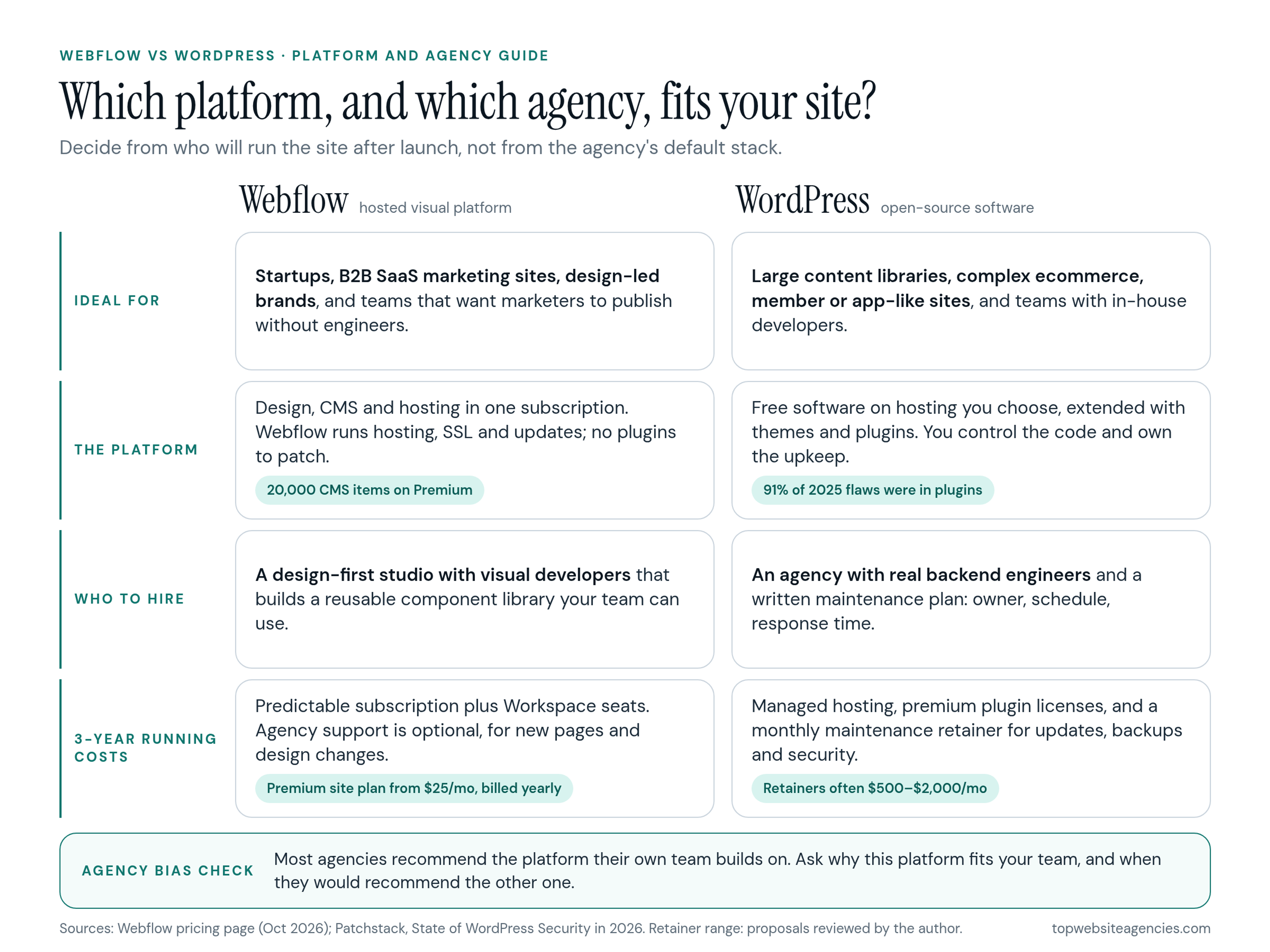
Webflow vs WordPress at a Glance
- Ideal for, Webflow: startups, B2B SaaS marketing sites, design-led brands, and teams that want marketers to publish without engineering help.
- Ideal for, WordPress: large content libraries, complex ecommerce, membership or custom-application sites, and teams with in-house developers.
- The platform: Webflow is a closed, hosted product with design, CMS, and hosting in one subscription. WordPress is free, open-source software that you install on hosting you choose and extend with themes and plugins.
- Who to hire: for Webflow, a design-first studio with visual developers. For WordPress, an agency with real backend engineers and a documented maintenance process.
- 3-year running costs: Webflow is a predictable subscription with light, optional support. WordPress needs hosting, plugin licenses, and an ongoing maintenance budget.
How the Two Platforms Actually Differ
WordPress is open-source software. You (or your agency) install it on a server, pick a theme, and add plugins for forms, SEO, caching, security, and anything else the site needs. You own and control the code and the database, and you are also responsible for everything that runs on them. Its reach is enormous: according to W3Techs, WordPress runs on roughly 40% of all websites and close to 60% of sites that use a known content management system.
Webflow takes the opposite approach. It combines a visual design tool, a CMS, and managed hosting in one product. Designers build layouts by working directly with HTML and CSS properties on a canvas, and the site is published to Webflow's own hosting. There is no server to manage and no plugin to update. In exchange, you accept Webflow's limits on database size, backend logic, and where the site can live.
That difference shapes the agency you need. A Webflow project is mostly a design and front-end job. A WordPress project is a design job plus a software and operations job that keeps running after launch.
Security and Maintenance: Who Patches What?
Most WordPress security risk lives in the ecosystem around the core, not in the core itself. Patchstack's State of WordPress Security in 2026 counted 11,334 new vulnerabilities in the WordPress ecosystem in 2025. Plugins accounted for 91% of them and themes for 9%, while WordPress core had only six reported issues, all low priority. The same report found that 46% of vulnerabilities had no developer fix by the time they were publicly disclosed, and that for heavily exploited flaws the weighted median time to first exploitation was about five hours.
For a buyer, the takeaway is practical: a WordPress site with 20 or 30 plugins needs someone watching it. That means monitoring, tested updates, backups, and a firewall or virtual patching layer, not just switching on auto-updates and hoping nothing breaks.
On Webflow, hosting, SSL, and platform updates are the vendor's job, so there is no plugin layer to patch. Your remaining risks are the ones every site has: who has admin access, which third-party scripts you embed, and how forms and integrations handle data. When I read proposals, this is a useful tell. A good Webflow agency explains what the platform covers and what still falls to you. A good WordPress agency shows you a written maintenance plan with an owner, a schedule, and a response time.
Editing Experience for Your Marketing Team
A marketing site earns its keep through how quickly your team can ship pages, test messages, and publish content. If a new landing page needs a developer ticket, the platform is slowing you down.
WordPress's block editor handles blog posts and simple pages well. For complex landing pages, many agencies add a page builder plugin such as Elementor. Builders give marketers drag-and-drop freedom, but in my experience they also add extra markup and scripts and make it easy to drift away from the design system one page at a time.
Webflow separates building from editing. The agency designs the system and reusable components in the Designer, and your team edits text, images, and CMS content in a restricted editing mode or builds new pages from approved components. Marketers can change copy on the page and publish, but they cannot accidentally break the layout. The catch is that this only works if the agency builds a real component library. A Webflow site built as one-off pages is just as hard to maintain as a messy WordPress install.
When Does WordPress Win?
Webflow is not the right answer for every company. WordPress is usually the stronger choice when:
- You publish at scale. Webflow's pricing page lists 20,000 CMS items on its Premium site plan as of October 2026, with more available only as paid add-ons or custom Enterprise terms. A publisher with tens of thousands of articles, authors, and tags is a natural fit for WordPress.
- Ecommerce is the business. WooCommerce on WordPress handles complex catalogs, variants, subscriptions, and custom checkout logic through a large extension ecosystem. Webflow's ecommerce plans cap product counts by tier, and the entry Standard plan adds a 2% transaction fee on top of payment processing. It works well for small catalogs, not for complex retail.
- You need custom backend logic. Member portals, complex user roles, custom integrations, and application-like features are easier when you control the server and the code.
- You must own the full stack. Some companies need to self-host for compliance or procurement reasons. WordPress lets you move hosts freely; leaving Webflow means rebuilding.
Which Platform Fits Your Team?
Before you compare agencies, answer three questions about your own site and team: how much content it will hold, how complex the features behind it are, and who will maintain and edit it every week. The answers usually point to one platform before any agency pitch does.
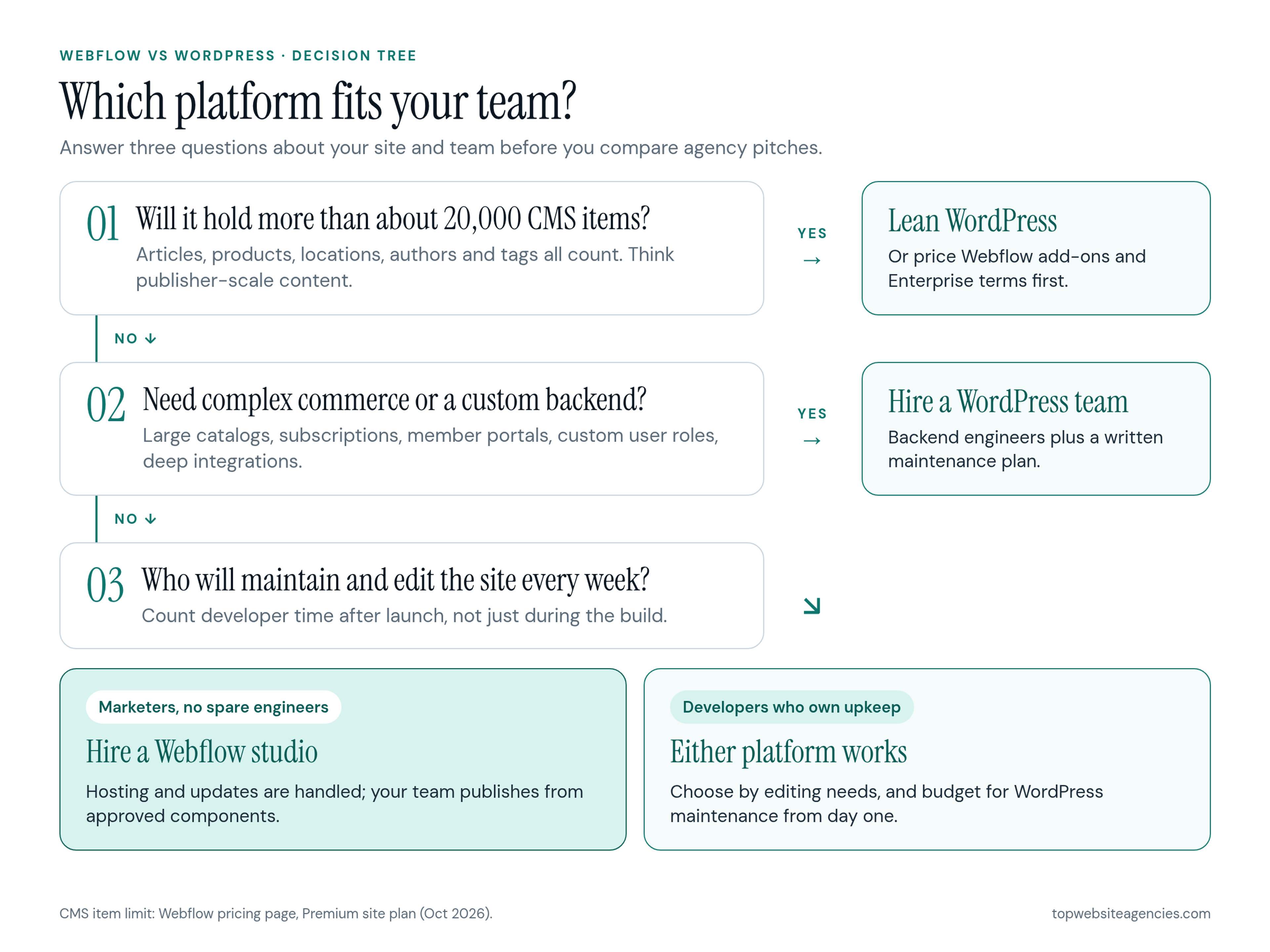
If you are a startup with a small marketing team and no spare engineers, Webflow usually fits, and our ranking of top startup website design agencies scores each studio on platform depth, including Webflow. If you are a SaaS company with a growing content program, the answer depends on scale: most SaaS marketing sites stay well within Webflow's limits. Use our list of the best SaaS web design companies to build a shortlist, then confirm platform scope in writing.
What Does Each Platform Cost Over Three Years?
Comparing build quotes alone is misleading, because the two platforms spend money at different times. In the US, a custom marketing site from a specialist agency typically lands somewhere between $15,000 and $80,000 on either platform, depending on scope. For a full breakdown of build pricing, see our guide to website redesign cost. The real difference shows up after launch.
Webflow running costs:
- A paid site plan for hosting and the CMS, plus a Workspace plan and seats for your team. Check Webflow's current plans, because the lineup changes; as of October 2026 the Premium site plan with the CMS starts at $25 a month billed yearly.
- No plugin licenses and no patching retainer.
- Optional support from the agency for new pages and design changes, often billed by the hour or as a small monthly block.
WordPress running costs:
- Managed hosting, which for a business site usually runs from a few dozen to a few hundred dollars a month.
- Annual licenses for premium themes and plugins, often a few hundred dollars a year in total.
- A maintenance retainer for updates, testing, backups, and security monitoring. The retainers I see in WordPress proposals usually fall somewhere between $500 and $2,000 a month, depending on plugin count and how critical uptime is.
Over 36 months, that maintenance line is what decides the comparison. Even a modest $800-a-month retainer adds up to $28,800 over three years before hosting and licenses, which is often more than the difference between two build quotes. That does not make WordPress the wrong choice; it means the maintenance budget belongs in the decision from day one.
How to Spot Agency Platform Bias
Platform bias is not a red flag on its own. A studio that builds only in Webflow is often excellent at it. The problem is when the recommendation comes before the discovery. Watch for these signs:
- The platform is in the first slide. If the agency proposes Webflow or WordPress before asking about your team, content volume, and integrations, the recommendation is a default.
- No downsides are mentioned. Every platform has limits. An agency that cannot name its own platform's weak spots has either not hit them yet or is not telling you.
- Maintenance is vague. On WordPress, "we'll keep it updated" is not a plan. On Webflow, an expensive monthly "security retainer" pays for work the platform already does.
- Every portfolio site uses the same stack. That is fine, but ask how they handled a client whose needs pushed the platform's limits.
Questions to Ask Before You Sign
- "Why this platform for us, and when would you recommend the other one?" A good answer refers to your team, content, and integrations, not to the agency's preferences.
- "What happens after launch, and who owns it?" On WordPress, ask for the update schedule, testing process, backup policy, and response time. On Webflow, ask what support is optional and what is genuinely needed.
- "Show us how our marketer will build a new page." Ask for a live demo using the component system they plan to build. If a new page needs custom CSS or a developer, the system is too rigid.
- "What happens if we outgrow the platform?" An honest Webflow agency will bring up CMS item limits and code export. An honest WordPress agency will talk about plugin sprawl and performance work.
- "Who owns the accounts?" Your company should own the Webflow site plan or the hosting account, the domain, and all admin logins from day one.
Frequently Asked Questions (FAQ)
Can I migrate a WordPress site to Webflow?
Yes, but treat it as a rebuild. Content such as blog posts can be exported from WordPress and brought in through Webflow's CSV import for the CMS, but the design, templates, and site structure are rebuilt from scratch, and every changed URL needs a redirect. Budget it like a redesign, not a copy-and-paste job.
Who owns the code if I build on Webflow?
You own your content and design, and on paid Workspace plans you can export the site's HTML, CSS, and JavaScript. CMS content does not come with the code export, though; it has to be exported collection by collection as CSV files, and features like forms and site search stop working outside Webflow. If you leave, plan on rebuilding the CMS side elsewhere.
Are Webflow agencies more expensive than WordPress agencies?
Not upfront. Quality agencies on both platforms charge similar rates for custom work. The cost difference is mostly after launch, where WordPress needs hosting, plugin licenses, and a maintenance retainer. Very cheap quotes on either platform usually mean a template with light customization.
Is Webflow or WordPress better for SEO?
Neither platform ranks a site by itself. Both can produce fast pages with clean metadata, redirects, and sitemaps. Webflow gets you there with less setup; WordPress gets you there with the right theme, caching, and SEO plugins. What matters more is the agency's technical SEO process and the quality of your content.
Conclusion
If you are a startup or B2B SaaS company that values speed, a small maintenance burden, and a marketing team that can publish on its own, hire a specialist Webflow agency. If you run a large publication, a complex store, or a site with heavy custom backend needs, hire a WordPress team with real engineers and a written maintenance plan. Either way, decide the platform from your team's reality, not from the agency's default, and price the full three years, not just the build. When you are ready to shortlist partners, start with the vetted agency lists on TopWebsiteAgencies and run each pitch through the questions above.