Use a website builder for a small site you edit yourself and could rebuild; commission a custom website when the site must connect to your own systems or leave a platform without a rebuild. The deciding factor is rarely launch day. It is what happens in year two, when the site has to do more or move.
If you have already reached the point of hiring, our list of studios that build custom sites for seed-stage and Series A teams is a good place to see who does this work. If you are still deciding, read on: the answer changes what you write in the brief, what you ask in proposals and what you pay for later.
This article does not rank website builders and does not tell you which one to buy. It gives you a way to decide between the two routes, with the vendors' own statements about leaving a platform, and a six-question test you can run in ten minutes. In a typical project, a team that settles this question first writes a clearer brief and compares quotes more evenly. When you are ready to compare studios, start with an independent comparison of web design studios by their shipped work.
Builder vs Custom at a Glance
- Who builds and edits it: with a builder, you or a teammate build and edit in a visual editor. A custom site is usually built by a designer and developers, then handed to your team to edit through a CMS or an editor set up for you.
- Time to launch: a builder can go live in hours or days. A custom build runs through discovery, design, development and testing, so plan for weeks or months depending on scope.
- Design freedom: a builder gives you templates and the layout options its editor supports. A custom design starts from your brand and your content, so the limits are your budget and your team's skill.
- Integrations and data: a builder covers common needs such as forms, booking and standard ecommerce. A custom build can read and write data from your own systems, such as a billing engine or a customer database.
- Hosting and ownership: a builder hosts the site for you, on its own platform. With a custom build you choose the host and hold the accounts, and your team can take the code elsewhere.
- Cost shape: a builder mostly bills a recurring plan. Custom work is mostly a project fee plus upkeep.
- Maintenance: a builder's vendor runs the platform. On a custom site, you or your agency run updates, fixes and monitoring.
- Exit and lock-in: leaving a builder usually means rebuilding the site. A custom site is portable, though only if the agreement and the accounts are set up that way.
- Best fit: a builder suits a small, standard site where speed matters most. A custom site suits a site with its own data, workflows or content model.
What Counts as a Website Builder and What Counts as a Custom Website
A website builder is a hosted, all-in-one product: the editor, the hosting and the business features come from one vendor. A custom website is designed and built for your requirements, on code or on a CMS that your team or agency controls.
The line between the two is blurry, and you should know that before you read any comparison, including this one. A visual builder configured by an agency can look entirely custom while the site still runs on the vendor's servers. A CMS such as WordPress can be installed with a ready-made theme, which feels like a builder, or developed from scratch, which is custom work. In a typical project the useful question is not what the tool is called. It is who controls the hosting, the code and the content model, and what it would take to move.
For that reason this article uses the plain definitions above. If a proposal calls something "custom," ask what is built for you, where it is hosted and who holds the accounts.
When a Website Builder Is Enough
A builder is enough when the site is small and standard and you want to launch fast. That covers many freelancers, small businesses and early startups: a handful of pages, a contact or booking form, perhaps a basic store.
Three typical-project scenarios, written as illustrations rather than client stories:
- A pre-launch landing page. A two-person startup needs a page to collect sign-ups and test a message. Nothing connects to a database, and the page may be thrown away in three months. A builder's speed beats any custom architecture here.
- A local service business. A clinic, studio or consultancy needs five or six pages, a booking form and a map. The people editing it are not developers. A builder's guardrails protect them from breaking the site.
- A small brochure site with a blog. A company that sells through a sales team needs a credible site that explains the offer. Content is added monthly. The plan's recurring fee is predictable, and nobody has to own servers.
What these have in common is that the cost of being wrong is low. If the site outgrows the builder, you rebuild a few pages. A builder also takes work off a small team: someone else runs the hosting, applies updates and keeps the platform available, so the team can spend its hours on the message and the offer.
When a Custom Website Earns Its Cost
A custom website earns its cost when the site has to do things a builder's settings cannot: connect to proprietary systems, run unique user workflows or manage large databases. If none of those apply, custom is usually more than you need.
Here is how those needs look in practice, again as illustrations:
- Proprietary systems. A B2B software company wants a pricing page that calculates a quote from data in its own billing system. A builder can embed a form, but reading and writing your own data usually needs development.
- Unique workflows. A manufacturer wants a configurator that lets buyers choose options and request a quote that lands in its sales tool. Standard templates cover forms and carts. They rarely cover a workflow specific to how you sell.
- Heavy content and a content model. A publisher or a large resource library needs authors, topics, case studies and industries linked to each other, with hundreds of structured entries. A purpose-built content model keeps that manageable.
- Control over performance, accessibility and URLs. If your team must tune how scripts load, meet specific accessibility requirements or control URL structure and redirects, custom work gives you direct control, where a builder gives you the settings the vendor exposes.
- Custom checkout or member areas. If the purchase or login journey is part of your product, you will probably need it designed and built for you.
Custom work costs more upfront and needs someone to look after it. It repays that when the site is part of how the business operates, not just how it is presented.
What It Costs, Without Rebuilding a Cost Guide
A builder is mostly a recurring plan; custom work is mostly a project fee plus upkeep. The right comparison is the total over the life of the site, not the launch invoice.
The first-year picture usually favors a builder, because there is no build fee for design and development. The picture changes if you will need to rebuild the site within a year or two, or if you will pay for extra apps and workarounds to approximate what a custom build would do natively. A custom build front-loads the cost, then adds hosting, security updates and a retainer or internal hours for changes.
People often ask whether $1,500 is a good price for a website. It depends entirely on what that price includes. For a small site you build yourself on a builder with a template, it may be reasonable. For a site that has to connect to your systems, it will not cover the work. Ask what pages, integrations, content entry and revisions are included, and who owns the result. For the full picture of what each route tends to cost, see our price ranges for each build route; we deliberately do not repeat those figures here.
Maintenance and Ownership
On a builder, the vendor runs the platform and you work inside it. On a custom site, you or your agency run it and you hold the keys. Neither is better in the abstract; they put the responsibility in different places.
With a builder, you do not apply security updates to the platform or manage servers. You also cannot change how the platform works, and you depend on the vendor's roadmap, plan structure and terms. With a custom build, your team or agency monitors uptime, updates the CMS and its components, renews domains and certificates and fixes things when a script conflicts with another. That is a real ongoing task, and it should be in the agreement: who does it, how fast and at what price.
Ownership is the part to write down. For any site, ask who is the registered owner of the domain, who owns the hosting account and who holds the admin login for the CMS or editor. These are plain questions that prevent hard conversations if an agency relationship ends.
SEO Is Not Decided by the Choice
Both routes can rank. Search engines look at whether a page is crawlable and useful, not at which tool made it. What matters is how well the site is configured and what is on the pages.
Google's own SEO Starter Guide makes two points that apply to any platform. It says some content management systems may create a sitemap file for you automatically, although submitting a sitemap is not required. It also says Google needs to be able to see a page the same way an average user does, so you should not block CSS or other resources the page needs. Both are configuration questions, not builder-versus-custom questions.
Where custom work can matter is control. If you need a specific URL structure, detailed redirects, structured data across a large content model or tuning for how pages load, a custom build lets developers do exactly that. Whether you need that depends on your site, not on a general rule. For a small site with standard pages, a well-configured builder site has the same chance of ranking as a custom one, given similar content.
Leaving Later: What You Can Take With You
Before you choose a builder, read what its vendor says about leaving. The answers differ by platform, and they are the part most comparison articles leave out. The three statements below are the vendors' own, checked on November 18, 2026. Policies change, so check the current page before you decide.
Wix. Wix's help center says a Wix site is built with Wix's technology and has to be hosted and operated on Wix's servers, because Wix is a SaaS solution. You can still connect a domain you bought elsewhere and manage that domain with another provider. Wix says the content you build belongs to you under its Terms of Use; the details are in Wix's help article on exporting or embedding a site elsewhere. Embedding a Wix site in another location is not supported by Wix support, and Wix notes that Google Analytics and search engines may not work properly with embedded sites.
Wix Studio Two code export. Wix's developer documentation describes an export of a Studio Two site as React source code that can be hosted on any platform that runs Node. It is currently in beta, and the page says the exported site still loads fonts and media from Wix and calls Wix APIs for business features. The documentation lists limits: a site with dynamic pages cannot be exported, visitors cannot log in to an exported site and widgets from installed apps can fail. Details are in Wix's page on exporting a site to code.
Squarespace. Squarespace's help center says you can export certain content to an .xml file in WordPress format, and that some content does not export because many features rely on its JavaScript and CSS. The Squarespace export documentation lists what stays behind, including style settings, custom CSS, product blocks, video and audio blocks, drafts, several page types and any blog beyond one. It also says you cannot export from a trial site.
What does this mean in practice? The words, images and domain are generally portable. The design, layout logic and platform features generally are not. If you leave a builder, expect to rebuild the site rather than move it. That is not a reason to avoid builders. It is a reason to keep your copy and images in your own files, to own the domain registration yourself and to price in a rebuild if you think you will outgrow the platform.
A Hybrid Path: Launch on a Builder, Plan the Move
For many early teams, the sensible route is to launch on a builder and decide in advance what would trigger a move. That keeps early spending low and turns the future custom brief into something you have already thought about.
Keep three things portable from day one: the domain registration in your own account, the written content in your own documents and the image files in your own storage. Write down your triggers too. Typical ones include a need to integrate with your own systems, content that has outgrown the builder's structure, accessibility or performance requirements the editor cannot meet and a team workflow that needs review steps or roles the plan does not offer.
When you plan the move, a visual builder that gives you more control than the entry-level tools may sit in the middle. For one example of that comparison, see how Webflow and a self-hosted WordPress build differ. Treat it as one possible middle step, not a recommendation.
The Builder-or-Custom Test: Six Questions
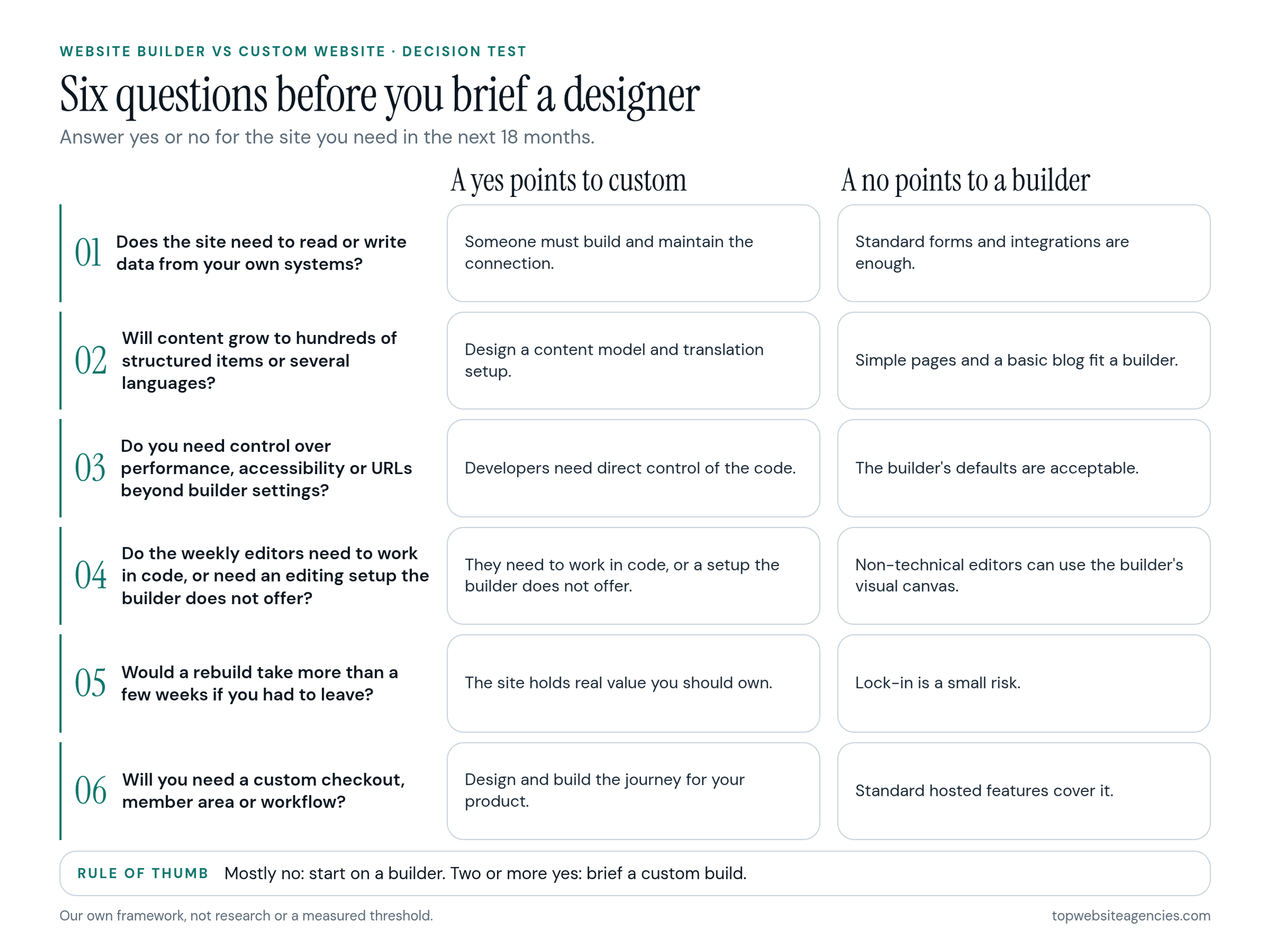
This is our own decision test, built from how projects tend to go. It is not research and it is not a measured threshold. Answer each question yes or no for the site you need in the next 18 months.
- Does the site need to read or write data from your own systems? A yes points to custom: someone has to build and maintain that connection. A no points to a builder.
- Will the content grow into hundreds of structured items or several languages? A yes points to custom, or at least to a CMS with a designed content model. A no points to a builder.
- Do you need control over performance, accessibility or URL structure beyond the builder's settings? A yes points to custom. A no means the builder's defaults are acceptable.
- Do the weekly editors need to work in code, or need an editing setup the builder does not offer? A yes points to custom. A no points to a builder, where non-technical editors can use the visual canvas.
- Would rebuilding the site take more than a few weeks if you had to leave the platform? A yes means the site holds real value that you should own, which points to custom. A no means lock-in is a small risk, which points to a builder.
- Will you need a custom checkout, member area or workflow? A yes points to custom. A no points to a builder's standard features.
Rule of thumb: mostly no answers mean start on a builder. Two or more yes answers mean brief a custom build. A single yes on question 1 or 6 deserves a conversation with a developer before you commit, because those two tend to be the expensive ones.
An illustrative example: a ten-person B2B startup answers no to all six questions. It starts on a builder and keeps its content portable. A second illustrative team, a software company with a billing integration and a multilingual resource library, answers yes to questions 1, 2 and 6. It briefs a custom build and treats the builder as out of scope. Neither team is claimed to be real; they show how the same test points two ways.
How to Brief a Designer Once You Decide
A good brief states your decision, your reasons and your constraints, so every proposal answers the same question. It should fit on a few pages and be specific enough that two agencies would quote roughly the same scope.
Put these items in it:
- Goals and pages: what a visitor should be able to do, plus a rough list of pages.
- Integrations: every system the site must connect to, such as a CRM, email platform, analytics or billing tool, and what data flows each way.
- Content model: the types of content you publish and how they relate, such as authors, case studies and industries.
- Who edits it: the people who will update the site and how technical they are.
- Exit and ownership: who owns the domain, the hosting account and the admin logins, and what you receive if the relationship ends, such as source files, documentation and training.
- Budget range and timeline: a range, not a single number, and the date that matters to you.
If you have not written one before, see how to write a web design brief. When you are choosing who should do the work, the question of agency, freelancer or in-house designer comes next.
Ask each proposal the same few questions. Why this route for this site? What does the first-year cost look like, including plan fees, apps and your team's time? What do I own at the end? What would it take to move? A team that answers these plainly is easier to compare.
Frequently Asked Questions
Is it better to build your own website or use a website builder?
It depends on what the site has to do. A builder is a good fit for a small, standard site you can rebuild later. A custom build is the better fit when the site must connect to your systems, handle complex content or stay portable. Run the six-question test above to see where you land.
What is the 3 second rule in website design?
It is a common rule of thumb that visitors should understand what a site offers within a few seconds of arriving. It is a heuristic, not a measured law. In practice, it means a clear headline, a short line on what you do and one obvious primary action above the fold.
Is $1,500 a good price for a website?
It depends on scope. For a small site on a builder with a template, it may be reasonable. For a site with integrations, custom design or a large content model, it will not cover the work. Compare what each quote includes, such as pages, integrations, revisions and who owns the result, instead of comparing the totals.
Is Wix or GoDaddy a better website builder?
We do not rank builders, and we cannot tell you that either is better for you. Use the six-question test, then read each vendor's current plan, export and ownership terms for the features you need before you commit.
Can a builder site rank on Google?
Yes. Google looks at whether it can crawl and understand useful pages, and a builder site can meet that standard. Make sure titles, headings and page content are strong, and check that nothing blocks the resources the page needs.
Can I move from a builder to a custom site later?
Yes, but plan on a rebuild. Your domain, copy and images can usually come with you, while the design and platform features generally cannot, depending on the vendor. Keep your content in your own files and the domain in your own account so the move is easier.
Conclusion
Start on a builder if your answers are mostly no, and brief a custom build if two or more are yes. Either way, treat the exit as a real cost: own your domain, keep your content in your own files and write down what would make you move.
The decision does not need to be permanent. It needs to be made on purpose, before you write the brief, so that the designers you talk to are quoting the same project.