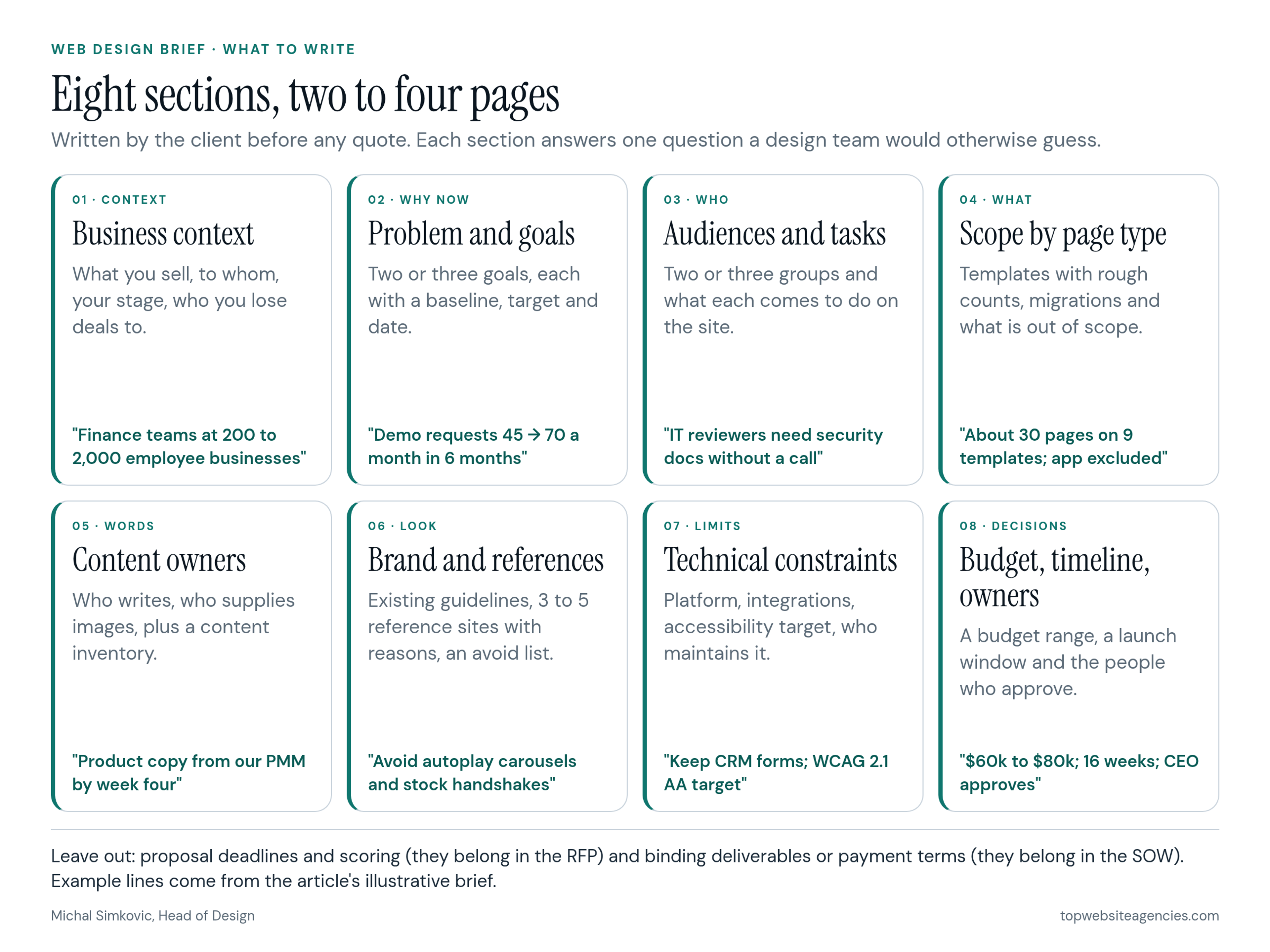
A web design brief is a two-to-four-page document the client writes before any quotes. It tells a design team why the website exists, who it has to serve, what success will be measured by, and which constraints are fixed. Write eight sections: business context, the problem and measurable goals, audiences and the tasks they come to complete, scope by page type, content and who supplies it, brand inputs and references with reasons, technical and accessibility constraints, and budget, timeline and decision owners. Leave vendor selection, scoring, contracts and kickoff to later documents. A full worked example is below.
Having led design teams at Copy.ai, Around, HackerRank and AWS, I judge a brief by one test: could a capable team plan and estimate the work from it without guessing? I apply the same lens as editor of our ranked index of web design studios, where clear scoping is part of what separates partners. If you run a software company, the SaaS web design agency shortlist we maintain is a practical place to find teams to send the finished brief to.
What a Web Design Brief Is (and Who Writes It)
A brief is the client's account of the project in plain language. It is written before you ask anyone for a price, and it should still make sense to someone who has never visited your website.
The client writes it, ideally one person who owns the project and gathers input from sales, marketing, product and whoever approves budgets. A design team may run a workshop to sharpen it, but outsourcing the first version to the vendor defeats the purpose. The brief is how you find out whether your own team agrees on the problem.
Length matters less than precision. Two to four pages is enough for most marketing sites. A brief longer than ten pages usually means requirements have crept in that belong in a later, more detailed document.
Brief vs RFP vs SOW: Which Document Does What
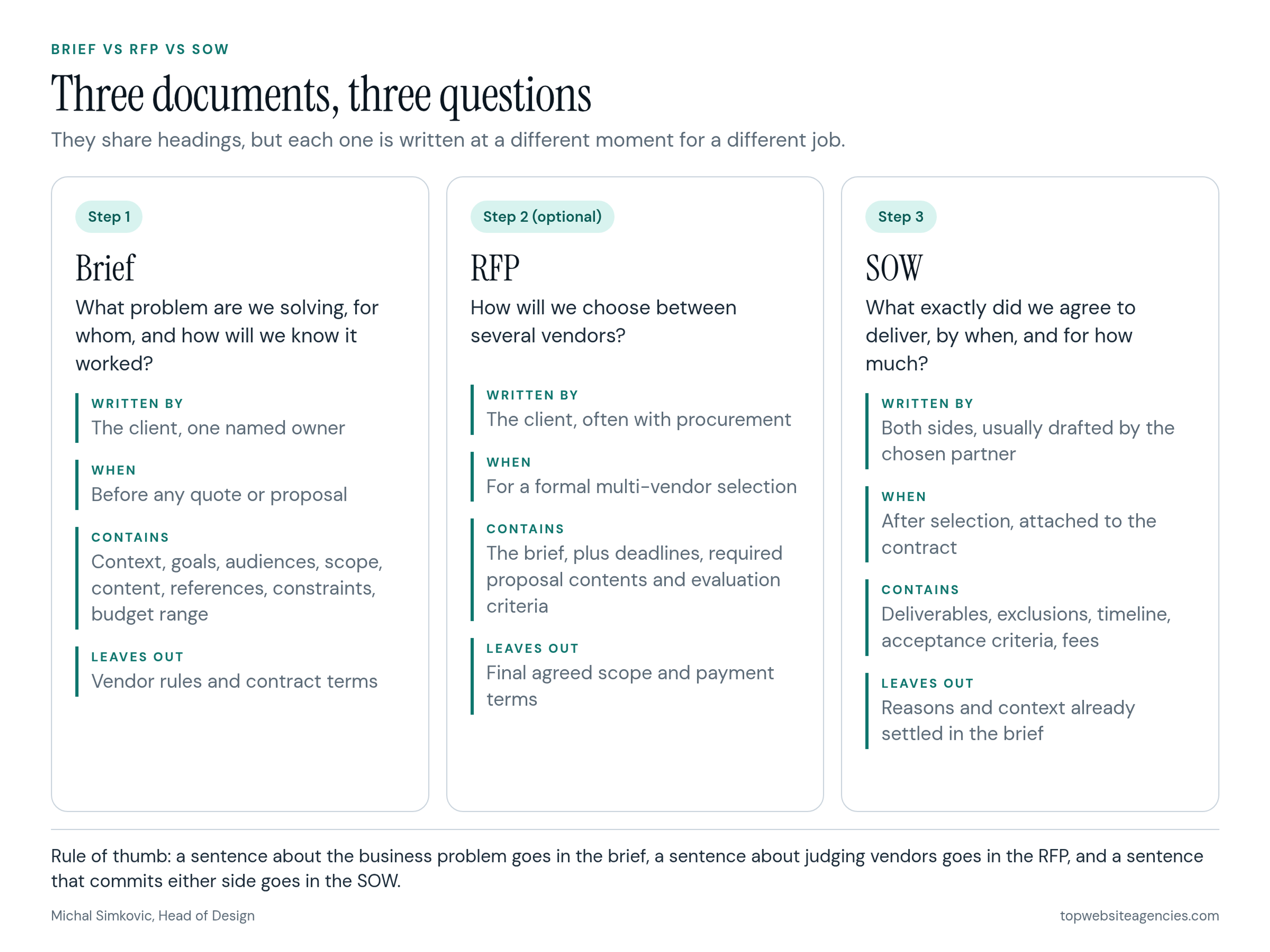
These three documents share some headings but answer different questions at different moments. Keep the distinctions short here and follow the linked guides for the later stages.
- The brief answers "what problem are we solving, for whom, and how will we know it worked?" It comes first, before any quotes, and it is useful even if you only talk to one studio.
- The RFP answers "how will we choose between several vendors?" Use the guide to how to structure an RFP and compare proposals when you need submission rules and evaluation criteria.
- The SOW answers "what exactly did we agree to deliver, by when, for how much?" It belongs in the contract after you choose a partner; see clauses a web design contract and SOW should include.
If a sentence describes the business problem, it belongs in the brief. Judging vendors belongs in the RFP. Binding deliverables belong in the SOW.
The Eight Sections to Write
Each section below pairs a typical weak line with a more useful rewrite. The difference is almost always specificity.
1. Business context
Say what you sell, to whom, at what stage the business is, and who you lose deals to. Mention anything about to change, such as a new product line or a move upmarket.
- Weak: "We are an innovative leader in our space."
- Useful: "We sell accounts-payable automation to finance teams at companies with 200 to 2,000 employees. Our main competitors in deals are two larger suites; we win on setup time."
2. The problem and measurable goals
Explain why the project is happening now and what the website is failing to do. Then write two or three goals, each with a baseline, a target and a date. Without a baseline, nobody can tell whether the new site worked.
- Weak: "Modernize the site and increase leads."
- Useful: "Demo requests from the website average 45 a month. We want 70 a month within six months of launch, without lowering the share that sales accepts as qualified."
This section is worth the extra time. Unclear requirements are a recognized cause of failure well beyond web projects: in PMI's Pulse of the Profession report on requirements management, organizations said that when projects missed their original goals, inaccurate requirements management was the primary cause 47 percent of the time. That survey is from 2014 and covers projects of every kind, but the pattern is familiar to anyone who has watched a redesign drift.
3. Audiences and their top tasks
Name the two or three groups who matter most and what each one comes to the site to do. Tasks are more useful to a designer than demographics, because they turn directly into page priorities and calls to action.
- Weak: "Our audience is B2B decision makers."
- Useful: "Primary: finance managers comparing tools, who need proof of integrations with their ERP and an idea of setup time. Secondary: IT reviewers, who need security documentation without booking a call."
4. Scope by page type
List page types with rough counts rather than every individual URL: homepage, product pages, solution pages, customer stories, blog, about, careers, contact, legal. Note which existing content moves over unchanged, which gets rewritten and which is retired. State what is out of scope, such as the product app, the help center or paid landing pages.
- Weak: "A complete new website."
- Useful: "About 28 pages across 8 templates, plus 140 blog posts migrated as they are. The help center and the app login page are out of scope."
5. Content and who supplies it
Content is where schedules slip. Say who writes new copy, who provides photography and product screenshots, and whether you need help with messaging. If the site already exists, attach a content inventory: a list of every page with its URL, owner and traffic. Nielsen Norman Group's guide to content inventories and audits describes how to build one; even a simple spreadsheet export changes the quality of the estimates you receive.
- Weak: "Content will be provided."
- Useful: "Our product marketing manager writes homepage and product copy by week four. We need the design team to write the four solution pages. Screenshots come from our product team."
6. Brand inputs and references with reasons
Attach what already exists: logo files, color and type guidelines, voice notes, any illustration or photo style. Then list three to five reference websites, and next to each one write the specific thing you want and why. A list of names without reasons tells a designer almost nothing, because two people can admire the same site for opposite reasons.
Add a short "please avoid" list. It is often more informative than the references.
- Weak: "We like Stripe and Apple."
- Useful: "Reference A: how pricing tiers are explained in one screen without a sales call. Reference B: the customer story layout, which leads with the metric. Avoid: stock photos of handshakes, autoplay carousels, dark mode as the default."
7. Technical and accessibility constraints
Note the current platform and whether you are open to changing it, the integrations the site must keep (CRM, marketing automation, analytics, consent management), hosting or security requirements, and who will maintain the site after launch.
Name your accessibility target in the brief rather than leaving it to the build. Many organizations use WCAG 2.1 Level AA; for US state and local governments it is the legal technical standard under the Justice Department's ADA Title II web accessibility rule, with the compliance date for larger public entities extended to April 26, 2027. Private businesses should check their own obligations, but stating the target up front keeps accessibility out of the "optional extras" column of a quote.
8. Budget range, timeline and decision owners
Treat budget as a brief input, not a negotiation. Give a range so teams know whether they are planning a lean rebuild or a deeper custom build; without one, the quotes you receive cannot be compared. For how website budgets typically break down once scope is clear, see what a website costs. Add a target launch window and say whether the date is fixed by an event or flexible.
Then name people: one day-to-day owner, the person who gives final approval, and anyone who can veto. Projects slow down most often when feedback arrives from people who were not named at the start.
A Worked Example: The Sample Brief
The example below is illustrative. Ledgerline is a fictional company created for this article, not a client project, and the numbers are placeholders chosen to show the level of detail that helps. Copy the structure and replace every line with your own facts.
Project: Ledgerline marketing website redesign. Owner: Head of Marketing. Final approval: CEO. Date: November 2026.
1. Context. Ledgerline sells accounts-payable automation to finance teams at companies with 200 to 2,000 employees, mostly in the US. About 60 employees, Series A. We usually compete with two larger finance suites and win on setup time, which our current site never mentions.
2. Problem and goals. The site was built three years ago for a different product and only marketing's one developer can publish pages. Goals: (a) demo requests from 45 to 70 a month within six months of launch, with sales acceptance holding at 60 percent or better; (b) marketing publishes a new landing page in under one working day without a developer; (c) mobile visitors reach the demo form in no more than two taps from the homepage.
3. Audiences and tasks. Finance managers comparing tools: confirm ERP integrations, understand setup time, see proof from similar companies. Controllers and CFOs approving purchase: see total cost and security posture. IT reviewers: download security documentation without a sales call.
4. Scope. About 28 pages on 8 templates: homepage, 3 product pages, 4 solution pages by role, plan comparison page, customer story template (10 stories to rebuild), blog index and post (140 posts migrated as is), security page, about, careers, contact, legal. Out of scope: the product app, help center, paid-campaign landing pages.
5. Content. We write homepage, product and plan comparison copy by week four. We need copywriting help for the four solution pages and a messaging session at the start. Product screenshots from our product team; no new photography. Content inventory attached (spreadsheet of 185 URLs with traffic).
6. Brand and references. Logo and color palette are staying; typography is open. Reference A: plan comparison explained on one screen. Reference B: customer stories that lead with a measured result. Reference C: an integrations page searchable by system name. Avoid: handshake stock photos, autoplay carousels, chat pop-ups on first load.
7. Constraints. Currently on WordPress with a custom theme; open to other platforms if marketing can edit without a developer. Must keep the HubSpot forms and CRM sync, analytics and consent banner. Accessibility target: WCAG 2.1 AA. Redirects for every changed URL are required.
8. Budget, timeline, people. Budget range $60,000 to $80,000 for design and build, excluding hosting. Target launch within 16 weeks of kickoff; flexible by two weeks, not tied to an event. Day-to-day: Head of Marketing. Final approval: CEO. Veto on security content: Head of IT.
Notice what the example leaves out: proposal deadlines, evaluation criteria, payment terms, revision limits. Those belong in the RFP and the SOW.
Questions a Design Team Will Ask If the Brief Is Thin
Before you send the brief, read it as the designers receiving it will. These are clarifications they need to plan the work, not proposal red flags. If any question has no answer on the page, add one sentence.
- What happens if we hit every goal? Is there a number that would make this project a success?
- Who decides when two stakeholders disagree about a design?
- Which existing pages must survive, and which can be retired?
- Who writes the words, and when will they be ready?
- Is the budget range for design only, or for design and development together?
- What is the one action you most want a visitor to take?
- Which platform decisions are already made, and which are open?
- What should we clarify about brand, content or constraints before we start estimating?
A brief that answers these gets you quotes you can compare, because every team starts from the same facts. For what happens after the brief is written, the phase-by-phase web design process walks through discovery, wireframes, design, build and launch.
Common Mistakes When Writing a Brief
- Describing the solution instead of the problem. "We need a mega-menu and a video hero" closes off options before the team understands the goal. Describe what visitors struggle with and let the team propose the solution.
- Leaving out the budget. It feels like negotiating leverage, but it mostly produces quotes built on different assumptions.
- Writing for the committee. A brief that tries to include every stakeholder's wish list has no priorities. Rank goals and be willing to cut.
- Forgetting the content. Design cannot finish without real words. Name the owner and the deadline.
- Treating the brief as final. Expect it to change after the first conversations. Update it, date the new version and send it to everyone who received the old one.
Frequently Asked Questions (FAQ)
How long should a web design brief be?
Two to four pages is enough for most marketing websites. Longer briefs are fine for large sites with many integrations, but anything past ten pages usually contains detailed requirements that belong in a later specification, not in the brief.
Who should write the web design brief?
The client, with one named owner who gathers input from marketing, sales, product and the budget approver. A design team can help refine it in a workshop, but the first version should come from your side because it records what your own team agrees on.
Is a design brief the same as a creative brief?
They overlap. A creative brief usually covers one campaign or asset and focuses on message and audience. A web design brief adds scope, content ownership, technical constraints and decision owners, because a website is a longer-lived product with more moving parts.
Should I include a budget in a web design brief?
Yes. A range is enough. Without it, teams guess at the level of research, custom design and development you expect, and the quotes you receive cannot be compared fairly.
What comes after the brief?
Usually conversations with a small number of design teams, then either a formal RFP or a proposal from your preferred partner. Selection rules and contract terms live in those later documents; the brief stays the reference for why the project exists.
Conclusion
A useful web design brief is short, specific and written by the people who own the problem. Cover the eight sections, write goals with a baseline and a date, give reasons for every reference, and name the people who decide. Leave vendor selection and binding commitments to the RFP and SOW. Use the worked example as a pattern, replace every line with your own facts, and send the same version to every team you talk to so the answers you get back are comparable.