Pick Shopify if selling products is the core of your business and you want the platform to run hosting, security and checkout for you. Pick WordPress with WooCommerce if content drives your revenue and the store is one part of a larger site, or if you need full control over URLs, checkout and data. If you already have a large WordPress site and only need a reliable checkout, you can run both.
That is the short version. The rest of this guide shows where the line falls for six common business models, what each platform lets you control, and a weighted scorecard for the close calls. If you plan to hand the build to a team, our list of e-commerce web design agencies compared by budget and fit groups studios by the store work they have shipped, Shopify themes included.
Shopify vs WordPress at a Glance
- What it is: Shopify is hosted commerce software you rent by the month. WordPress is open-source content software, and WooCommerce is the plugin that adds a store.
- Who runs hosting, security and updates: Shopify does. With WooCommerce, you, your host or your developer do.
- How selling works: Store features are built into Shopify. On WordPress, they come from the free WooCommerce plugin.
- Checkout: Shopify runs a managed checkout with limited changes outside Shopify Plus. WooCommerce checkout is code you control.
- Extensions: Shopify apps are reviewed before listing and mostly run on the app maker's servers. WordPress plugins run inside your site.
- Content and blogging: Shopify has a basic blog. WordPress is a full content system with custom post types and categories.
- URLs: Shopify uses fixed paths such as /products/ and /collections/. WooCommerce lets you choose product and category bases.
- Time to launch: Usually faster on Shopify because hosting and checkout come ready. Usually slower on WooCommerce because the stack has to be assembled.
- Ownership and exit: On Shopify you can export your store data, but not the platform. On WordPress you own the code, the database and the hosting choice.
Fit by Business Model
Feature lists rarely settle this decision. The better question is how your business makes money day to day, because that decides which platform's limits you will feel. The platform also shapes the kind of build partner you need: the studios in our five-factor rankings of web design studios range from theme specialists to full-stack teams, and a Shopify theme project and a custom WooCommerce build call for different skills.
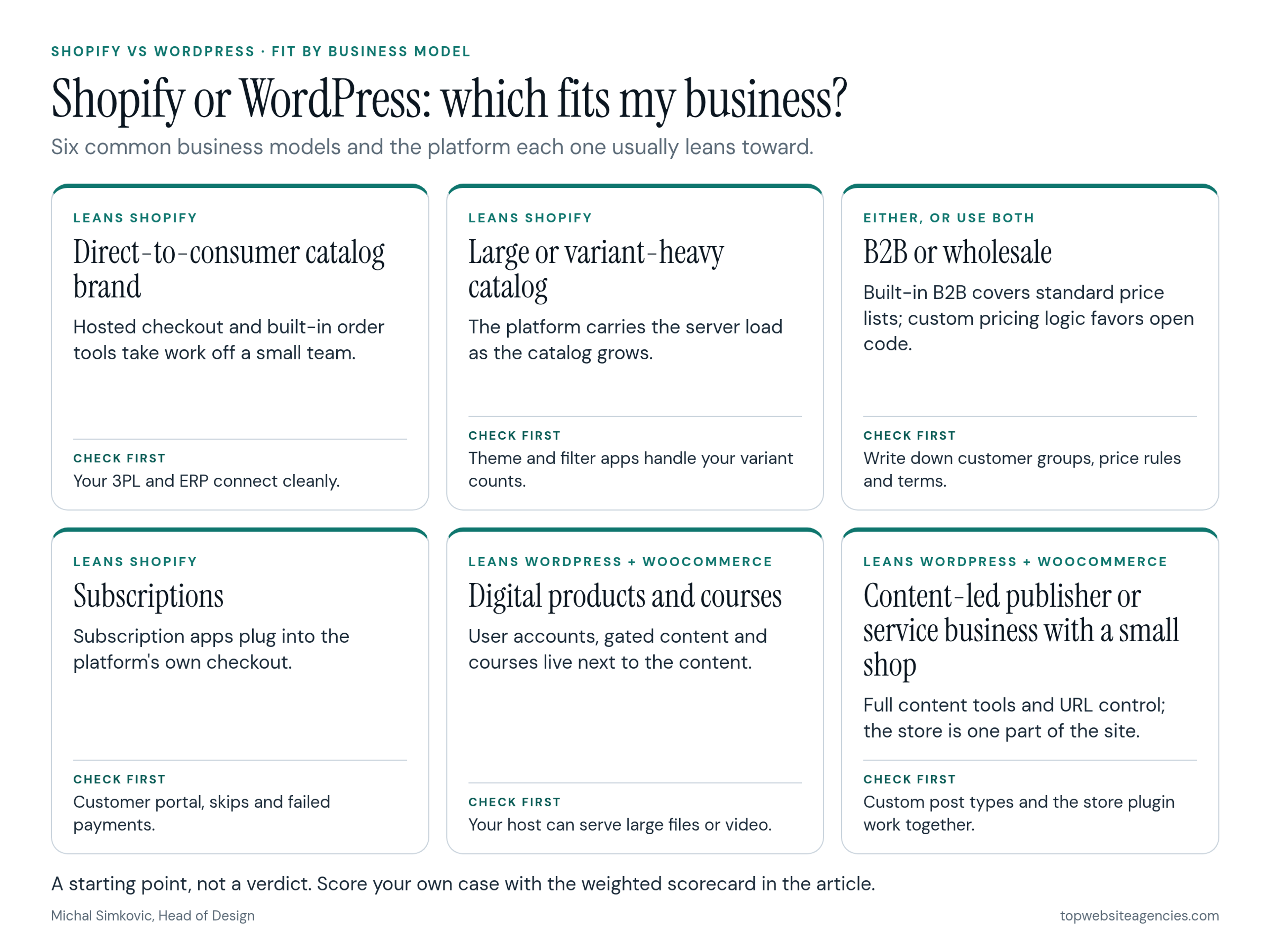
Direct-to-Consumer Catalog Brand
Leans Shopify. If your days are spent acquiring customers and shipping boxes, a hosted checkout and built-in order tools remove a lot of work. Check first that your fulfillment or 3PL partner and any ERP connect cleanly with Shopify.
Large or Variant-Heavy Catalog
Leans Shopify, with caveats. Shopify carries the server load, and it now allows up to 2,048 variants per product across three options. Some older themes and apps still stop at 100 variants, so check that your theme, filtering and feed apps handle your real variant counts. A large WooCommerce catalog works too, but hosting and database tuning become your job.
B2B or Wholesale
Either, depending on your rules. Shopify has native B2B features from the Basic plan up, with company accounts and catalog pricing, though what you get depends on your plan. If you need customer-specific pricing logic tied closely to an older ERP, WooCommerce gives a developer direct access to the database to build it. Check first: write down your customer groups, price rules and payment terms before comparing.
Subscriptions
Leans Shopify. Subscription apps plug into Shopify's own checkout, so recurring billing behaves predictably. Check first how your chosen subscription app handles the customer portal, skipped deliveries and failed payments.
Digital Products and Courses
Leans WordPress with WooCommerce. Courses, memberships and gated content depend on a close link between the user account and the content, which WordPress plugins handle well. Check first that your host can serve large downloads or video, or plan a separate video host.
Content-Led Publisher or Service Business With a Small Shop
Leans WordPress with WooCommerce. When articles or leads bring most of the revenue, moving a large content library into Shopify's blog means giving up categories, custom fields and editorial workflows you already rely on. Check first that your custom post types and the store plugin work together on a staging copy.
What You're Actually Comparing
Shopify is software as a service. You pay a monthly plan, and Shopify builds, hosts, secures and updates the store. You choose a theme, add apps and manage products and orders.
WordPress is open-source software that you install on a server you rent. The core handles content, and the free WooCommerce plugin adds products, cart and checkout. This guide means self-hosted WordPress from WordPress.org, not the WordPress.com hosting service. If you want the base comparison for a site that doesn't sell, see how WordPress stacks up against Webflow for marketing sites.
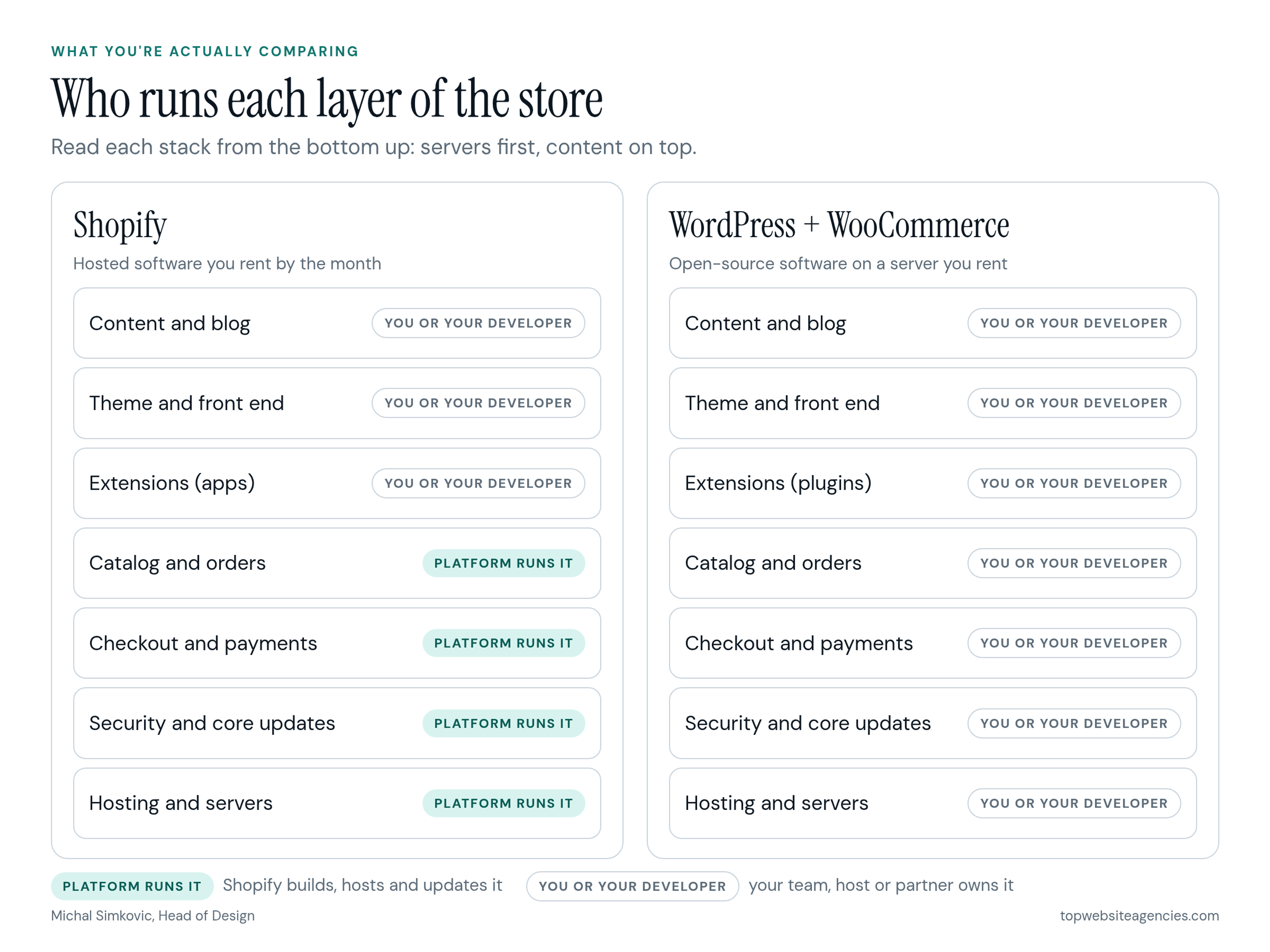
So a Shopify build is mostly theme and app configuration on a fixed base. A WooCommerce build covers the whole stack: hosting, the WordPress core, the store plugin, payment gateways and every extension.
Checkout and Payments Control
Shopify runs the checkout. That protects most merchants from breaking their own payment flow, and Shopify carries the heavy security work behind it. The trade-off is control. On most plans you can brand the checkout and add apps to the thank-you and order status pages, but apps that change the information, shipping and payment steps are limited to Shopify Plus, according to Shopify's checkout UI extensions documentation.
Payments add a structural rule. If you use Shopify Payments, you pay its card rates. If you use another provider, Shopify charges a third-party transaction fee on top of that provider's own rate, even when Shopify Payments is also turned on. PayPal is exempt from that fee if Shopify Payments is your primary provider. US stores whose US sales tax is managed by Shopify can't use third-party providers.
WooCommerce gives you the checkout code. You can reorder steps, add fields, build a custom flow and use any gateway that has a WooCommerce extension, with no platform fee on top. The cost of that freedom is responsibility: you, your host and your gateway share the security and PCI compliance work. Using a gateway that hosts the card fields reduces that load, but it doesn't remove it.
Apps vs Plugins: Who Vets What You Install
Shopify reviews apps before they appear in its App Store. Most apps run on their maker's servers and talk to your store through Shopify's APIs, so a faulty app rarely takes the whole store down. The usual cost is creep: many apps bill monthly, and a store that needs eight apps for basic features carries eight subscriptions.
WordPress plugins run inside your site. That lets them change almost anything, which is why WooCommerce can be shaped around unusual businesses. It also means a badly written or abandoned plugin can conflict with your theme, slow the site or open a security hole. Extensions sold on the WooCommerce Marketplace are vetted by WooCommerce, while the wider plugin world varies. Keep a short approved list, update on a schedule and remove what you no longer use.
Store SEO and Content: What Each Platform Lets You Control
Shopify uses fixed paths. Products live under /products/, collections under /collections/, pages under /pages/ and blog posts under /blogs/. Shopify's own guide to URL slugs confirms the prefix stays fixed and you control only the handle after it. Themes that use Shopify's standard canonical tag typically point search engines to the main product URL rather than a variant or filtered version. Only a headless storefront changes the path structure.
WooCommerce lets you pick the base for products and categories. Per the WooCommerce permalinks documentation, you can use /product/, your shop page, the shop page plus the category, or a custom base, and you can rename the category and tag bases. Add WordPress's categories, custom post types and SEO plugins, and you have finer control over site structure and structured data.
Both platforms can rank well. On Shopify, the work is planning handles, collections and internal links within fixed rules. On WordPress, the work is keeping categories, tags and filter pages from producing thin or duplicate pages.
Design and Customization
Shopify themes are built from sections in the Liquid template language, and merchants can add, remove and reorder sections in the theme editor without code. You can get far with a good theme before you need a developer, and the limits show up when a layout doesn't fit the section model.
WordPress uses block themes, page builders and custom PHP templates. Almost any layout is possible, but a distinctive design usually needs a developer earlier, and a page builder adds its own weight and update cycle.
Who Runs the Store After Launch
Shopify runs hosting and updates, so your team can stay on products, orders and content. A WooCommerce store needs ongoing care from you, your host or a maintenance partner.
For how those lines show up in a budget, see hosting, plugin and upkeep lines in a WordPress budget.
Ownership, Lock-In and Migration
Shopify lets you export products, customers and orders as CSV files. Your theme code can be downloaded, but it only runs on Shopify, and app setups and Shopify-specific features don't travel. Customer passwords don't carry over between platforms in either direction, so plan how returning customers will sign in after a move.
With WordPress you own the database and files and can move hosts whenever you like. Moving from WooCommerce to Shopify means reshaping product data into Shopify's format and redirecting every old URL to its new /products/ or /collections/ address. Moving from Shopify to WooCommerce means rebuilding the theme and mapping URLs the other way. Either direction needs a full redirect map before launch.
Using Both: WordPress Content With Shopify Commerce
If you have a WordPress site that already brings in traffic, you don't have to choose. There are three common setups, from simplest to most complex.
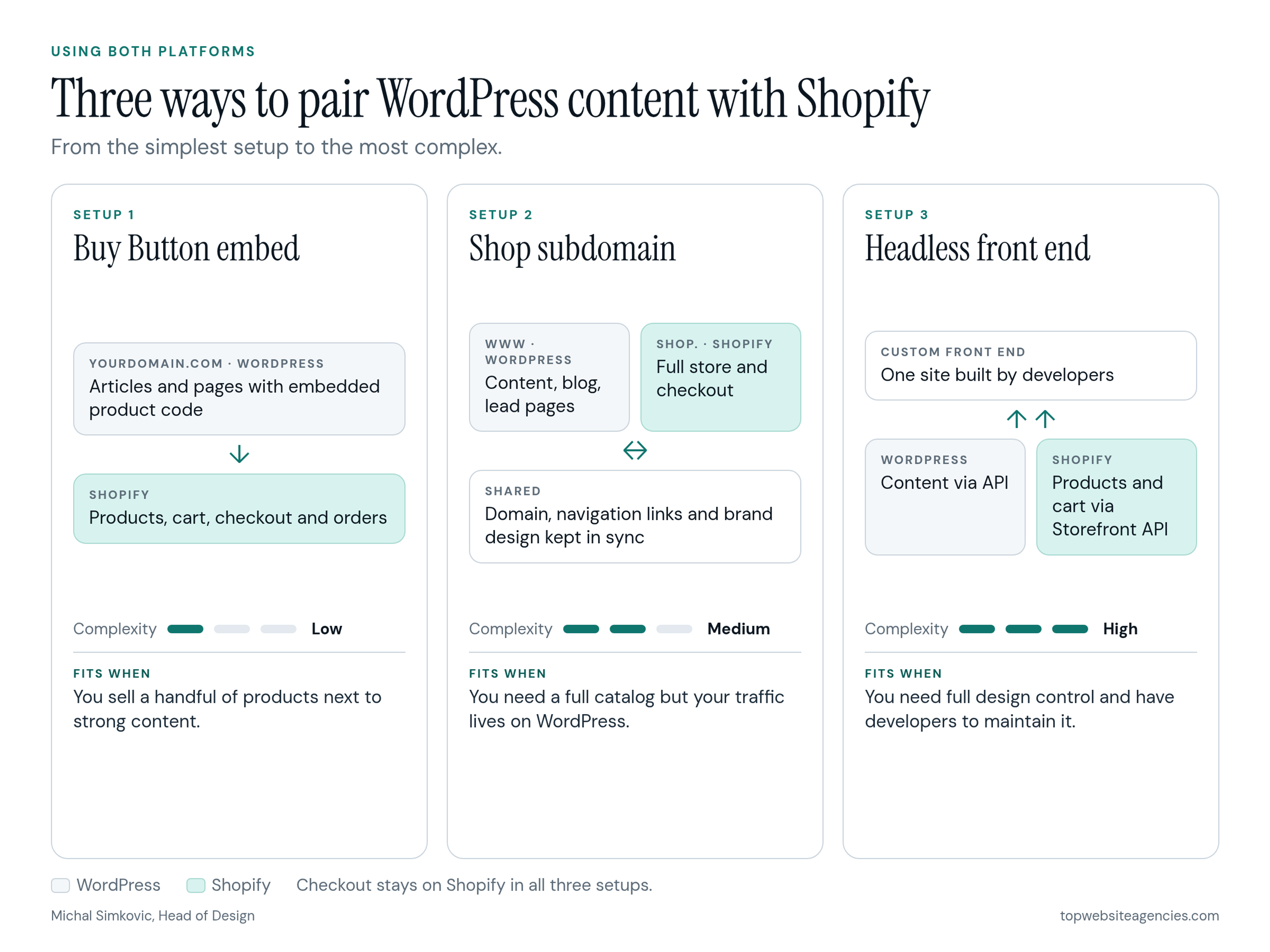
- Buy Button: Shopify generates embed code for products or collections that you paste into WordPress pages. Shoppers buy without leaving your site, and orders land in your Shopify admin. Best for a handful of products.
- Shop subdomain: WordPress stays on www.yourdomain.com and Shopify runs a full store on shop.yourdomain.com. Each platform does what it does best, at the cost of two systems and two designs to keep in sync.
- Headless: A custom front end pulls content from WordPress and products and cart from Shopify's Storefront API, while checkout stays on Shopify. It gives the most design control, but it needs developers to build and maintain.
What Each One Costs, Structurally
The two platforms charge in different ways. Shopify is a monthly plan plus payment processing, any third-party transaction fees and app subscriptions. WooCommerce is free to install, so the costs sit in hosting, paid extensions and the time someone spends maintaining the store. For build budgets, see what an ecommerce build costs.
A Weighted Scorecard to Decide
When the fit by business model leaves you between the two, score them. This scorecard is an editorial decision aid I put together for this guide. It is not the vetting score we use to rank agencies.
Score each platform from 1 (poor fit) to 5 (strong fit) on each criterion for your business. Multiply each score by the criterion's weight, add the results and divide by 5 to get a total out of 100. A gap of more than 10 points signals a clear choice. Within 10 points, decide on your highest-weighted criterion or consider using both. Change the weights to match your situation: if nobody on your team is comfortable running software, raise team capacity.
Default weights (total 100):
- Catalog and selling complexity: 20
- Content and SEO depth: 20
- Checkout and payments control: 15
- Team capacity to run software: 15
- Customization and integrations: 10
- Speed to launch: 10
- Ownership and portability: 10
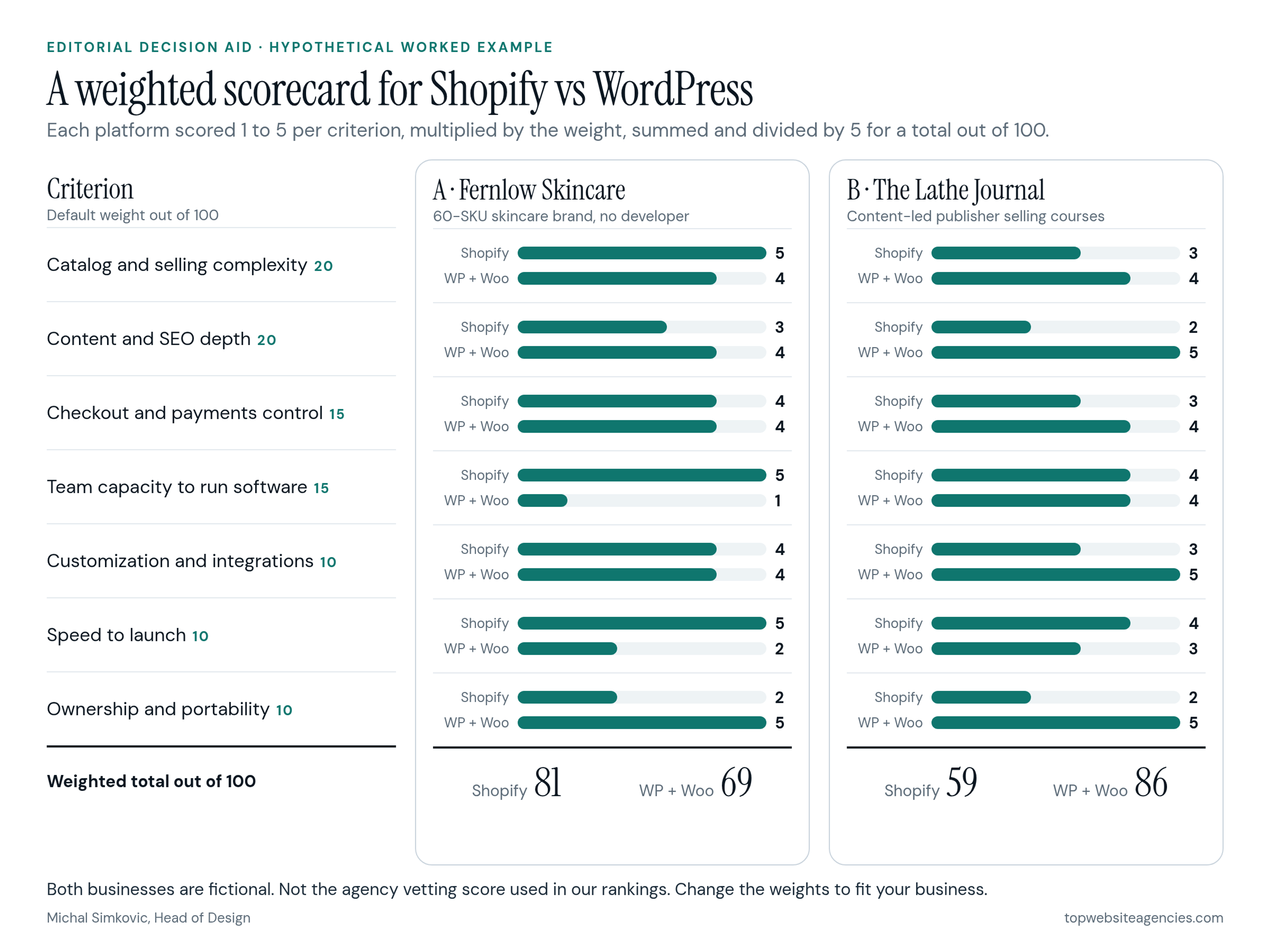
Hypothetical Worked Example A: Fernlow Skincare
Fernlow Skincare is a fictional direct-to-consumer brand with 60 SKUs, a subscribe-and-save program, a two-person team and no developer. Scores are Shopify first, then WordPress with WooCommerce.
- Catalog and selling complexity (20): 5 and 4
- Content and SEO depth (20): 3 and 4
- Checkout and payments control (15): 4 and 4
- Team capacity to run software (15): 5 and 1
- Customization and integrations (10): 4 and 4
- Speed to launch (10): 5 and 2