Website accessibility for business owners: the ADA covers public-facing business sites, and I treat WCAG 2.1 or 2.2 Level AA as the practical target. Most of what you need to check you can do yourself in an hour, without writing code.
I read the live Google results for this query on Nov 22, 2026. Five of the first nine organic results were legal or business-advice explainers about legal risk, and none of the nine showed a test on a real page. So I ran one. I ran Google Lighthouse's accessibility audit on ADA.gov's homepage and on one of our own guides: both scored 100, and both still listed 10 checks to do by hand.
Then I pressed Tab on each page. On ADA.gov, the first Tab showed "Skip to main content" with a thick outline. On our guide, the first element to get focus was the logo, not a skip link, so a keyboard user passes the navigation before reaching the content. A perfect automated score and a keyboard gap can sit on the same page, which is why this article puts manual checks first.
If you are hiring or replacing a studio, start with our directory of independently compared web design studios and use the questions in the hiring section below. If you sell online, look at the e-commerce web design studios we have vetted, because e-commerce was the largest share of the 2025 lawsuits counted in the data covered below.
What the Law Expects From a Business Website
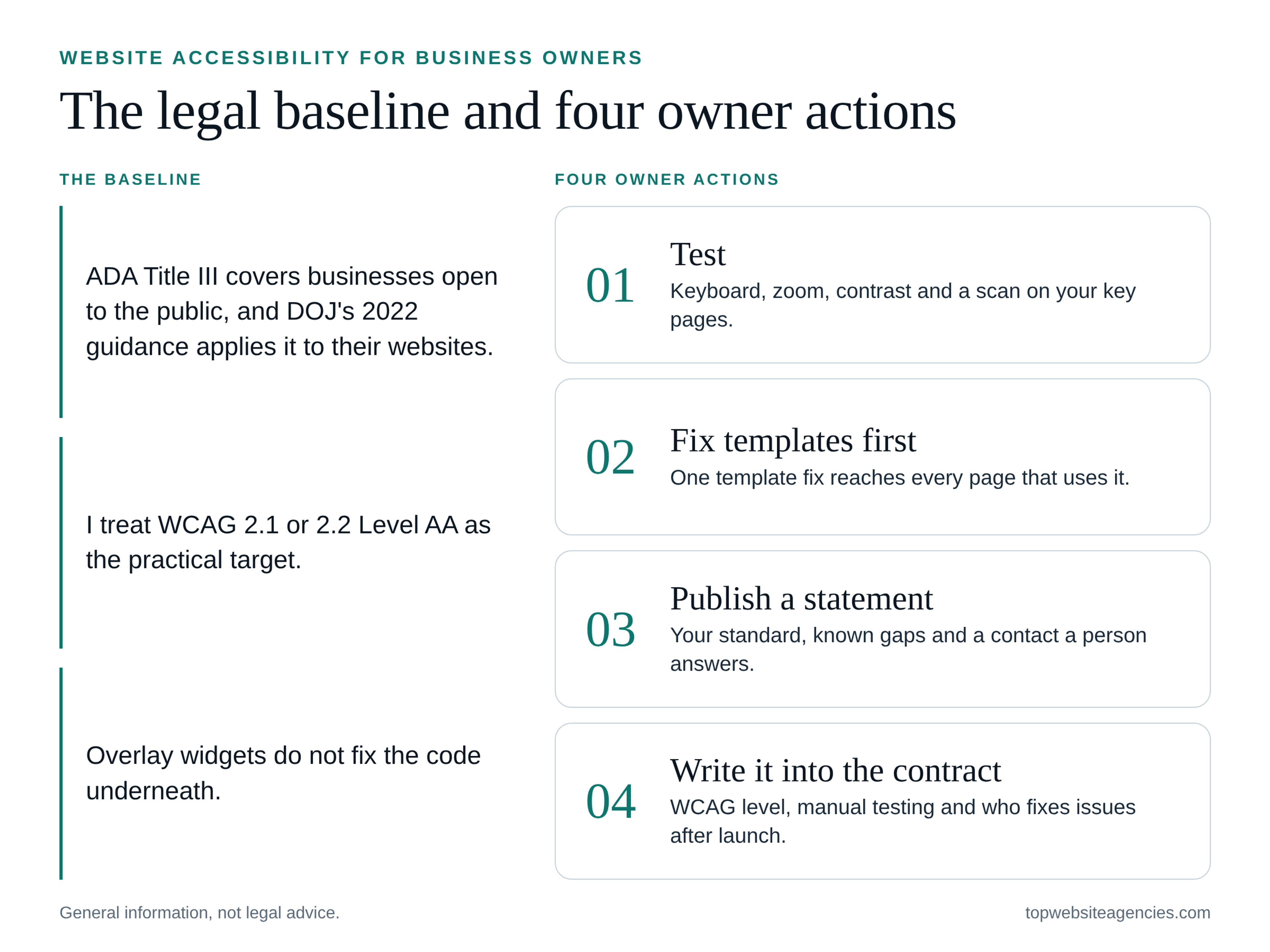
ADA Title III covers businesses open to the public, and the Justice Department's March 18, 2022 guidance explains how those businesses can make their websites accessible. DOJ has no technical rule for private business sites, so courts and settlements commonly point to WCAG as the yardstick.
I read the DOJ press release of March 18, 2022. It says of the guidance: "It explains how state and local governments (entities covered by ADA Title II) and businesses open to the public (entities covered by ADA Title III) can make sure their websites are accessible to people with disabilities in line with the ADA’s requirements." The release also describes DOJ settlements with Hy-Vee, Kroger, Meijer and Rite Aid to make vaccine scheduling websites accessible, so the department has acted on specific business sites.
WCAG (the Web Content Accessibility Guidelines) is the technical yardstick. The Section508.gov webinar page (July 2024) gives the version history: WCAG 2.0 Level AA became the web accessibility requirement under Section 508 in March 2017, WCAG 2.1 was finalized in June 2018, and WCAG 2.2 was finalized in October 2023. Section 508 governs the federal government's own sites, and DOJ has set WCAG 2.1 AA for state and local government sites (2024 rule; DOJ extended the compliance dates in 2026). Neither is a rule for your private business, but both show which standard regulators use. Level AA is the middle of WCAG's three levels (A, AA, AAA), and it is what people usually mean by "WCAG compliant."
If you run a medical practice or another healthcare site, healthcare-specific rules such as Section 504 and Section 1557 may apply on top of the ADA. This is general information, not legal advice.
Next step: pick one WCAG version and level (2.1 or 2.2, Level AA) and write it into your project documents. Ask your own lawyer about anything specific to your industry or state.
Lawsuit Risk in Numbers
UsableNet's January 8, 2026 report, "ADA Web Lawsuit Trends for 2026: What 2025 Filings Reveal," counted more than 5,000 digital accessibility lawsuits by the end of 2025, with federal filings at 3,100-plus. UsableNet sells accessibility services, so read it as a vendor's tally, but the figures are specific and dated.
Other figures from the same report:
- Repeat targets: according to UsableNet, of the more than 5,000 digital accessibility lawsuits filed in 2025, 1,427 targeted companies that had already faced an ADA web accessibility claim.
- Industries: according to UsableNet's 2025 breakdown, e-commerce made up nearly 70 percent, food and service roughly 21 percent, and healthcare about 2 to 3 percent.
- Company size: according to UsableNet, in 2025, 36 percent of companies sued reported annual revenue exceeding $25 million, which leaves most of the companies sued outside that group.
These numbers count filings. They do not tell you the odds for your own site or how any case ended. My reading is that the repeat-target figure matters most: a site with known, unfixed barriers appears to be a weak spot, and a dated record of what you found and fixed is worth keeping. The size figure also suggests that being a smaller business is not a reason to skip the work.
Next step: list what your site does (sells, books, collects forms, shows documents), then run the check in the next section on those pages first.
Why an Overlay Widget Is Not a Fix
An overlay is a script that adds a toolbar or automatic adjustments on top of a site without changing the code underneath. The sources I read say it cannot make a site compliant on its own, and the FTC's January 3, 2025 order against accessiBe is the clearest dated example.
The FTC's January 3, 2025 press release on the accessiBe order says: "The Federal Trade Commission will require software provider accessiBe to pay $1 million to settle allegations that it misrepresented the ability of its AI-powered web accessibility tool to make any website compliant with the Web Content Accessibility Guidelines (WCAG) for people with disabilities." That order is about what a vendor claimed, so it is a warning about marketing, not a verdict on every tool.
The Overlay Fact Sheet, signed by accessibility practitioners and users with disabilities, states: "No overlay product on the market can cause a website to become fully compliant with any existing accessibility standard and therefore cannot eliminate legal risk."
UsableNet's report adds a legal angle: "In 2025, an increasing number of lawsuits explicitly referenced accessibility widgets while alleging unresolved code-level barriers." It concludes: "The conclusion from the filings is consistent: widgets do not materially reduce legal risk." Again, that is a vendor's view, but it matches the other two sources.
The reason is practical. A broken tab order, a custom control with no label or a form without proper labels lives in the page code, and the fix belongs in the code or the template.
Next step: if your site has a widget, ask your developer to test the key pages with it switched off. If a vendor promises compliance from one line of script, ask for test evidence on your own pages.
A No-Code Accessibility Check You Can Run in an Hour
You can run a useful first check with a keyboard, a browser and two tools, but automated tools cannot finish the job. On both pages I tested, Lighthouse scored 100 and still listed 10 items for a human to check.
Run these on your homepage, one service or product page, and your contact or checkout page:
- Keyboard only. Put the mouse aside. Use Tab to move forward, Shift+Tab to go back, and Enter or Space to activate. Can you reach and use the menu, forms, buttons and any pop-ups?
- Visible focus. Is there a clear outline on whatever is selected at every step?
- Skip link. Does the first Tab offer a way to jump past the navigation, such as "Skip to main content"?
- Zoom. Zoom the browser to 200%, the text-resize level per WCAG 2.2 (2023). Does the text stay readable, without overlap or hidden controls?
- Contrast. Is there enough difference between text and background, especially on buttons, placeholder text and text over images?
- Alt text. Do meaningful images have a short description that says what the image does or shows?
- Captions. Do videos have accurate captions?
- Forms. Does every field have a visible label, and are error messages clear and tied to the field?
- Headings. Do they run in a sensible order (H1, then H2, then H3), describing the page structure rather than styling?
- Link text. Read each link out of context. "Click here" tells a screen reader user nothing.
- PDFs and third-party tools. Test linked documents, chat, booking calendars and payment embeds with the same keyboard steps.
Two tools help. In Chrome, open DevTools (right-click, then Inspect), choose the Lighthouse tab, tick only Accessibility and run it. WAVE by WebAIM is an online tool where you enter a page URL, and it also has browser extensions for Chrome, Firefox and Edge. WebAIM describes it this way: "WAVE can identify many accessibility and Web Content Accessibility Guideline (WCAG) errors, but also facilitates human evaluation of web content." Lighthouse is more direct about its limits: it lists items it cannot test, and on both pages I tested there were 10.
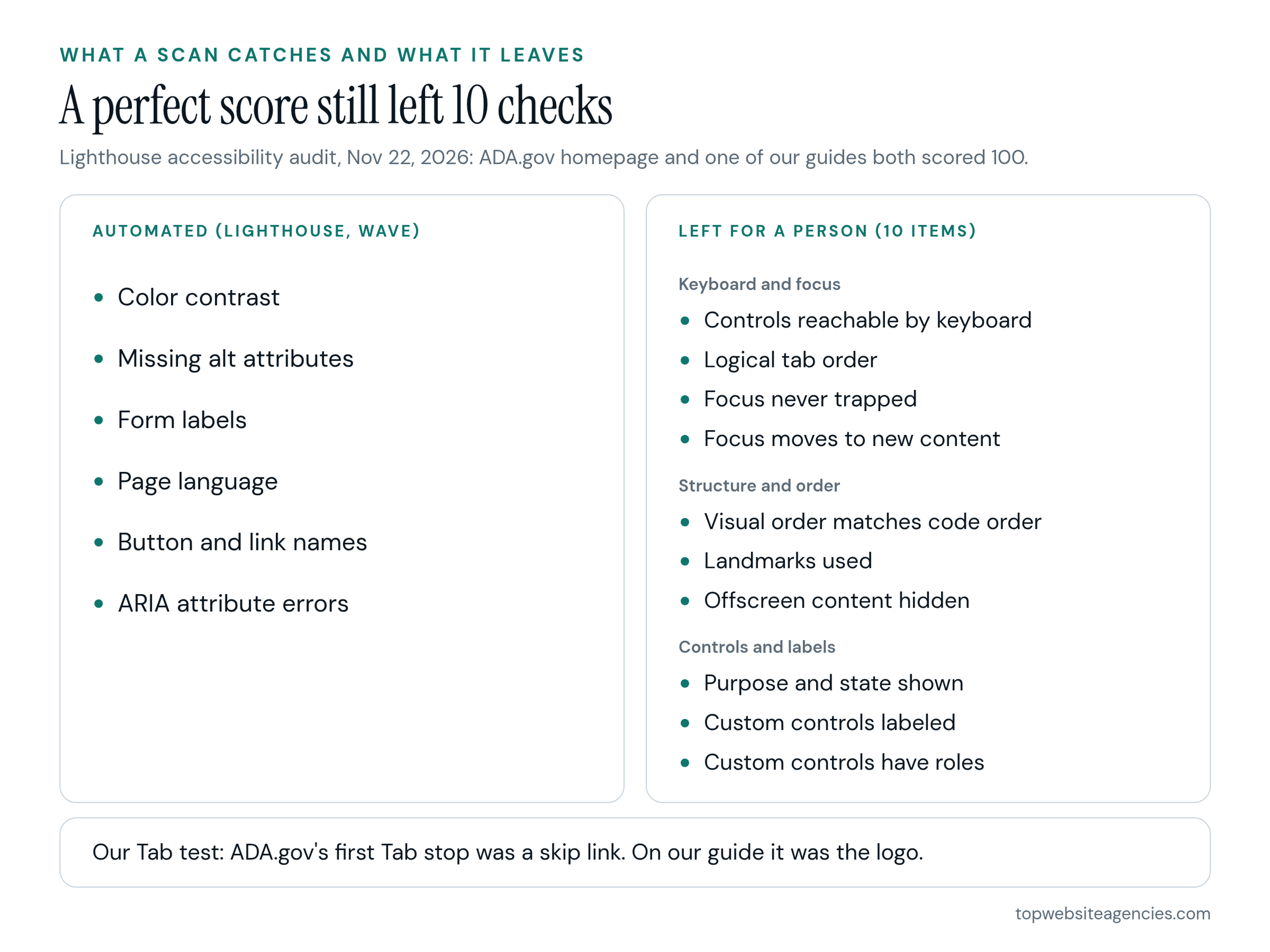
The 10 items Lighthouse listed as "additional items to manually check," grouped:
- Keyboard and focus: "Interactive controls are keyboard focusable"; "The page has a logical tab order"; "User focus is not accidentally trapped in a region"; "The user's focus is directed to new content added to the page".
- Structure and order: "Visual order on the page follows DOM order"; "HTML5 landmark elements are used to improve navigation"; "Offscreen content is hidden from assistive technology".
- Controls and labels: "Interactive elements indicate their purpose and state"; "Custom controls have associated labels"; "Custom controls have ARIA roles".
What my test showed (Nov 22, 2026): I ran Lighthouse 12.8.2 (accessibility category only, headless Chrome, command line) on the ADA.gov homepage and on our website launch checklist guide. Both scored 100, and both listed the same 10 manual items. I then loaded each page in headless Chrome and pressed Tab six times. On ADA.gov, the first Tab landed on "Skip to main content" with a visible 3px solid outline. On our guide, focus went to the logo, then the "Industry" and "Location" menu buttons, then "Rankings", "Blog" and "Contact", with the browser's default outline and no skip link. That is a gap on our own page, and it takes under a minute to spot by hand. Both pages had no images missing an alt attribute (ADA.gov: 23 images; our guide: 3). This was one test on two pages, so it illustrates the limit of automated scores rather than measuring anything broader.
Next step: write down each failure by page and template, then agree in writing on who runs which checks before go-live, so the work does not fall between you and your studio.
What Fixing It Costs Depends On
The cost of fixing a site depends on its scope, mainly the number of unique templates, custom components and outside tools. I am not giving dollar figures, because I have no sourced numbers to offer and a figure without a scope would mislead.
The main drivers:
- Unique templates: a fix to the header, footer, navigation or form template reaches every page that uses it, so templates come first.
- Platform and theme: a CMS or theme that already outputs clean, labeled markup needs less work than a heavily customized one.
- Custom components: mega menus, carousels, filters, checkouts and booking flows usually need keyboard and labeling work.
- Documents and media: PDFs, video captions and alt text across a large library add up.
- Third-party tools: chat, scheduling and payment embeds are often not yours to edit, and some may need replacing.
- Retesting: manual checks after the fixes, and again after future changes.
A planned redesign is often a cheaper moment to fix these than retrofitting old code, because the templates are being rebuilt anyway.
One number you may hear is the 20% rule, from a 1991 Justice Department regulation. The Cornell LII text of 28 CFR 36.403 says: "Alterations made to provide an accessible path of travel to the altered area will be deemed disproportionate to the overall alteration when the cost exceeds 20% of the cost of the alteration to the primary function area." That is a building-alterations rule for physical facilities, not a website rule, so do not treat it as a cap on website fixes.
Next step: ask any studio for a scoped quote broken down by template and component, with retesting included, and compare quotes on that basis.
What to Require From Your Web Design Agency
Put accessibility in the brief, the contract and the acceptance test: name the WCAG version and level, require manual testing, and name who fixes problems after launch. Automated scores alone, as the Lighthouse results above show, leave too much unchecked.
Start with what goes in your web design brief, before design begins. Then carry them into the contract:
- Standard and scope: the WCAG version and level, and which templates and flows are covered.
- Manual testing: keyboard and screen reader checks, plus a short written summary of what was tested and what remains open.
- CMS components: fields and blocks that require alt text and sensible heading levels, so editors cannot break the structure later.
- Accessibility statement: a short public page that names the standard you aim for, lists known gaps and gives a contact route (an email or phone number a person answers).
- Post-launch fixes: who fixes barriers found after launch, how fast and for how long.
For context, our own methodology is explicit about this. It says: "We inspect live sites for visual layout precision, mobile responsiveness, semantic HTML efficiency, page speed performance (LCP < 2.5s), and WCAG 2.1 AA accessibility compliance." According to the methodology page (Nov 2026), that sits inside Portfolio & Code Quality, which weighs 30% of our score. The same page lists omitting WCAG 2.1 AA accessibility as a red flag, because skipping semantic markup, contrast checks and keyboard navigation exposes brands to compliance risk and excludes users. For a fuller picture, see how our methodology checks WCAG 2.1 AA on live sites.
Eight questions I'd ask before signing:
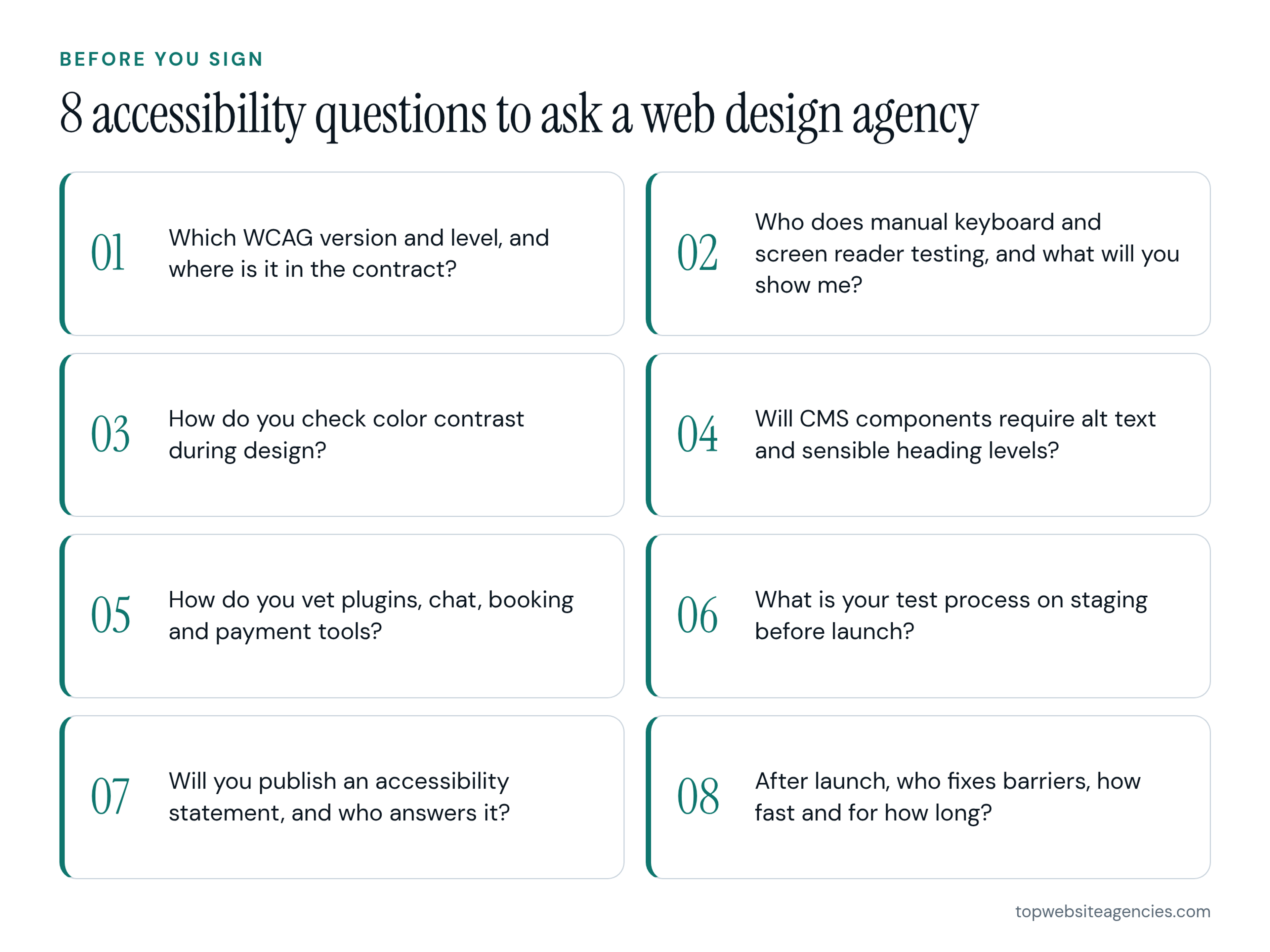
- Which WCAG version and level will you build to, and where is that written in the contract?
- Who does the manual keyboard and screen reader testing, and what will you show me afterward?
- How do you check color contrast during design, before anything is built?
- Will the CMS components require descriptive alt text and sensible heading levels?
- How do you vet third-party plugins, chat, booking and payment tools for barriers?
- What is your test process on the staging site just before launch?
- Will you publish an accessibility statement with a contact route, and who answers it?
- When barriers turn up after launch, who fixes them, how fast and for how long?
Next step: send these questions to every studio on your shortlist and compare the answers, not only the portfolios. Our rankings show how the studios we vetted score.
Frequently Asked Questions
What is the 20% rule for ADA?
It is a building rule. Under 28 CFR 36.403 (a 1991 Justice Department regulation, per Cornell LII), an accessible path of travel to an altered area is deemed disproportionate when its cost exceeds 20% of the cost of the alteration to the primary function area. It applies to physical alterations and does not limit what a business may need to spend on its website.
Can you get sued for website accessibility?
Yes. According to UsableNet's January 2026 report, there were more than 5,000 digital accessibility lawsuits by the end of 2025, including 3,100-plus federal filings, and e-commerce was the largest share. That is a vendor's count and not your personal odds, but it is enough reason to check your site, fix templates and keep a dated record of the work.
How much does it cost to make a website accessible?
It depends on scope, not a standard rate. The drivers are the number of unique templates, the platform, custom components such as checkouts and carousels, PDFs and media, and third-party tools. To get a usable quote, give the studio your most-used templates and a list of components and outside tools, then ask for a price per template and component, including retesting and post-launch fixes.
Is WCAG legally required?
For most private businesses, no rule names WCAG directly, because DOJ has not published a technical standard for private business sites. Courts and settlements commonly point to WCAG, though, and government rules use it: Section 508 for federal sites and WCAG 2.1 AA for state and local government sites (2024 rule; DOJ extended the compliance dates in 2026). I treat WCAG 2.1 or 2.2 Level AA as the practical target and ask your lawyer about state or industry rules.
Do small businesses need an accessibility statement?
I did not find a rule in the pages I read that requires one for a private business. I would still publish one. A short statement with your standard, known gaps and a working contact route gives users a way to report problems, but it does not replace fixing the site.
Conclusion
Website accessibility for business owners comes down to three moves: know the baseline (ADA Title III, with WCAG 2.1 or 2.2 Level AA as the practical target I recommend), check your own site by hand, and write the standard and the testing into your contract. The numbers say the risk is real, and the tests I ran say a perfect Lighthouse score still leaves 10 checks, and sometimes a keyboard gap, for a person to find.
Next step: run the hour-long check on your three most important pages, then use our rankings to compare studios on how they handle code quality and accessibility.