Web design projects rarely fail because of bad design. They fail because of mismatched expectations. The buyer assumes the final delivery includes a fully populated CMS, while the designer plans to hand off empty page layouts. That gap turns into friction, a slipping timeline and a strained working relationship.
When I led design teams at Copy.ai, Around, HackerRank, and AWS, I reviewed hundreds of agreements with external design partners. The difference between a smooth launch and a painful dispute almost always came down to the paperwork both sides signed before the kickoff call.
This guide assumes you have already picked a partner and have a draft agreement in your inbox. If you are still comparing options, start with a vetted shortlist of web design teams, and use our guide to scoring and comparing agency proposals before you get to the contract stage.
A quick note before we start: this is practical guidance from the buyer's side of the table, not legal advice. Have a lawyer review the final contract before anyone signs it.
The Master Agreement Versus the Statement of Work
Most professional design engagements split the paperwork into two documents.
The Master Services Agreement (MSA) governs the legal relationship. It covers confidentiality, dispute resolution, limitation of liability, termination and the general rules for intellectual property. The MSA rarely changes from project to project. If you hire the same partner a year later for a new feature, the MSA stays in place and you sign a new SOW under it.
The Statement of Work (SOW) defines the current project: the timeline, the specific deliverables, the payment schedule and the boundaries of the scope. The SOW deserves your closest attention, because this is where scope creep starts.
Smaller studios and freelancers often combine both into a single web design contract. That is fine, as long as every topic below appears somewhere in the document. Also check the order of precedence clause, which says which document wins if the MSA and the SOW contradict each other.
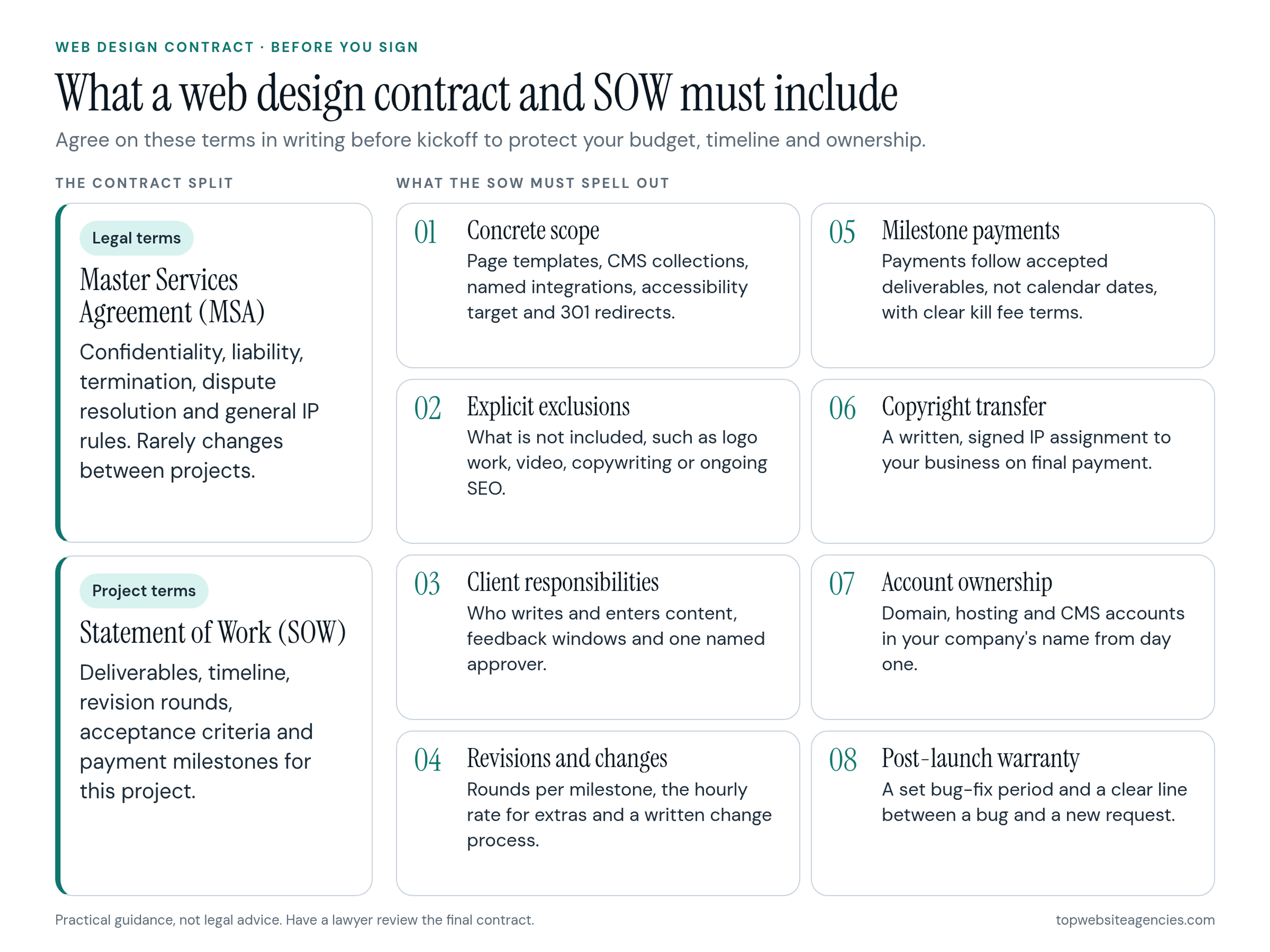
Defining Concrete Scope
A strong statement of work leaves no room for interpretation. It translates marketing goals into specific creative and technical outputs.
Do not accept a scope that simply lists "a new marketing website." You need explicit, countable boundaries. The SOW should state:
- The number of unique page templates the partner will design and build, not just the total page count.
- The CMS collections required, such as authors, blog posts, case studies or job listings, and the fields in each.
- Every third-party integration by name, for example your CRM, analytics, email platform or scheduling tool.
- The design tool and the build platform, so nobody is surprised by a stack change halfway through.
Content and Copy Responsibilities
A common dispute starts when the site is designed but nobody has written the words to fill it. The contract must state who writes the copy, who sources photography and illustrations, and who enters the final content into the CMS. If the partner is entering content, cap the volume, such as a number of pages or posts.
Technical Requirements
Technical requirements need the same clarity. List the browsers and devices the site must support. Name your accessibility target, for example WCAG 2.2 Level AA, and say how it will be checked before launch.
If you are redesigning an existing site, the SOW must include SEO migration: a redirect map from old URLs to new ones, with 301 redirects configured at launch. Skipping this step is one of the most common reasons a redesign loses organic traffic.
The Power of Explicit Exclusions
The most useful section in an SOW is often the exclusions list. A professional partner will write down what they are not doing. Common exclusions include logo and brand identity work, custom video or animation, photography, copywriting and ongoing SEO. Seeing a clear exclusions list should build your confidence. It shows the partner knows exactly where their responsibility ends, and it tells you what you need to budget for elsewhere.
Scope Definition Example
The difference between a weak contract and a strong one is easiest to see in how a single deliverable is described.
Vague scope language:
"Design and build a responsive blog with SEO optimization."
Specific scope language:
"Design one blog index template and one article template in Figma. Develop the approved designs in Webflow. Configure the Webflow CMS with custom fields for Author, Publish Date and Category. Client is responsible for all written content. Agency will migrate up to 50 existing blog posts from the client's current WordPress site, including 301 redirects for every migrated URL."
The second version tells both sides what done looks like. The first one guarantees an argument.
Timelines and Client Responsibilities
A project timeline works in both directions. The contract should say when the partner delivers each milestone, and it should equally define what you owe them and when.
Studios plan their people around schedules. If you take three weeks to send feedback on a homepage design, the team cannot sit idle, and your project drops behind other work. A strong web design contract sets a feedback window for each milestone, for example a few business days for consolidated written feedback, and states what happens to the timeline if the client misses it.
The SOW should also name the person on your side who has final approval authority. Design by committee causes endless delays. Name one stakeholder who signs off on every milestone, and make sure other reviewers send their comments through that person.
Revisions and Change Requests
Every creative project needs refinement. The SOW must define what counts as a revision round and how many rounds each milestone includes. Two or three rounds per milestone is a common range; whatever number you agree on, write it down.
The document should also explain what happens when you go past the included rounds. Extra revisions are usually billed at an hourly rate, and the contract should list that exact rate so there is no negotiation in the middle of the project.
Adding a new feature halfway through the build triggers a change request. The SOW should outline a formal process:
- You submit the request in writing.
- The partner estimates the cost and the timeline impact.
- You approve the estimate in writing, or decline it.
- The SOW is amended, and only then does the work start.
Never accept verbal agreements for extra work. They are the fastest way to end up with a surprise invoice.
Acceptance Criteria and Quality Assurance
Before the site launches, you go through user acceptance testing. The contract must define what a successful result looks like.
Acceptance criteria describe how you will test the site against the agreed requirements: the site renders correctly on the agreed browsers and devices, the CMS works as specified, forms submit to the right destination and the accessibility target is met. Set a fixed testing window and a rule for how defects are logged and fixed. Once the site meets the documented criteria, you give formal QA sign-off, which usually triggers the final invoice.
Payment Terms and Schedules
Tie payments to project milestones, not to calendar dates. One common structure is a deposit of around half the fee to reserve the team's time, a second payment on design approval and the final payment on QA sign-off before launch. The exact split matters less than the principle: each payment follows a deliverable you have accepted.
Read the late payment terms carefully. Many contracts add interest or a late fee to invoices that are overdue past a set number of days.
You will probably also see a kill fee. It sets what you owe if you cancel the project midway. The clause protects the partner for time already spent and people already scheduled. If you end a project after the design phase, the kill fee typically ensures the partner is paid for that completed milestone. Make sure the same clause states which files you receive if the project is cancelled.
Intellectual Property and Account Ownership
Intellectual property is where most buyers make assumptions. Under Section 201 of the US Copyright Act, copyright vests initially in the author of the work, which means an outside designer or studio owns what they create unless your agreement says otherwise. The same chapter, in Section 204, says a transfer of copyright ownership is not valid unless it is in writing and signed by the owner of the rights.
Many contracts use "work made for hire" language to solve this. Be careful: for work by an outside contractor, the statutory definition of a work made for hire only covers nine specific categories of commissioned work, and a website does not clearly fit any of them. That is why well-drafted agreements also include a written IP assignment clause that transfers the copyright to your business, and your lawyer should confirm the wording.
Partners usually make that transfer conditional on full and final payment. That is standard and fair. In the meantime, the contract can grant you a license to use the work so a payment dispute does not take your site offline.
The SOW must also list the source files you will receive: the native design files, all source code and every exported asset. Pay close attention to fonts and stock imagery. These licenses usually belong to whoever bought them and often cannot simply be handed over, so plan to buy commercial licenses for premium typefaces and stock photos in your company's name.
Account ownership is just as important. Your business should register the domain name and pay for hosting, the CMS and other core tools directly, then invite the design team into those accounts as users or administrators. Do not let a vendor buy your domain on your behalf. If the relationship turns sour, recovering a domain you do not control is slow and difficult.
Post-Launch Support
A website is never truly finished. The contract should define a warranty period after launch, often 30 days, during which the partner fixes bugs in their own work at no additional cost.
The contract must also distinguish a bug from a new request. Fixing a broken contact form falls under the warranty. Adding a new dropdown menu needs a new SOW or a post-launch support retainer. If you expect ongoing work, agree on the retainer scope, response times and hourly rate before launch, while you still have leverage.
Common Red Flags in Contract Wording
Certain phrases in a draft contract signal future trouble. Here are the ones to watch for and how to fix them.
- "Client will have unlimited revisions until approved." It sounds generous, but it usually leads to vague feedback and a partner who quietly deprioritizes your project. Define the exact number of revision rounds per milestone instead.
- "Agency will provide SEO services." Replace it with specific outputs, such as page titles and meta descriptions for a set number of pages, an XML sitemap and a complete 301 redirect map.
- "Final payment is due 30 days after launch." Tie the final payment to formal QA sign-off, not the public launch date. Launch dates often slip because of your own internal marketing schedule.
- "Agency retains all rights to underlying code." If the partner keeps proprietary components, the contract should give you a perpetual, royalty-free license to use and modify any code you need to run the site.
- "Timeline subject to change." Ask for named milestone dates and a clear rule for how the timeline moves when either side is late.
Clause-by-Clause Checklist
Use this website design contract checklist before you send the document to your lawyer:
- Is the number of unique page templates and CMS collections listed?
- Are all third-party integrations named?
- Is responsibility for writing and entering content assigned?
- Are target browsers, devices and the accessibility standard defined?
- Is an SEO migration and 301 redirect map included in the scope?
- Are explicit exclusions listed?
- Are client feedback windows documented?
- Is a single person named for final approvals?
- Are revision rounds counted per milestone?
- Is the hourly rate for extra revisions and change requests stated?
- Is there a written change request process?
- Are the acceptance criteria for QA defined?
- Are payments tied to accepted deliverables rather than calendar dates?
- Does the copyright transfer to your business in writing on final payment?
- Does your business own the domain, hosting and CMS accounts?
- Is there a post-launch warranty period for bug fixes?
Sample Web Design Contract and SOW
Below is an example web design contract and SOW to adapt for your own project: fill in the fields in [square brackets], and treat it as a starting point, not legal advice. The same sample is available as a .docx download.
Sample web design contract and SOW
This sample is for general information only and is not legal advice. Laws vary by state and country; have a lawyer review any contract before you sign.
Parties and date
This agreement is made on [Effective date] between [Client legal name], located at [Client address] ("Client"), and [Agency legal name], located at [Agency address] ("Agency"). The Client's named approver for this project is [Approver name and title]. If this statement of work (SOW) sits under a master services agreement (MSA) dated [MSA date], the [MSA or SOW] controls if the two documents conflict.
Buyer note: Check that the legal entity names match your company records and that one approver is named. Red flag: no order of precedence clause when there is a separate MSA.
Scope of work (Schedule A)
The Agency will design and build the website described below on [Build platform], using [Design tool] for design files.
| Phase | Deliverables | Timeline | Fee |
|---|---|---|---|
| Discovery | Sitemap, content inventory, redirect map plan | [Start date] to [Date] | [Fee] |
| Design | [Number] unique page layouts, mobile and desktop, in [Design tool] | [Date] to [Date] | [Fee] |
| Build | Approved layouts built on [Build platform]; CMS collections: [List collections and fields]; integrations: [Name each tool] | [Date] to [Date] | [Fee] |
| QA and launch | Testing on [Browsers and devices], accessibility check against [Accessibility target, for example WCAG 2.2 Level AA], 301 redirects configured at launch | [Date] to [Launch date] | [Fee] |
Content entry by the Agency is capped at [Number] pages or posts. Content migration covers up to [Number] existing posts from [Current platform].
Buyer note: Every row should be countable: layouts, collections, named integrations and dates. Red flag: scope written as "a new marketing website" or "SEO optimization" with no specific outputs.
Exclusions
The following are not included unless added through a change request: [Logo and brand identity work], [Copywriting], [Photography], [Custom video or animation], [Ongoing SEO], [Paid fonts and stock imagery licenses], [Other exclusions].
Buyer note: Use this list to budget for work you will need elsewhere. Red flag: no exclusions list at all, which leaves both sides guessing where the Agency's work ends.
Client responsibilities
The Client will provide final copy, images and brand assets by [Materials due date], and access to [Domain, hosting, CMS and tool accounts] by [Access date]. The Client will send consolidated written feedback through the named approver within [Number] business days of each delivery. If feedback or materials arrive late, the timeline moves by the length of the delay, and [Describe any rescheduling terms].
Buyer note: Make sure the feedback window is realistic for your team's calendar. Red flag: a missed feedback window lets the Agency cancel the project or charge a fee without notice.
Revisions and change requests
Each design milestone includes [Revision rounds] rounds of revisions. A round means one set of consolidated written feedback from the approver and one updated delivery. Extra rounds are billed at [Hourly rate] per hour. Any new feature or added work follows this process: the Client submits the request in writing; the Agency estimates the cost and timeline impact within [Number] business days; the Client approves or declines in writing; the SOW is amended before work starts.
Buyer note: Check that the hourly rate is written down and that no extra work starts without written approval. Red flag: "unlimited revisions" or change requests agreed by phone or chat.
Acceptance criteria
The site is accepted when it renders correctly on [Browsers and devices], CMS collections work as specified in Schedule A, forms submit to [Destination], redirects resolve as mapped, and the site meets [Accessibility target]. The Client has [Number] business days to test and log defects in [Tracking tool]. The Agency fixes logged defects within [Number] business days. Formal written QA sign-off by the approver completes acceptance.
Buyer note: Acceptance should be tested against the written criteria, not taste. Red flag: the site counts as accepted automatically on launch, or after a short silence from you.
Fees and payment schedule
The total fee is [Total fee], excluding [Taxes or third-party costs]. Payments follow accepted milestones:
- [Deposit percentage] on signing: [Amount]
- [Percentage] on design approval: [Amount]
- [Percentage] on QA sign-off: [Amount]
Invoices are due within [Number] days. Late invoices accrue [Late fee or interest terms]. Kill fee: if the Client cancels the project, the Client pays for milestones already accepted plus [Kill fee amount or percentage] for work in progress, and the Agency delivers all files for completed work within [Number] days of payment.
Buyer note: Each payment should follow a deliverable you have accepted, with the final one tied to QA sign-off. Red flag: final payment due on a calendar date or "30 days after launch," or a kill fee that does not say which files you receive.
Intellectual property and account/domain ownership
On receipt of full and final payment, the Agency assigns to the Client all copyright and other rights in the deliverables, including design files, source code and exported assets. Until then, the Client has a license to use the work. Pre-existing Agency components are licensed to the Client on a perpetual, royalty-free basis to use and modify as needed to run the site. Fonts and stock imagery are licensed in the Client's name at the Client's cost. The Client registers and owns the domain, hosting, CMS and other core accounts and invites the Agency as a user.
Buyer note: Look for a written assignment clause, not only "work made for hire" wording, and confirm the list of source files you receive. Red flag: "Agency retains all rights to underlying code" or the Agency buying your domain in its own name.
Post-launch warranty
For [Warranty period, for example 30 days] after launch, the Agency fixes defects in its own work at no extra cost. New features, content changes and third-party tool changes are not defects and need a new SOW or a support retainer at [Retainer terms].
Buyer note: Check how a bug is told apart from a new request and how fast the Agency responds. Red flag: no warranty period, or one that starts at design approval instead of launch.
Confidentiality
Each party keeps the other's non-public information confidential and uses it only for this project, for [Number] years after the agreement ends. The Agency may show the work in its portfolio [only after launch / only with written consent].
Buyer note: Decide whether portfolio use is acceptable before you sign. Red flag: confidentiality that only protects the Agency.
Termination
Either party may end this agreement with [Number] days' written notice. Either party may end it immediately if the other materially breaches it and does not fix the breach within [Number] days of notice. On termination, the Client pays for accepted work and any kill fee, and the Agency hands over files and account access for paid work.
Buyer note: Confirm you can leave without losing paid work or account access. Red flag: termination rights for the Agency only.
Limitation of liability
Except for breaches of confidentiality or intellectual property obligations, each party's total liability is capped at [Cap, for example the total fee paid]. Neither party is liable for indirect or consequential losses.
Buyer note: Check that the cap applies to both sides and that IP and confidentiality carve-outs are present. Red flag: a cap that covers only the Agency or is far below what you pay.
Governing law
This agreement is governed by the laws of [State or country]. Disputes will be resolved in [Courts or arbitration venue].
Buyer note: Ask your lawyer whether the chosen law and venue work for you. Red flag: a venue far from you that makes any dispute expensive to pursue.
Signatures
[Client legal name]
Signature: [Signature]
Name and title: [Name, Title]
Date: [Date]
[Agency legal name]
Signature: [Signature]
Name and title: [Name, Title]
Date: [Date]
Buyer note: The signer on each side should have authority to bind the company. Red flag: work starting before both parties have signed.
Frequently Asked Questions (FAQ)
What is the difference between a web design contract and a statement of work?
The contract, or MSA, sets the legal rules of the relationship: confidentiality, liability, termination and intellectual property. The web design statement of work describes one specific project: deliverables, timeline, revision rounds, acceptance criteria and payment milestones. Many studios combine both in one document for smaller projects.
Can I use my own MSA if the agency provides one?
Yes. Mid-size and enterprise companies often ask vendors to sign the company's standard MSA, and the partner's project details are then attached as an SOW under that master agreement. Expect some negotiation on liability caps and IP terms.
What happens if the agency misses a deadline?
A well-written contract gives the partner a defined cure period to fix the problem after written notice, and it describes what you can do if they still miss it. If your own late feedback caused the delay, the timeline shifts accordingly, which is why documented feedback windows protect both sides.
Do I own the fonts and stock photos used on my site?
Usually not automatically. Fonts and stock images are licensed, not owned, and the license terms set who can use them and where. Buy the web font and image licenses in your company's name, or confirm in writing that the partner's licenses cover your use.
Conclusion
Picking the right partner is the hard part. Once you have a clear web design contract and a specific SOW in place, you can stop worrying about legal mechanics and focus on building a site that works. Define every deliverable, list what is excluded, set feedback windows that match your team's reality, and make sure the copyright and every core account end up in your company's name.
If you are still deciding whether a freelancer or a studio fits your project better, settle that question first, because the right contract structure depends on who will do the work. Then have a lawyer review the final draft before you sign.