A website redesign is worth the time and money when the site itself is holding the business back: your positioning has changed, qualified visitors stop converting, pages are slow or hard to use, or your team can't publish anything without a developer. If the problem is narrower, such as one weak landing page or a dated color palette, a targeted fix or a visual refresh gets you most of the benefit with far less risk. The planning you do before anyone opens a design file decides which of those paths you take.
I have watched both failure modes up close, first leading design teams at Copy.ai, Around, HackerRank, and AWS, and now as editor of the Top Website Agencies rankings. Some companies wait a year or two too long and keep patching a site that no longer describes what they sell. Others tear everything down because a new executive dislikes the homepage, and lose rankings and conversion paths that were working fine.
This guide covers the signs that justify a full redesign, how a redesign differs from a refresh, a replatform, or a fix, and how to plan the project so the team you hire starts with clear goals, real data, and a scope it can price. When you are ready to compare partners, our independent rankings of website design studios are a practical place to build a shortlist.
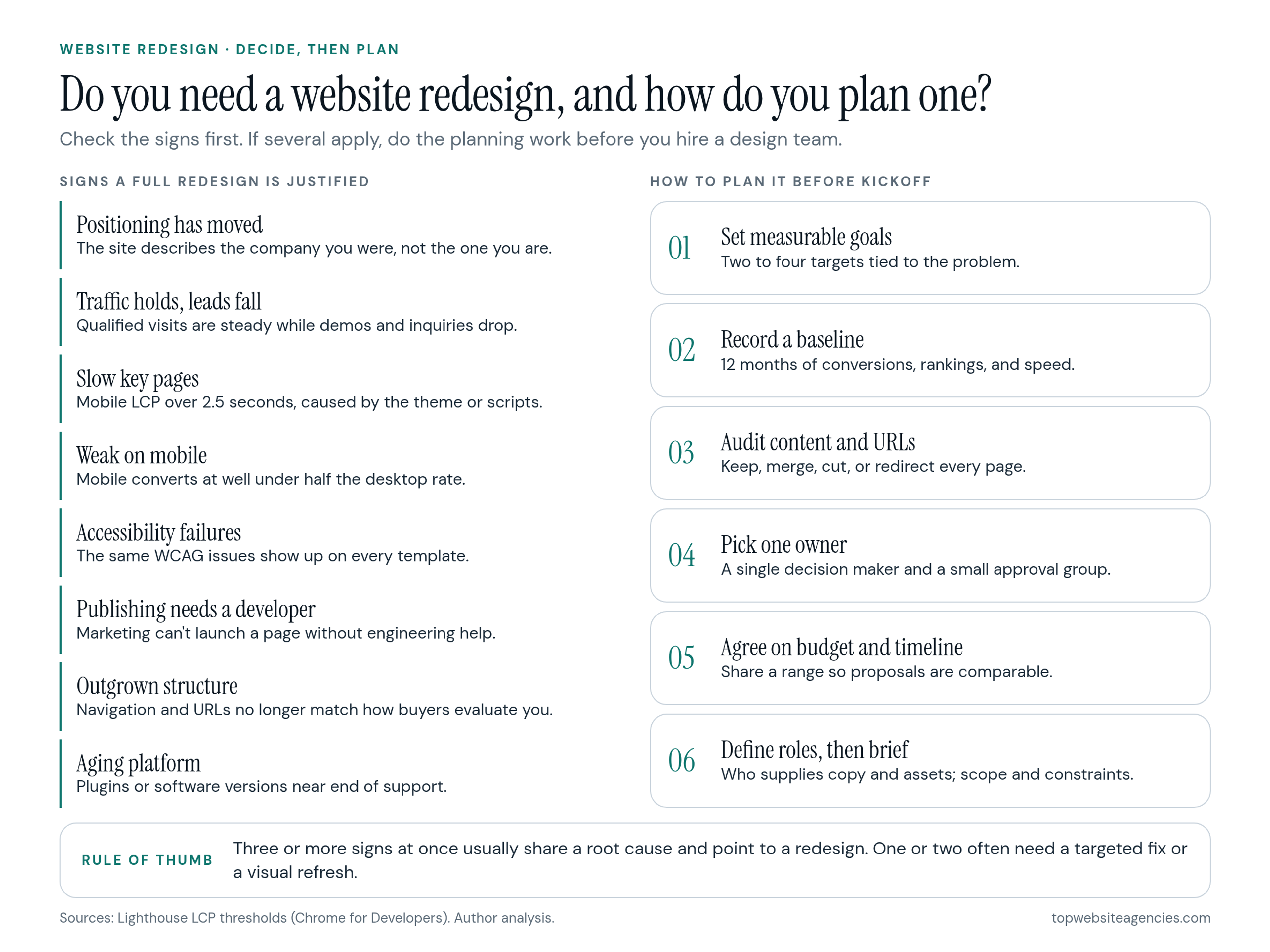
8 Signs Your Website Needs a Full Redesign
One sign on its own rarely justifies a rebuild. When three or more show up together, they usually share a root cause in the site's structure, platform, or message, and patching them one at a time ends up costing more than starting over.
1. Your positioning has moved and the site hasn't
The company has changed, but the website still describes who you were three years ago. This happens a lot when a product moves upmarket from self-serve plans to larger contracts. If the homepage still talks about entry-level features while sales is pitching security reviews and multi-year deals, every visit from a serious buyer starts with a mismatch that your sales team has to undo on the first call.
2. Traffic holds steady but leads keep falling
Qualified traffic from search and paid channels is flat or growing, yet demo requests, trials, or inquiries keep slipping. First rule out the boring explanations: a broken analytics tag, a changed form, or seasonality. If the decline survives that check, the cause is usually structural. Navigation hides the next step, the value proposition is buried below generic headlines, or forms ask for too much too early. One rewritten page won't fix a pattern that runs through every template.
3. Key pages are slow, especially on phones
Speed problems that come from the theme, a page builder, or years of stacked scripts can't be solved by compressing a few images. Run your most important pages through Lighthouse. Its guidance on Largest Contentful Paint treats a mobile LCP up to 2.5 seconds as fast and anything over 4 seconds as slow. Then check the Core Web Vitals report in Search Console, which reflects real visits rather than a lab test.
How the site was built matters more than which logo is on the CMS. In its 2025 chapter on content management systems, the HTTP Archive Web Almanac reports a mobile Core Web Vitals pass rate of 45% for WordPress sites, among the lowest of the major platforms, and attributes most of the variation to themes, plugins, and page builders rather than to WordPress itself. When the slowness lives in the template layer, the fix is a rebuild of that layer.
4. Mobile visitors convert far worse than desktop visitors
Compare conversion rates by device in your analytics. When I review sites, a mobile conversion rate below half of the desktop rate is my cue to look closely at the mobile layout: tiny tap targets, menus that hide key pages, tables that overflow the screen, and forms that are painful to fill in with a thumb. If the site was designed for desktop and squeezed down later, the fix touches every template.
5. Accessibility problems show up on every page type
Accessibility gaps are common, which is exactly why they are easy to overlook. The WebAIM Million 2025 report, which scans the home pages of the top one million websites, found detectable WCAG 2 failures on 94.8% of them, with low-contrast text on 79.1%. If an automated scan finds the same failures on every template, the problem sits in your colors, components, and form patterns. Fixing it properly means changing the design system, which is redesign territory.
6. Publishing a page requires a developer
If marketing needs an engineer or an outside contractor to launch a landing page, add a case study, or edit the navigation, your content management setup is costing you speed every week. A modern build gives editors a library of approved sections they can assemble into new pages without touching code, and without breaking the layout.
7. You have outgrown the structure
New products, acquisitions, new markets, and years of "just add a page" leave you with navigation nobody can explain. Visitors can't find the path that matches their situation, and search engines face hundreds of thin or overlapping URLs. When the information architecture no longer matches how buyers evaluate you, the menus, templates, and URL structure all need to change together.
8. The platform is approaching end of life
Old themes and custom plugins often lock a site to outdated software. PHP, which runs WordPress and many other platforms, publishes its support schedule for each release branch: two years of active support, then two years of security fixes only, then end of life. If your host can't upgrade because the site would break, you are carrying security risk and blocking new integrations. That is one of the clearest technical reasons to rebuild.
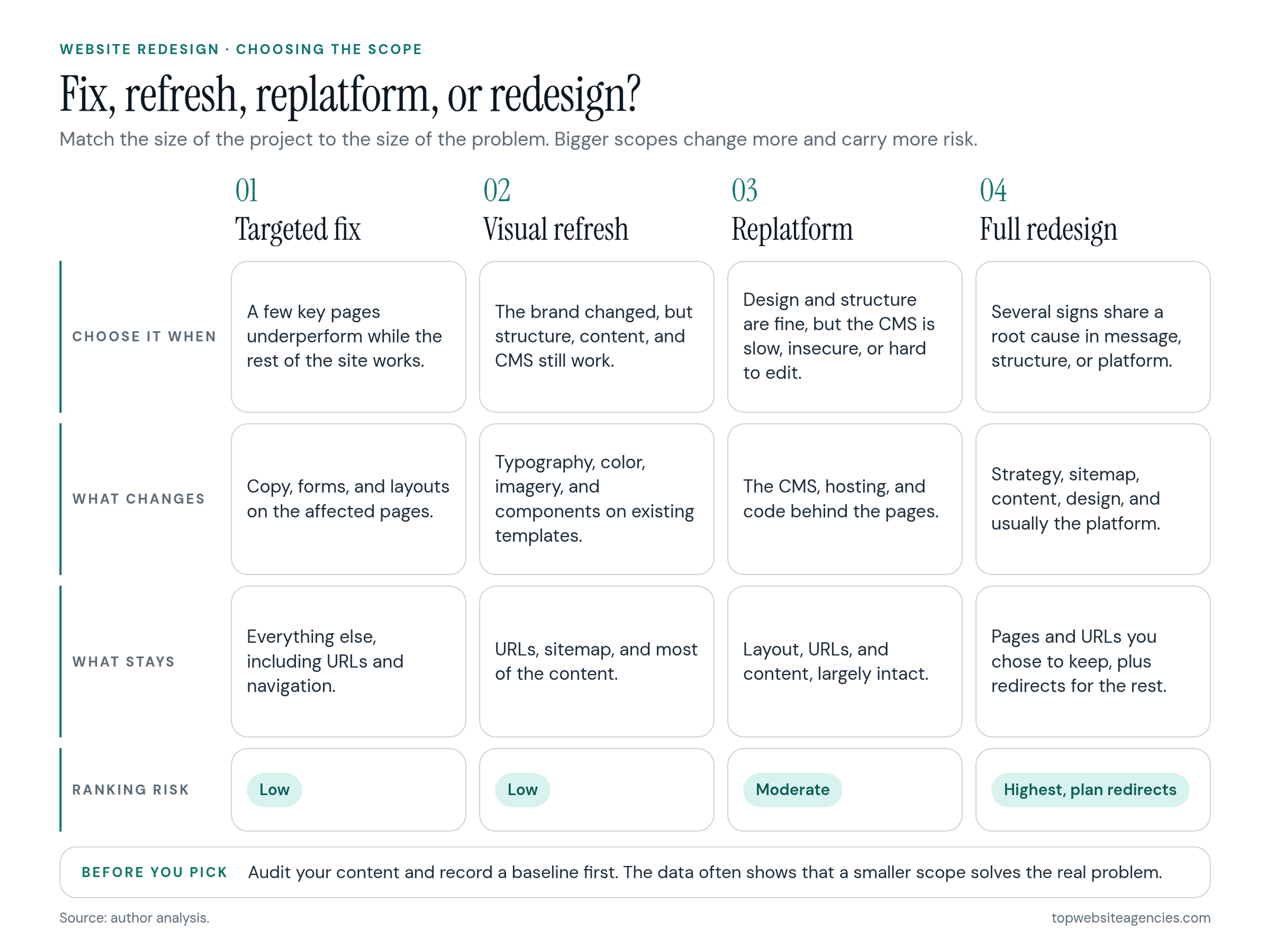
Redesign, Refresh, Replatform, or Fix?
Before you start talking to outside teams, decide which kind of project you actually need. Many problems that feel like "we need a new website" have a smaller answer.
- Targeted fix: one or a few pages underperform while the rest of the site works. Rewrite the copy, simplify the form, test a new layout on the pages that matter most.
- Visual refresh: the brand has been updated, but the structure, content, and platform still work. New typography, color, and imagery go onto the existing templates, and URLs stay the same.
- Replatform: the design and structure are fine, but the CMS is slow, insecure, or hard to edit. The site moves to a new platform with its layout and URLs largely intact.
- Full redesign: strategy, structure, design, and usually the platform all change together, because the problems in the signs above share a root cause.
When not to redesign
Hold off on a full redesign in three situations:
- Search traffic is healthy and converting, and the main motivation is that leadership wants something new. Changing URLs, page structure, and content hierarchy always carries some ranking risk. A refresh gets you the new look without it.
- You haven't audited your content. Without knowing which pages bring in leads and links, it is easy to delete the ones that pay for the project.
- Your positioning or packaging is still in flux. A design team can't fix an unclear offer. Settle what you sell and to whom first, then write the brief.
How to Plan a Website Redesign Before You Hire Help
Most of the planning below is work your own team should do before kickoff. It makes proposals comparable and keeps the first weeks of the project focused on decisions rather than data gathering. What happens after kickoff is covered in our walkthrough of the phase-by-phase delivery sequence most studios follow.
1. Name the problem and set measurable goals
Write one paragraph on why the redesign is happening, tied to the signs above. Then turn it into two to four goals you can measure after launch. Examples of the kind of targets I like to see in a brief:
- Pipeline: raise the visit-to-demo conversion rate on product pages by a set percentage within 90 days of launch.
- Performance: keep mobile LCP at or under 2.5 seconds on the top 20 landing pages.
- Operations: let marketing publish a campaign page in a day without a developer.
- Accessibility: pass a WCAG 2.1 AA review of every template before launch.
Pick numbers from your own baseline, not from someone else's benchmark.
2. Record a baseline
Export at least 12 months of data so you can prove the redesign worked:
- Conversion rates from visit to lead and lead to qualified opportunity, split by device.
- Your top 20 pages by leads and by organic traffic, with the queries each one ranks for.
- Core Web Vitals for your main templates.
- Drop-off points on high-intent pages such as pricing, product, and contact.
Numbers tell you where people leave. To see why, add behavioral data. Microsoft Clarity, a free behavioral analytics tool, provides heatmaps and session recordings, and an afternoon of watching recordings on your key pages usually reveals the friction points faster than any report. If you can, also run five to eight short interviews or usability sessions with recent prospects.
3. Audit your content and URLs
Crawl the current site and sort every indexed URL into one of four actions: keep, merge, cut, or redirect. Flag the pages that earn leads, rankings, or backlinks, because those need a one-to-one destination on the new site. This list later becomes the redirect map. Our guide to protecting search rankings during the migration covers what the SEO side of the scope should include.
4. Choose one owner and a small approval group
Assign a single internal owner with final decision rights, usually a marketing or brand leader. Collect input widely from sales, product, support, and legal early on, but keep the approval group to two or three people. Every additional approver adds review rounds, and the design that survives a large committee is usually the safest and least distinctive option.
5. Set a budget range and a realistic timeline
Decide on a budget range before you talk to anyone, and share it in the brief. Without a range, proposals can't be compared because each team guesses a different scope. For context on how much each scope typically costs and where the money goes, see how redesign budgets break down by scope. On timing, a redesign of a mid-size marketing site usually takes three to five months from kickoff to launch, and content delays are the most common reason it runs longer.
6. Decide what your team will provide
Be explicit about who supplies what: brand assets, product screenshots, photography, subject-matter interviews, and final copy. If you expect the outside team to write copy, say so up front, because it changes both the price and the schedule.
Working With an Agency: Brief, Shortlist, and Contract
With goals, data, and scope in hand, the hiring part gets much simpler.
What to put in the brief
- Company context: what you sell, to whom, your stage, and your main competitors.
- Why now: the problem and the goals from your planning work.
- Scope: an estimated page count by template type (homepage, product, pricing, case study, blog, contact).
- Technical constraints: required CMS, integrations such as your CRM and marketing automation, and hosting.
- Roles: what your team provides and what you expect the partner to deliver.
- Budget range and target launch date.
Questions to ask on the pitch call
- "Who writes the copy, and when does content work start?" Look for teams that develop messaging alongside wireframes instead of waiting for finished text.
- "How will you protect our search rankings at launch?" A good answer mentions a pre-launch crawl, a one-to-one redirect map, keeping the staging site out of search results, and monitoring after launch.
- "Can we test a recent site you launched?" Run a few of their live client sites through Lighthouse and an accessibility checker yourself. Slow, inaccessible portfolio sites predict how yours will turn out.
- "Show us how our marketers would build a new page." Ask for a live demo inside a CMS they handed over to a past client.
If you are a software company, you can start with the SaaS website design teams we have vetted and run each of them through these four questions.
Red flags
- Promises of guaranteed rankings or traffic gains right after launch.
- No access to a staging site while the work is in progress.
- Domain, hosting, or code repositories held in the agency's name.
- Accessibility treated as an optional extra.
- Desktop mockups only, with no plan for mobile layouts or interactive states.
Who should own what at the end
The contract should transfer full intellectual property in all deliverables to your company on payment. Your team should hold administrator access to:
- The domain registrar and DNS.
- Production and staging hosting.
- CMS admin accounts.
- Design source files.
- Code repositories.
- Analytics, tag management, and Search Console.
Mistakes That Derail a Redesign
- Designing with placeholder text. Lorem ipsum hides layout problems that real messaging exposes. Design around real copy, even rough drafts.
- Launching without a redirect map. Old URLs that return errors throw away years of rankings and links.
- Reviewing desktop only. Approving layouts on a large monitor and discovering the mobile version in QA is a reliable way to blow the schedule.
- Over-animating. Heavy motion and autoplay video slow pages down and annoy visitors who came for a quick answer.
- Leaving accessibility for after launch. Fixing contrast, focus states, and labels on a finished site means reworking code that could have been right the first time.
- Treating launch as the finish line. Plan a 30-day period after launch to fix bugs, watch real behavior, and adjust the pages that matter most.
Frequently Asked Questions (FAQ)
How often should a website be redesigned?
There is no fixed cycle. Many growing companies end up redesigning every few years because their positioning, products, or platform change that often. If your platform, brand, and structure are still sound, you can extend the life of the site with refreshes, targeted fixes, and new page sections instead of a full rebuild.
Can we redesign without losing search traffic?
Usually, yes. Traffic drops come from changed URLs without redirects, deleted pages that used to rank, and slower templates. A content audit, a one-to-one redirect map, preserved headings and metadata on key pages, and close monitoring after launch prevent most of the damage. Our redesign SEO guide, linked in the planning section above, covers the full checklist.
Should we rewrite our content before hiring a design partner?
Settle the messaging strategy first: who you serve, what you offer, and why you are different. Leave the page-level copy for the project itself, so layout and words are developed together. If your team will write the copy, agree on deadlines in the contract.
How long does a website redesign take?
For a mid-size marketing site, plan on roughly three to five months from kickoff to launch. Large sites with complex integrations or hundreds of pages to migrate take longer. The most common cause of delay is late content, not design or development.
Is a full redesign always the most expensive option?
Usually, because strategy, structure, design, development, and migration are all in scope. That said, repeatedly patching a site with structural problems can cost more over two or three years than a single well-planned redesign.
Conclusion
A redesign is a business decision, not a matter of taste. Start by checking the signs: shifted positioning, falling leads, slow mobile pages, accessibility failures, publishing friction, an outgrown structure, and an aging platform. If several apply, plan the project properly before you hire anyone. Set measurable goals, record a baseline, audit your content, appoint one owner, and agree on a budget range.
That preparation is what turns proposals into an apples-to-apples comparison. Once your brief is ready, shortlist a few teams from our rankings, put each through the same questions about copy, SEO, performance, and ownership, and choose the one whose answers show they understand your business problem, not just your homepage.