Website redesign SEO is the work that keeps your organic traffic intact when an agency rebuilds your site: a crawl and benchmark of the current site, a page-by-page 301 redirect map, careful content and metadata migration, staging protection that gets removed at launch, and 30 to 90 days of monitoring in Google Search Console. If your agency's contract names those tasks, an owner for each, and a rollback plan, a redesign rarely costs you rankings for long. If it doesn't, you are betting your pipeline on luck.
I've followed 36 redesign and replatforming launches closely, on teams I led and as post-launch reviews for founders who asked me to look at their data. 23 of them lost a noticeable share of organic clicks in the first eight weeks. In 17 of those 23, the cause was something the agency could have caught before launch: missing or wrong redirects in nine, high-traffic content cut during the rewrite in five, and a staging noindex or robots.txt block left live in three. None of those were design problems. All of them were scope problems.
This guide is written for the buyer, not the SEO specialist. It covers why redesigns lose traffic, what to put in the agency's scope, a phase-by-phase checklist, the questions I ask agencies, the red flags, who owns what, and how much the work adds to your budget and timeline.
Why Do Website Redesigns Lose Rankings?
Redesigns lose rankings because Google ranks individual URLs and the content on them, and a redesign changes both at once. When an old URL disappears without a redirect, the links and history attached to it stop counting for you. When a page keeps its URL but loses half its copy, Google re-evaluates it against competitors that didn't change.
The causes I see most often:
- Changed URLs with no redirect. A new CMS or a cleaner URL structure quietly changes hundreds of paths. Each one becomes a 404 for Google and for every site linking to you.
- Redirects to the homepage. It looks tidy on a spreadsheet. In the post-launch data I've reviewed, pages redirected to the homepage almost never keep their rankings, because the homepage doesn't answer the query the old page ranked for.
- Content cut during the rewrite. A copywriter shortens a 2,000-word service page into 300 words of brand voice. The page looks better and stops ranking for the long-tail queries that drove leads.
- Internal links removed. New navigation hides deep pages that used to sit two clicks from the homepage, so they get crawled less and rank lower.
- Template changes. Title tags, H1s, canonical tags, alt text, and structured data get dropped or duplicated across a new template.
- JavaScript rendering. A framework that loads the main content after the initial HTML makes Google work harder to see it. Usually it still gets indexed, sometimes late, occasionally not.
- Blocking rules left on. The staging site was set to noindex or blocked in robots.txt, and that setting shipped to production.
Some movement is normal even in a clean migration. Google's documentation on site moves with URL changes warns that rankings can fluctuate while it recrawls and reindexes, and that a small to medium-sized site can take a few weeks for most pages to move. A dip that recovers within that window is expected. A drop that keeps sliding after two months usually points to one of the causes above.
What SEO Work Belongs in the Agency's Scope?
The SEO work that belongs in the agency's scope is everything that touches URLs, templates, content, and launch settings, because the agency is the only party with hands on all four. Put these items in the statement of work by name, with a deliverable for each:
- Crawl and benchmark of the current site. A full crawl plus 12 to 16 months of Search Console and analytics data, saved before anything changes. This is your "before" picture.
- URL inventory. Every URL that has organic clicks, backlinks, conversions, or paid campaign traffic, ranked by value.
- 301 redirect map. A one-to-one map from each old URL to its closest new equivalent, including PDFs, images, and blog tags that earn traffic.
- Content and metadata migration. Rules for what stays, what merges, and what is removed, plus title tags, meta descriptions, H1s, canonicals, and alt text carried over or deliberately improved.
- Structured data. Existing schema markup (Organization, Article, Product, FAQ, Breadcrumb) rebuilt in the new templates and validated.
- Page speed and Core Web Vitals targets. Written thresholds the new templates must meet before launch.
- Staging protection. Password protection or a noindex rule on staging, and a written step to remove it at launch.
- Launch checklist. Redirects live, robots.txt and noindex checked, XML sitemap updated, analytics and tag manager verified.
- Post-launch monitoring. A named person watching Search Console for at least 30 days, with a response time for fixes.
If you want to see where this sits in the full project, my walkthrough of the web design process shows the phases these tasks attach to. The short version: the crawl belongs in discovery, the redirect map belongs in information architecture, and nothing goes live until QA signs off on the launch checklist.
Website Redesign SEO Checklist by Phase
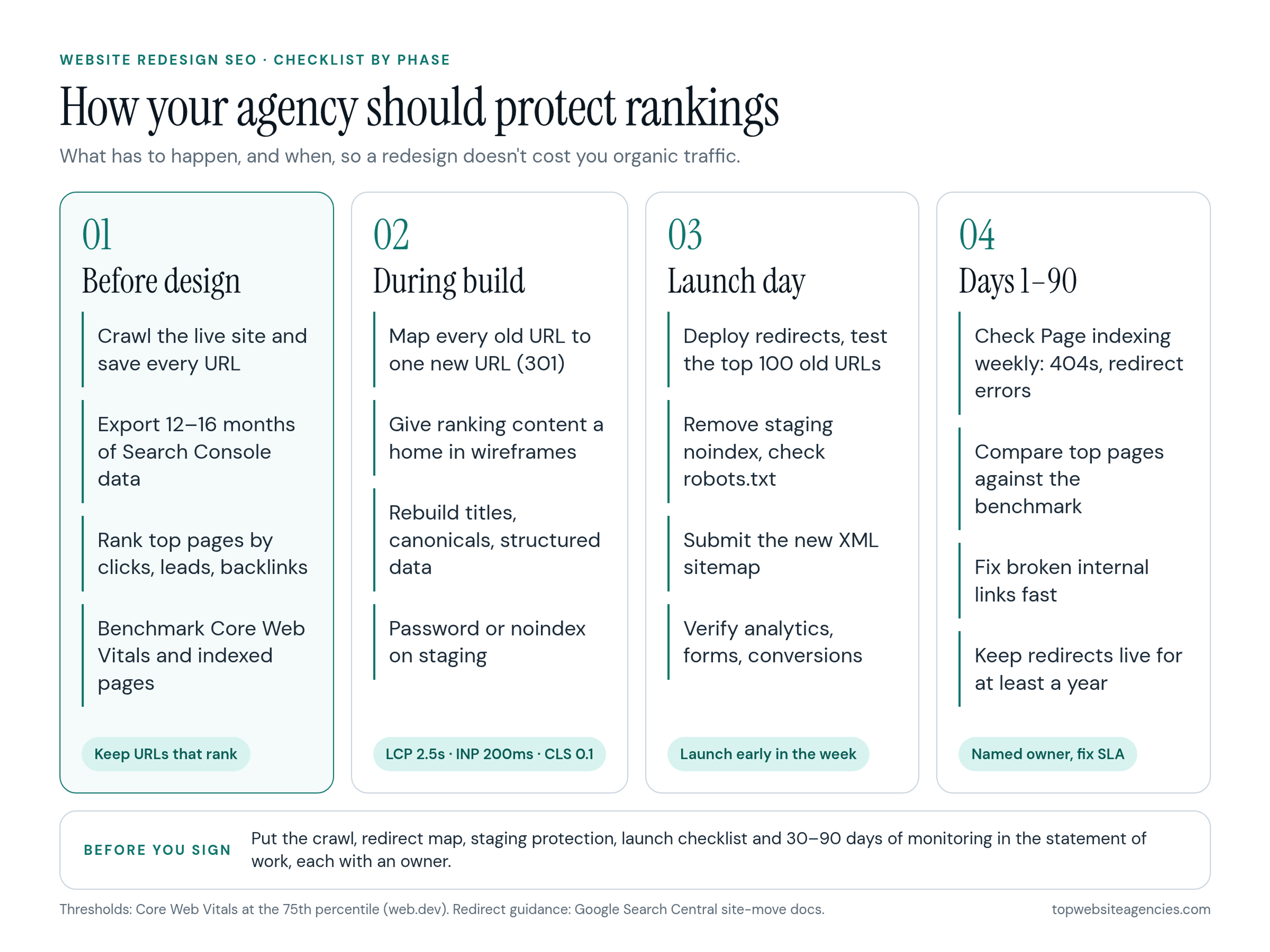
The checklist below is the one I hand to clients before they sign. The infographic is the one-page version to forward to your agency.
Before design starts
- Crawl the live site and export every URL, status code, title, H1, canonical, and word count.
- Export Search Console performance data for the last 12 to 16 months, by page and by query.
- Flag your top pages by clicks, conversions, and referring domains. These are the pages you protect first.
- Record current Core Web Vitals and indexed page counts as the benchmark.
- Agree on the URL structure early. Keeping existing URLs is the cheapest form of SEO protection there is.
During design and build
- Build the redirect map as soon as the new sitemap is approved, not in launch week.
- Review wireframes for your top pages against their current content. If a section ranks, it needs a home on the new page.
- Rebuild structured data, canonicals, and hreflang (if you run multiple languages) in the templates.
- Test performance on staging against the Core Web Vitals thresholds: Largest Contentful Paint within 2.5 seconds, Interaction to Next Paint of 200 milliseconds or less, and Cumulative Layout Shift of 0.1 or less, measured at the 75th percentile, as defined in web.dev's Core Web Vitals guide.
- Keep staging behind a password, or send a noindex rule with an X-Robots-Tag header, so the test site never competes with the real one.
Launch day
- Deploy redirects and test the top 100 old URLs by hand or with a crawler. Each should return one 301 hop to the right page.
- Remove the staging noindex and password, then check robots.txt on the live domain.
- Submit the new XML sitemap in Search Console and request indexing for your most important pages.
- Confirm analytics, conversion tracking, and forms fire on the new templates.
- Launch early in the week. A Friday launch means nobody is watching when something breaks.
First 30 to 90 days
- Check the Search Console Page indexing report weekly for new 404s, redirect errors, and pages excluded by noindex.
- Compare clicks and impressions for your top pages against the benchmark, week over week.
- Fix broken internal links and update your highest-value backlinks where you have a relationship with the linking site.
- Keep the redirects in place. Google's site-move guidance recommends keeping them for as long as possible, generally at least a year.
Questions to Ask an Agency Before You Sign
The best way to test whether an agency can protect rankings is to ask it to describe its last migration in detail. Agencies that do this work well answer quickly and specifically. Agencies that don't will talk about design.
- Can you show me a redesign where you handled the migration, and what organic traffic did in the 90 days after launch?
- Who on your team builds the redirect map, and when in the project does it start?
- How do you decide which pages keep their URLs, which merge, and which are removed?
- How do you protect staging from indexing, and who removes that protection at launch?
- What Core Web Vitals targets will the new templates meet, and how will you prove it before launch?
- How does your CMS or framework render content? Will the main copy be in the initial HTML?
- Who monitors Search Console after launch, for how long, and how fast will you fix a redirect error?
- If organic traffic is down more than 20 percent after eight weeks, what do you do, and is that work included in the fee?
Red Flags in an Agency's SEO Approach
These are the answers that make me cross an agency off a shortlist for any site that depends on organic leads:
- "SEO is out of scope." Then the redirect map is out of scope too, and that is the single most important deliverable in a redesign.
- "We'll redirect old pages to the homepage." That is a shortcut, not a migration.
- No crawl before design. The agency can't protect pages it hasn't inventoried.
- Redirects scheduled for "the week before launch." Mapping a 500-page site properly takes days of work and client review.
- A new URL structure for its own sake. Cleaner slugs rarely justify the risk on pages that already rank.
- No named owner after launch. If the contract ends on launch day, so does anyone's responsibility for the dip.
- Guaranteed ranking improvements. Nobody controls Google's results, and promises of a specific position are a trust signal in the wrong direction.
Who Owns What: Client, Agency, and SEO Specialist
The cleanest ownership split is simple: the agency executes, the client decides and supplies access and content, and an SEO specialist (in-house or independent) reviews the high-risk deliverables. Problems start when everyone assumes someone else has the redirect map.
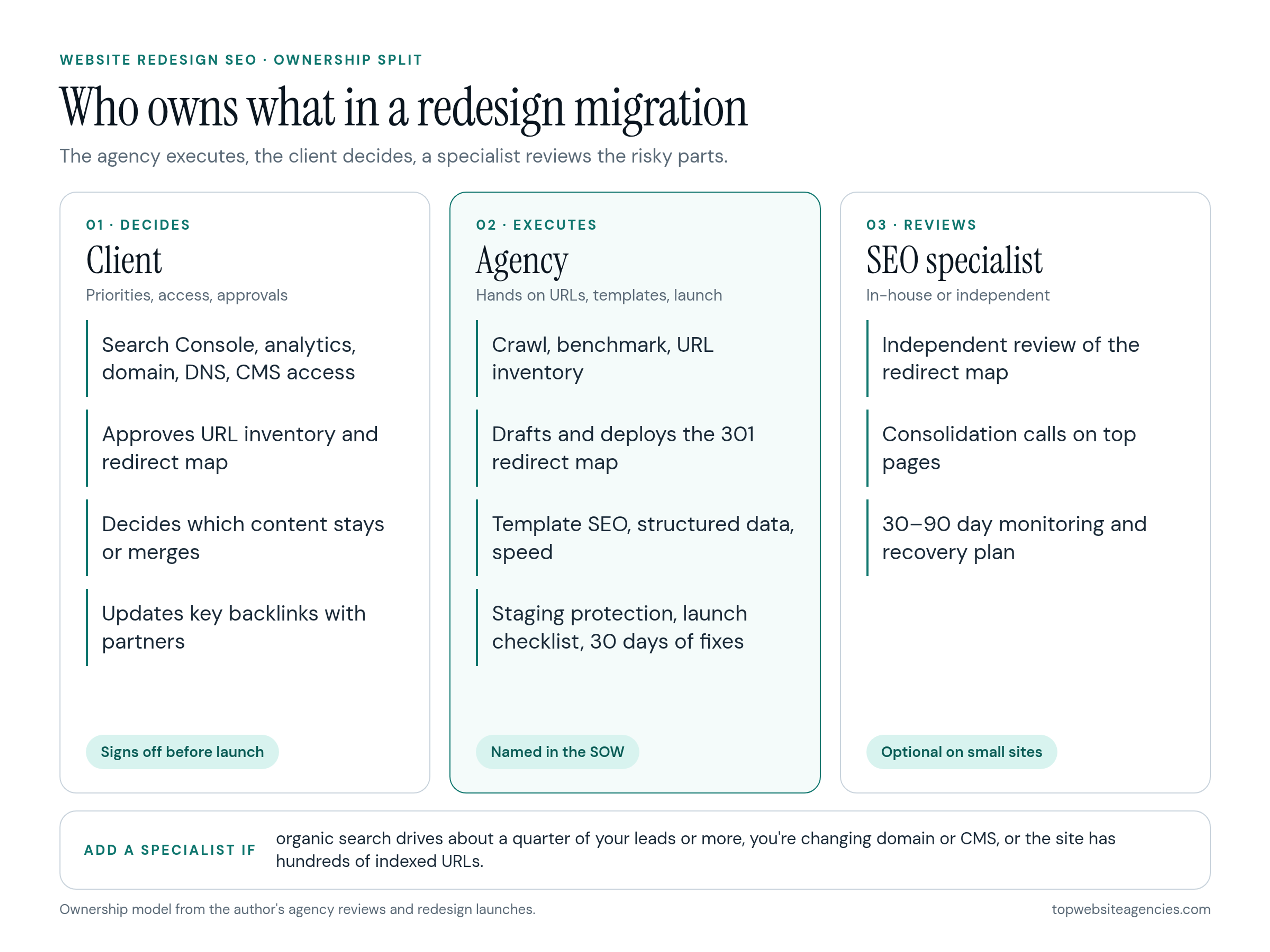
- The client owns business priorities, access to Search Console, analytics, the domain, DNS, and the CMS, approval of the URL inventory and redirect map, and content decisions about what stays.
- The agency owns the crawl and benchmark, the URL inventory, the redirect map draft, template SEO (titles, headings, canonicals, structured data), performance, staging protection, the launch checklist, and the first 30 days of fixes.
- An SEO specialist owns an independent review of the redirect map, content consolidation decisions on top pages, and the 30-to-90-day monitoring and recovery plan.
You can skip the specialist on a small brochure site with little organic traffic. I wouldn't skip one if organic search drives more than about a quarter of your leads, if you are changing domains or CMS platforms, or if the site has more than a few hundred indexed URLs.
How Much Does Redesign SEO Add to Cost and Timeline?
In the proposals I review, SEO migration usually adds 5 to 15 percent to a US agency redesign budget. In dollars, that tends to look like this:
- Small marketing site (under about 100 URLs): $2,000 to $6,000, often bundled into the project fee.
- Mid-size B2B or SaaS site (a few hundred URLs, active blog): $6,000 to $20,000, depending on how much content is merged or rewritten.
- Large site or replatforming (thousands of URLs, multiple languages or a domain change): $20,000 to $50,000 or more, usually with a dedicated SEO specialist.
On timeline, a well-run migration adds about one to three weeks of work, mostly spread across discovery and QA rather than tacked onto the end. Monitoring then runs for one to three months after launch. For the full budget picture by scope, see my breakdown of website redesign cost.
Compare that to the cost of a bad migration. If organic search brings you 40 qualified leads a month and a broken launch cuts that by a third for a quarter, you've lost around 40 leads. For most B2B companies, that costs more than the entire SEO line item.
Frequently Asked Questions (FAQ)
Will a website redesign hurt my SEO?
It doesn't have to. Most of the damage comes from changed URLs without redirects, deleted content, and blocking rules left on after launch. With a redirect map, a content migration plan, and post-launch monitoring, short-term fluctuation is normal and lasting losses are uncommon.
How long does it take rankings to recover after a redesign?
For a clean migration on a small to medium-sized site, most pages settle within a few weeks. If traffic is still falling after eight weeks, look for redirect errors, lost content on top pages, or indexing blocks rather than waiting longer.
Should I keep my URLs the same during a redesign?
Yes, wherever you can. Keeping URLs on pages that already rank is the lowest-risk option. Change them only when the old structure is broken or misleading, and redirect every old URL to its closest equivalent.
Do I need a separate SEO agency for a website redesign?
Not always. A capable web design agency can handle the migration on a small site. Bring in an SEO specialist when organic search is a major lead source, when you are changing domains or CMS platforms, or when the site has hundreds of URLs that earn traffic.
How long should I keep 301 redirects after a redesign?
Keep them for at least a year, and longer if old URLs still earn backlinks or visits. Redirects are cheap to maintain, and removing them early throws away the signals you worked to transfer.
Conclusion
Rankings rarely disappear because a redesign looks different. They disappear because URLs, content, and launch settings changed without anyone owning the consequences. Write the crawl, the redirect map, staging protection, the launch checklist, and post-launch monitoring into your agency's scope, assign an owner to each, and ask every shortlisted agency to walk you through its last migration.
If you are comparing teams now, start with our curated list of B2B web design agencies, then put the questions above to every agency on your shortlist in the first call.