Framer fits a design-led marketing site; Webflow fits a larger, content-heavy site that needs more CMS capacity and code export. A small team can edit a Framer site on a canvas, and both are visual website builders, but they differ in how much content they hold, what the plan price leaves out, and whether you can take the site with you. This guide compares them as of Nov 17, 2026, using each vendor's published limits and one independent hands-on test.
Founders and marketing leads often commit to a platform before fully understanding the limits of the underlying software. When evaluating web design teams that work with early-stage companies, the platform decision dictates how the agency will build the site, how much the project will cost, and who can edit the pages after launch. Pick the wrong one and the fix can be a full rebuild, because Framer sites cannot be exported as code.
Both platforms come up often in the agency portfolios and proposals behind our side-by-side reviews of web design studios. This guide looks at the choice from the side of the team that has to run the website after the agency hands it over, and ends with five questions to put in your brief.
Webflow vs Framer at a Glance
Here is how the two compare across the main decision points:
- Design model: Webflow uses a class-based visual development system modeled strictly on HTML and CSS. Framer uses a free-form canvas modeled closely on design tools like Figma.
- CMS capacity: Webflow offers larger database limits for content-heavy sites. Framer sets lower strict limits on database collections and items.
- Pricing model: Both bill monthly prices at annual rates. Both charge base site fees plus additional costs for workspace editors and add-on capacity.
- Code export: Webflow allows code export on paid workspace plans. Framer locks the site code inside its ecosystem.
- AI builder: Both include artificial intelligence generation tools. Webflow takes more steps for thorough output. Framer generates visual concepts faster.
- Ecommerce: Webflow includes dedicated ecommerce tiers. Framer relies on third-party integrations for shopping carts.
- Learning curve: Webflow requires an understanding of web development principles. Framer is faster for designers to pick up.
- Best fit: Webflow fits complex builds with extensive content architectures. Framer fits polished, fast-moving marketing pages and startup MVPs.
How the Two Editors Work
Webflow is a class-based visual editor modeled on HTML and CSS, and Framer is a free-form canvas that feels like Figma. Webflow asks designers to think in the document object model. You place elements inside div blocks, organize layouts with flexbox or CSS grid, and style everything using classes. This class-based approach maps closely to how front-end developers work. If you assign a specific class to a button, changing that class updates every instance of that button across the website. On its own Webflow versus Framer page (a vendor page, so read it as Webflow's pitch), Webflow says developers can bring code components onto the canvas and that the site's code is standard and exportable. The same page concedes that Framer is a good fit for a simple site a team builds and publishes on its own, and that Framer is quicker to learn.
Framer's interface resembles a design tool: a free-form canvas where you drag, resize and position elements. Webflow's page describes Framer as a tool for launching React-based sites with built-in hosting. Designers who spend their days in UI tools tend to feel at home here, and the canvas speeds up polished, interactive pages. Zapier's hands-on review reaches the same view: Framer is easy to use and fast for landing pages, prototypes and MVPs.
CMS Capacity and Content Growth
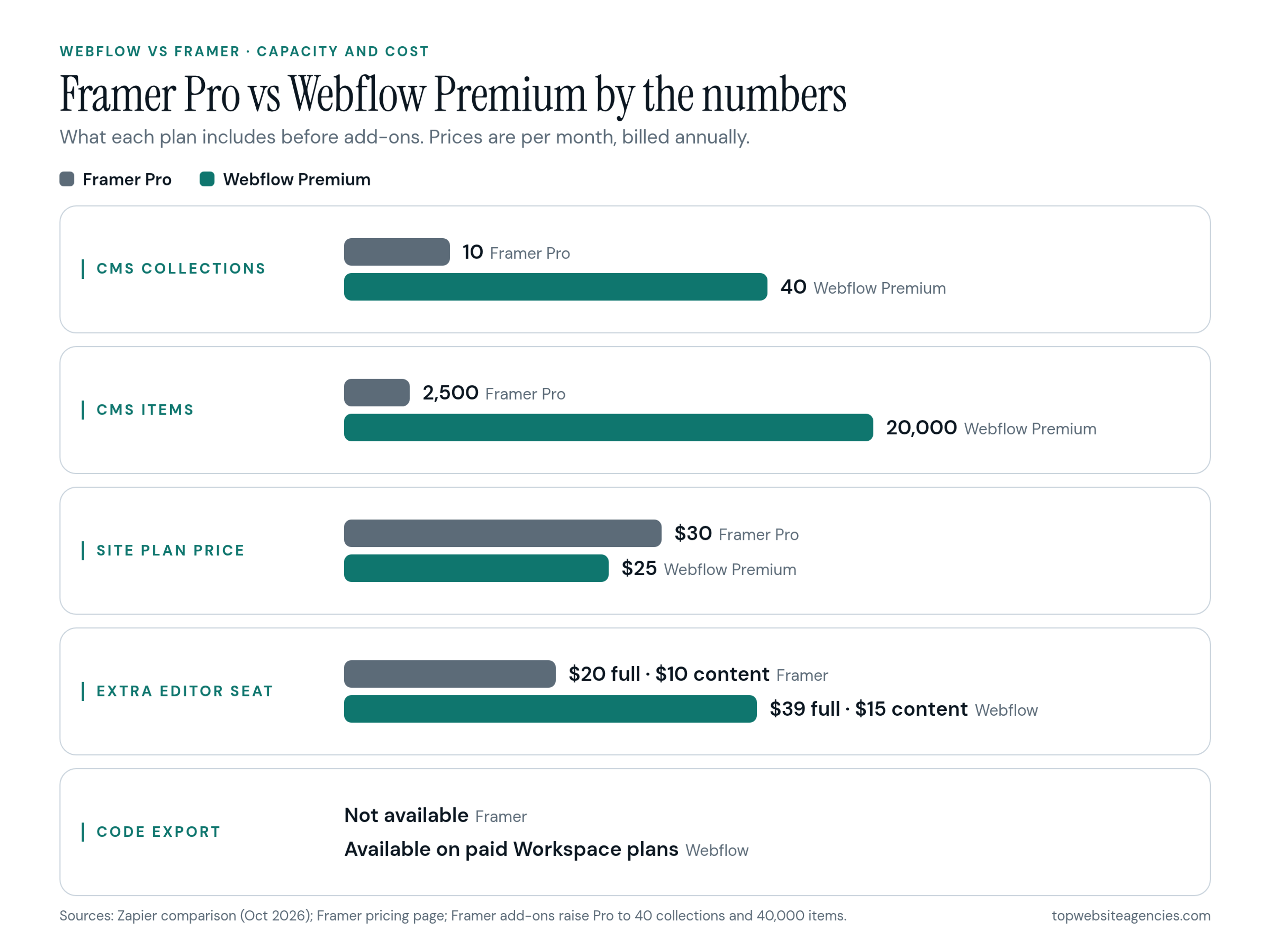
Webflow Premium holds far more structured content than Framer Pro: 40 CMS collections and 20,000 items against 10 collections and 2,500 items. A B2B software company typically needs a separate collection for blog posts, authors, case studies, integration partners, glossary terms and job listings, so the collection count is the limit to watch.
Per Zapier's independent comparison, Webflow Premium provides 40 CMS collections and up to 20,000 items, and Webflow has more CMS field types. That is room for years of content, including relationships such as linking an author profile to a blog post and a related product feature.
Framer sets tighter limits on content architecture. Even Framer's own comparison page says Webflow suits teams that prefer a class-based design system, larger self-serve CMS limits, code export and a broader developer platform. Framer, as the competitor, also lists Webflow's Team platform plan at $2,500 per month on an annual contract, so confirm that figure with Webflow before you budget.
Framer's Pro plan includes 150 pages, 10 CMS collections and 2,500 CMS items. A site with a blog, podcast episodes, customer stories, team members and a resource library can approach the 10-collection limit. In return, Framer Pro includes whole-project branches with previews, which lets a design team review a major site change before it goes live.
Pricing and Seats: What the Plan Price Leaves Out
Both platforms advertise a monthly site price billed annually, and neither price includes the people who log in to edit. Agency proposals often quote the build and skip these recurring software costs, so ask for them in writing. Plan figures below were checked on Nov 17, 2026 and change often.
Webflow Premium costs $25 per month billed annually. A Webflow Basic plan costs $15 per month billed annually but removes CMS functionality entirely. Webflow ecommerce plans range from $29 to $212 per month. To edit the site, you must pay for workspace seats. Webflow full editors cost $39 per month, while Limited seats cost $15 per month. Seat costs grow with the team. To see what a Webflow site plan, workspace seats and add-ons add up to, first map out who needs design access and who only needs to write.
Framer Basic costs $10 per month and includes 30 pages, 2 CMS collections, 1,000 CMS items, and 50 GB of bandwidth. Framer Pro costs $30 per month and increases those limits to 150 pages, 10 CMS collections, 2,500 CMS items, and 100 GB of bandwidth. These figures come from Framer's pricing page. Framer lists $20 per extra editor and $10 per content editor. Framer Pro lets you buy add-ons to raise the default limits. You can add more pages at $20 per 100 up to 700 pages. You can add more collections at $40 per 10 up to 40. You can add more items at $20 per 10,000 up to 40,000. You can purchase more bandwidth at $40 per 100 GB up to 2 TB. Enterprise plans provide custom limits, SSO, and SCIM.
AI Builders and Agents
Both platforms ship an AI site builder, and the practical difference is speed versus thoroughness. Both are aimed at the blank-page phase of a project.
In Zapier's hands-on test, Webflow's AI builder took more steps but was judged more thorough, while Framer's agent was faster. Treat either as a way to get a structural starting point, not a finished, on-brand site. A skilled designer still has to review the structure, copy and content model before anything ships.
SEO, Localization and Performance Controls
Both platforms cover the basic SEO controls (metadata, redirects, hosting on a CDN), and the difference shows up in localization. Framer's own comparison page lists redirects and dynamic metadata, and Webflow's page lists sitemap controls, automated metadata and 301 redirects.
Webflow Localize handles internationalization natively by placing localized pages in a subdirectory, such as `.com/es/`. Webflow's Localize page lists an auto-generated sitemap with hreflang tags, translated meta titles and descriptions, and a customizable locale selector.
Framer localization supports adding new locales and provides automatic locale redirects based on browser language and timezone settings. Framer's localization help covers right-to-left layouts and automatic translation of both canvas and CMS content. On the pricing page, Framer sells translation locales as an add-on at $20 per locale, up to 20.
If the site needs several languages, count the locales in your brief, because they change the monthly bill on Framer.
Lock-in and Code Export
Webflow can export your site's code and Framer cannot, so the choice decides what you can take with you if you leave the agency or the platform.
Zapier notes that Webflow lets you export your code and host elsewhere, whereas Framer cannot export code; Framer's comparison page lists code export for Webflow on paid Workspace plans. If your engineering team later wants to host the front end itself, Webflow gives you that option. Expect dynamic CMS features to need rebuilding outside Webflow, so treat export as an exit route, not a one-click move.
Framer does not offer code export, so the site lives on Framer. If you outgrow it, the practical path is a rebuild on another stack. For an early-stage startup still testing its message, that lock-in often matters less than launching quickly. For an established business with a security or procurement team, it is a real risk to put in the brief.
The Downsides of Each
Buyers usually ask about the friction points before they sign, and each platform has its own.
The downsides of Framer center on its ceilings. The limits on collections, items and pages push a growing editorial team to buy add-ons or rethink its content model, and because the code stays inside Framer, a startup that later needs a custom backend faces a rebuild.
The downsides of Webflow center on complexity and cost structure. Zapier describes a steeper learning curve, and Webflow's own page admits it takes more time to learn. Plans, seats and add-ons stack, so the real cost needs a worksheet. A Webflow site also needs discipline in class naming and content structure from day one, which is a good reason to have an experienced builder set it up.
When to Choose Each
Pick Webflow when content volume, governance or code ownership matters, and pick Framer when speed and design polish matter most. The scenarios below are illustrative, not client cases.
Choose Webflow when the project looks like this:
- In a typical project for a Series B software company, the marketing team plans to publish three blog posts a week, host a library of case studies, and maintain a directory of integration partners.
- In a typical project for a financial services firm, the compliance team requires specific technical SEO controls, strict content governance, and the option to export the front-end code for internal security audits.
- In a typical project for an enterprise marketing team, ten different writers need restricted CMS access to update landing pages without the ability to accidentally break the global navigation styling.
Choose Framer when the project looks like this:
- In a typical project for a newly funded startup, the founders need a highly polished, interactive landing page launched within three weeks to support a product launch.
- In a typical project for a small creative studio, a single designer wants to build a visually striking portfolio site with complex scroll animations without writing a single line of CSS.
- In a typical project for a mobile app company, the team uses Figma exclusively and wants a web workflow that mimics their native product design process with minimal development overhead.
When Neither Fits
Neither builder fits every business model. A large store catalog or a high-volume publisher can outgrow the CMS limits above. In these cases the conversation shifts toward a store platform or a publishing system. Evaluating how Webflow compares with a self-hosted WordPress build or a dedicated Shopify Plus instance becomes the necessary next step. Visual builders favor design agility, while large transactional sites favor database durability.
The Platform Brief: Five Questions to Answer Before You Hire
Five questions settle most of the platform decision, and your answers go straight into the agency brief. This framework is our own reasoning, not research. Answer them before you request proposals.
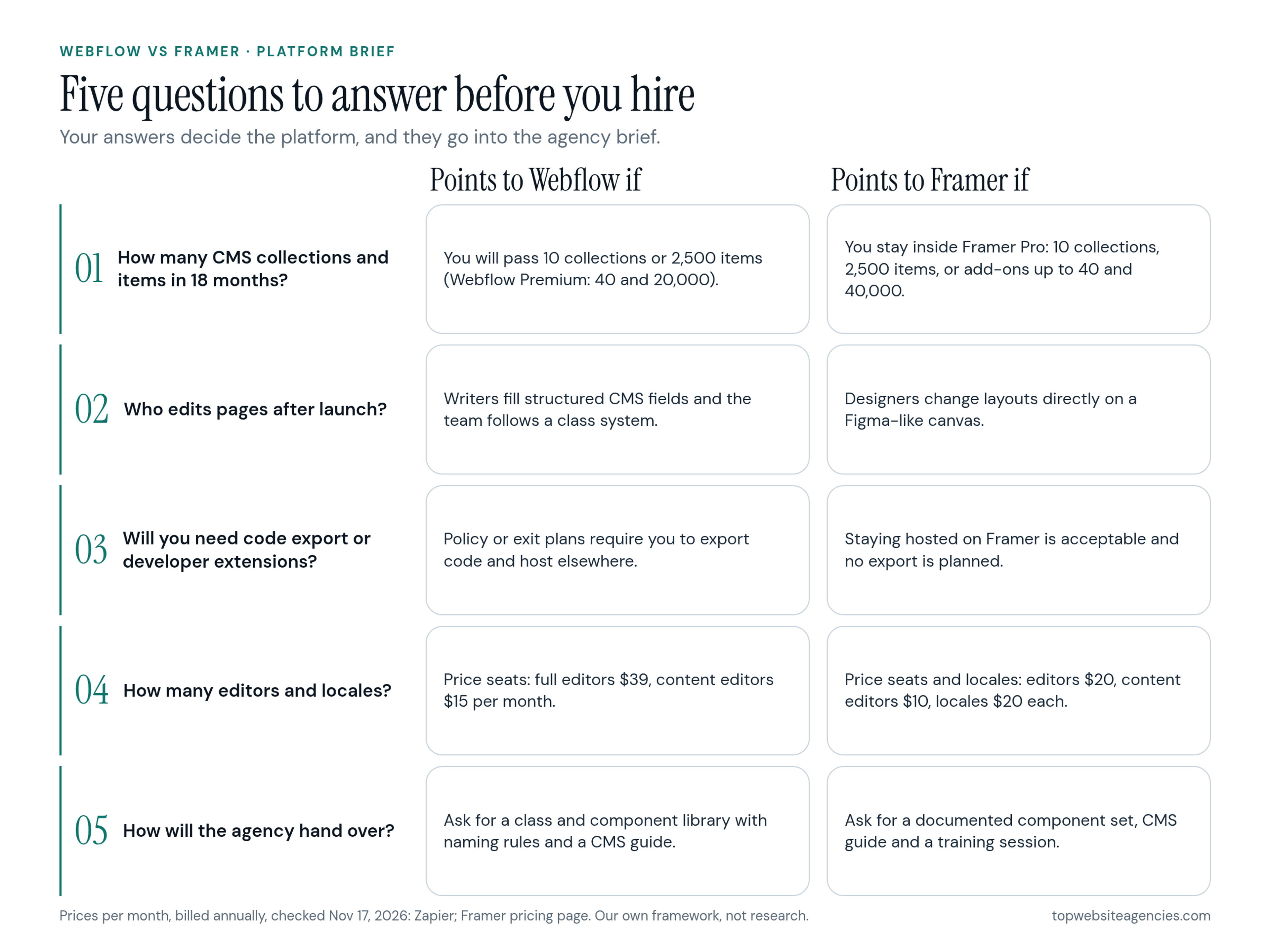
- How many CMS collections and items will the site hold in 18 months? Count your current blog posts, team members, and case studies. Project the growth. If the number approaches ten collections or a few thousand items quickly, note in your brief that you require high-capacity CMS infrastructure.
- Who edits pages after launch, and do they live in Figma or in a CMS? Identify the daily users. If your marketing writers just need form fields to paste text into, structured CMS platforms work best. If a lone designer expects to visually drag elements around a canvas daily, note that you require a free-form design editor.
- Will developers need to add custom code or take the site elsewhere later (code export)? Consult your engineering lead. If the company policy mandates owning the raw code or preparing for an eventual internal migration, make code export a mandatory requirement in the agency brief.
- How many locales and editors will you need (seats and locale add-ons)? Map out your global footprint and team size. Calculate the exact number of regional translations needed and the number of staff requiring login access. Write these numbers into the brief so the agency can forecast the true first-year software cost.
- How will the agency hand over (training, library of components, documentation)? Define the exit strategy. Specify whether you expect the agency to record training videos, supply a styled component library, or write standard operating procedures for publishing new pages.
How to Brief an Agency on Platform Choice
Bring your five answers to the agency and ask why it recommends one platform. Many agencies specialize in one platform, so test their reasoning against your answers.
Ask the agency these concrete questions during the proposal phase:
- Why are you recommending this specific platform for our particular content scale?
- Who will own the primary account and the workspace billing during and after the build?
- What happens to our website files if our relationship with your agency ends next year?
- Can you provide a spreadsheet showing what our first-year cost looks like, including the site plan, workspace seats, and necessary add-ons?
- How exactly does the handoff and training work for our non-technical marketing staff?
An agency that answers these clearly understands what it takes to run a website after launch. Vague answers on pricing and ownership are a signal to ask more questions. Using a step-by-step way to compare agencies and proposals helps expose these gaps before you sign.
Frequently Asked Questions (FAQ)
Is Framer better than Webflow?
Neither is better for every project. Framer is faster for designers who want a canvas for polished, interactive marketing pages. Webflow is the better fit for larger, content-heavy sites that need more CMS capacity, a class-based system and code export.
What are the disadvantages of Webflow?
Webflow has a steeper learning curve and expects some understanding of HTML and CSS concepts. Costs grow as you add editors and ecommerce. It also needs consistent class naming and content structure to stay maintainable.
What are the downsides of Framer?
Framer limits the number of CMS collections, items and pages, which caps the size of content-heavy sites. It cannot export code, so the site stays on Framer. Zapier also notes it has no ecommerce features of its own and relies on plugins to connect Shopify or other tools.
Which is cheaper?
Framer's entry plan is cheaper: $10 per month billed annually for Basic against $15 for Webflow Basic, which has no CMS. The real total depends on editors, CMS size, locales and add-ons, so total the base plan, seats and add-ons for your own site before you decide.
Which is better for SEO?
Both list the standard controls: metadata, redirects and CDN hosting. Webflow documents subdirectory locales with hreflang sitemaps, and Framer supports locales and automatic redirects through a paid locale add-on. Neither platform replaces good content and site structure.
Can I move a site between them?
We found no automatic migration path between the two in the sources we checked. Plan a move as a rebuild of the layouts, with the content moved over separately, and budget it like a small redesign.
Conclusion
Choose Framer for a focused, design-led marketing site that a small team edits on a canvas. Choose Webflow when you expect a large CMS, need code export or want developers to extend the site. Either way, write your five answers into the brief and ask the agency for the first-year cost including seats and add-ons before you sign.