A web designer decides how your website looks, reads and guides visitors toward action. A web developer turns that plan into working code, a configured content management system (CMS) and a live, fast site. If your site works and only needs a new look or new pages, start with a designer. If it needs new functionality, integrations or fixes under the hood, start with a developer. Most new websites need both, either as two specialists or as one person who covers both roles.
I have led design teams as Head of Design at Copy.ai and Around, as Director of Design at HackerRank, and as a Design Lead on the AWS Design System at AWS. In all of those roles, the projects that went wrong rarely failed because someone lacked talent. They failed because the buyer hired for one role and expected the output of the other. If you already know you need both, you can skip ahead to web design teams we have vetted for both design and build. If not, this guide shows what each role does, what they earn and which one your project needs.
The Difference Between a Web Designer and a Web Developer
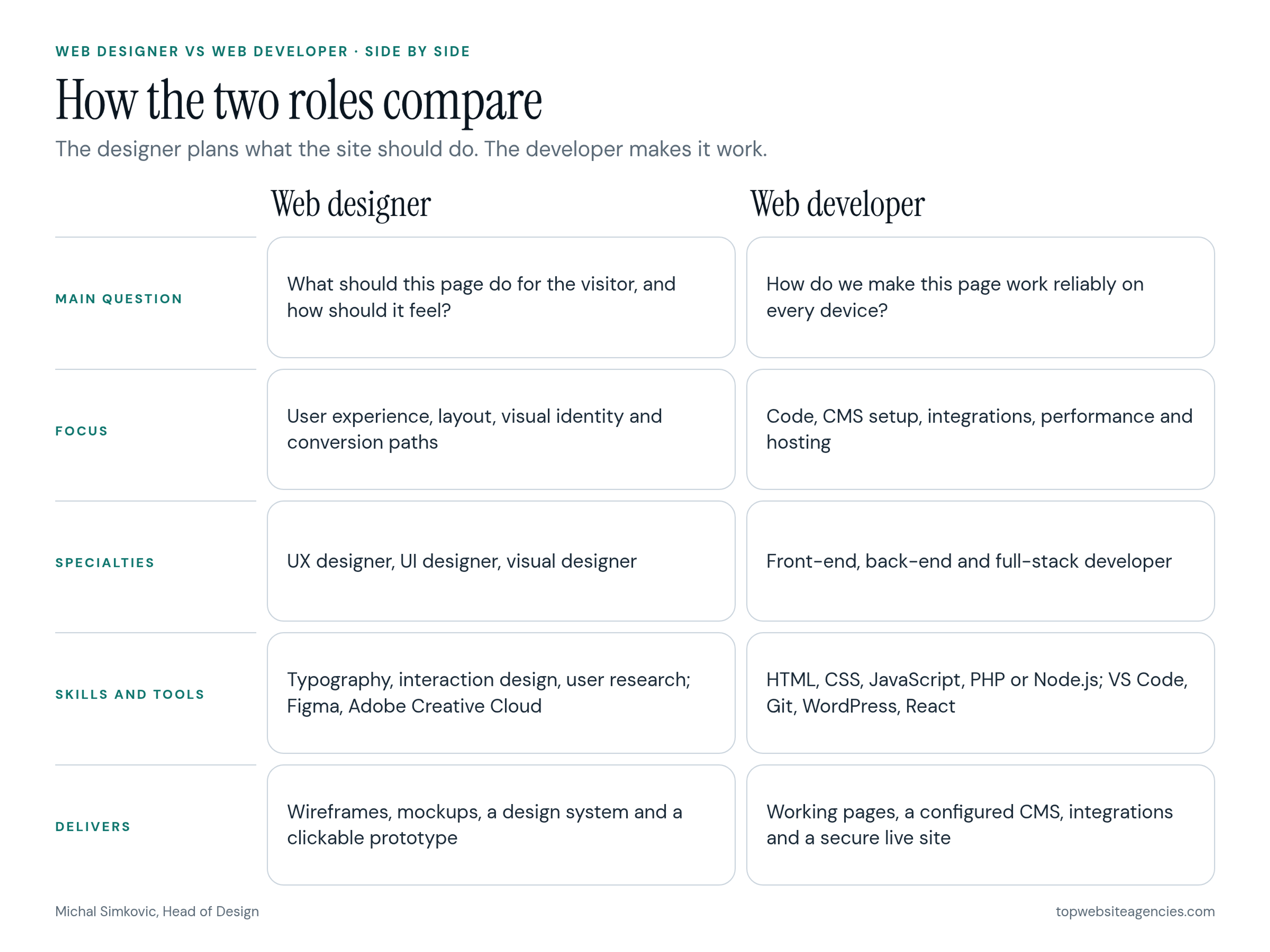
The simplest way to see the split is to look at what each person hands you at the end of their work. A designer delivers the blueprint: wireframes, mockups, a design system and a clickable prototype. A developer builds the house: working pages, a configured CMS, integrations, hosting and the code that keeps it all running.
The two roles overlap at the edges. Many designers understand HTML and CSS, and many front-end developers have a good eye for layout. But the core question each one answers is different. The designer asks "what should this page do for the visitor?" The developer asks "how do we make this page work reliably for every visitor, on every device?"
What Does a Web Designer Do?
A web designer solves business problems with layout, content structure and visual communication. On a typical website project, the designer is responsible for:
- Information architecture: deciding which pages exist, how they connect and what goes in the navigation.
- Wireframes: low-detail page layouts that settle structure and content priority before anyone debates colors. See how wireframes, mockups and prototypes differ when you need the full comparison.
- Visual design: high-fidelity mockups that apply your brand's typography, color and imagery.
- Responsive layouts: showing how each page adapts from a large desktop screen down to a phone.
- Design system and components: reusable buttons, cards, forms and sections, so new pages stay consistent.
- Prototypes: clickable versions of key flows that stakeholders and users can test before development starts.
UX, UI and Visual Designers
"Web designer" is an umbrella title. In practice you will meet three specialties, and the job post or proposal should tell you which one you are getting.
- UX designer: focuses on the logic of the site. They map user journeys, plan content hierarchy, run usability tests and reduce friction on key paths such as a demo request or a checkout.
- UI designer: focuses on the interface itself. They design the navigation, forms, buttons, states and interactive patterns people click and tap.
- Visual designer: focuses on the brand layer. They make typography, illustration, photography and color feel like your company.
On most marketing websites, one senior product or web designer covers all three. On larger sites, especially SaaS products with a logged-in app, the roles are often split across separate people.
What Does a Web Developer Do?
A web developer translates design files into technology that works. On a typical project, the developer is responsible for:
- Building pages: turning mockups into semantic HTML, CSS and JavaScript, or into templates in a platform such as WordPress or Webflow.
- CMS setup: creating content types and fields so your team can publish without touching code.
- Integrations: connecting forms, analytics, your CRM, payment providers and other third-party tools.
- Performance and accessibility: making pages load quickly and work with keyboards and screen readers.
- Hosting, security and deployment: configuring servers or hosting platforms, SSL, backups and the release process.
- Maintenance: updating plugins and dependencies, patching vulnerabilities and fixing bugs after launch.
Front-End, Back-End and Full-Stack Developers
Developer titles describe which part of the system someone works on.
- Front-end developer: builds everything that runs in the visitor's browser: layout, interactions, animations and responsive behavior. This is the developer who works most closely with the designer.
- Back-end developer: builds what visitors never see: servers, databases, APIs, user accounts and application logic. You need one for logins, dashboards, custom data handling or complex integrations.
- Full-stack developer: works across both layers. A good full-stack developer is a strong fit for small and mid-size builds, though on complex projects most are stronger on one side than the other.
The Designer Who Builds
There is also a hybrid role that has become common: the designer who builds. These professionals design the site and then build it themselves in visual development platforms such as Webflow or Framer. For a standard marketing site, this works well. One person owns the result from wireframe to launch, and nothing gets lost in a handoff.
The model stops working when the project needs custom server logic, user authentication, complex data or heavy integrations. At that point you need a developer, even if a designer-builder handles the marketing pages.
Skills and Tools for Each Role
Skills tell you what a person can do. Tools tell you how they work day to day. You should check both.
Web Designer Skills and Tools
- Core skills: layout and visual hierarchy, typography, color, interaction design, information architecture, user research and usability testing, plus enough HTML and CSS knowledge to design layouts a developer can actually build.
- Common tools: Figma for design and prototyping, Adobe Creative Cloud apps for image work, and sometimes Webflow or Framer for designers who also build.
Web Developer Skills and Tools
- Front-end skills: HTML, CSS and JavaScript, plus a framework such as React or Next.js on custom builds, along with responsive layout, performance tuning and accessibility.
- Back-end skills: a server-side language such as PHP, Node.js or Python, databases, APIs, authentication and security practices.
- Common tools: a code editor such as VS Code, Git and GitHub for version control, a CMS such as WordPress or a headless CMS, and browser developer tools.
How to Check Skills Before You Hire
Do not ask for a course list. Ask to see applied work.
- For a designer: ask to walk through a recent Figma file, not just polished portfolio shots. Look for organized components, clear layer names, mobile layouts and defined states for buttons and forms. That file is what your developer will work from.
- For a developer: ask for live links to sites they built and run Google's Lighthouse report on a few pages. Ask which CMS platforms and frameworks they know deeply. A developer who claims expert-level skill in every framework usually lacks depth in any of them.
What Web Designers and Web Developers Earn
Pay data is a useful reference point for what each skill set costs, even if you never hire anyone full time. According to O*NET OnLine, the US Department of Labor's occupation database, the 2025 median annual wage was $104,000 for web and digital interface designers and $92,650 for web developers, based on Bureau of Labor Statistics wage data.
Treat these numbers as a baseline, not a quote. Medians hide a wide range: a senior developer fluent in modern JavaScript frameworks earns far more than a junior developer customizing templates, and a senior product designer earns more than a junior visual designer. Employer costs such as benefits and payroll taxes sit on top of salary, and freelance or contract rates follow different math altogether.
Whether you staff the work with a freelancer, an employee or an outside team is a separate decision, and our comparison of freelance, in-house and outside design hires covers the costs and tradeoffs of each model.
How Designers and Developers Work Together
The highest-risk moment in a website project is the handoff: the point where the designer delivers the design files and the developer starts coding. While working on the AWS Design System, I learned that most handoff problems show up in the same three places.
- Designs that ignore CMS limits. A designer creates a filtering system, a mega menu or a layout variation that the chosen platform cannot support without heavy custom work. The developer either says no late in the project or quietly builds a fragile workaround.
- Missing responsive states. The designer delivers desktop and mobile views but skips tablet widths, very large screens, long headlines, empty states and error messages. The developer has to invent them.
- Developers interpreting intent. Without specs for spacing, hover states, animations and component behavior, the developer guesses. Developers usually favor function over form, so the live site ends up looking slightly off compared to the mockup.
You prevent all three by making the two roles talk early. The developer should review wireframes for feasibility before visual design is finalized, and the designer should review the build on staging before launch. A clean handoff package usually includes:
- A Figma file with named components, styles and variables
- Layouts for at least mobile, tablet and desktop widths
- Interaction and state specs: hover, focus, error, loading and empty states
- A content model that maps each page section to CMS fields
- Exported assets, fonts and icons, with licensing confirmed
- A short list of open questions and decisions both sides have agreed on
Who Do You Need? A Project-Type Matrix
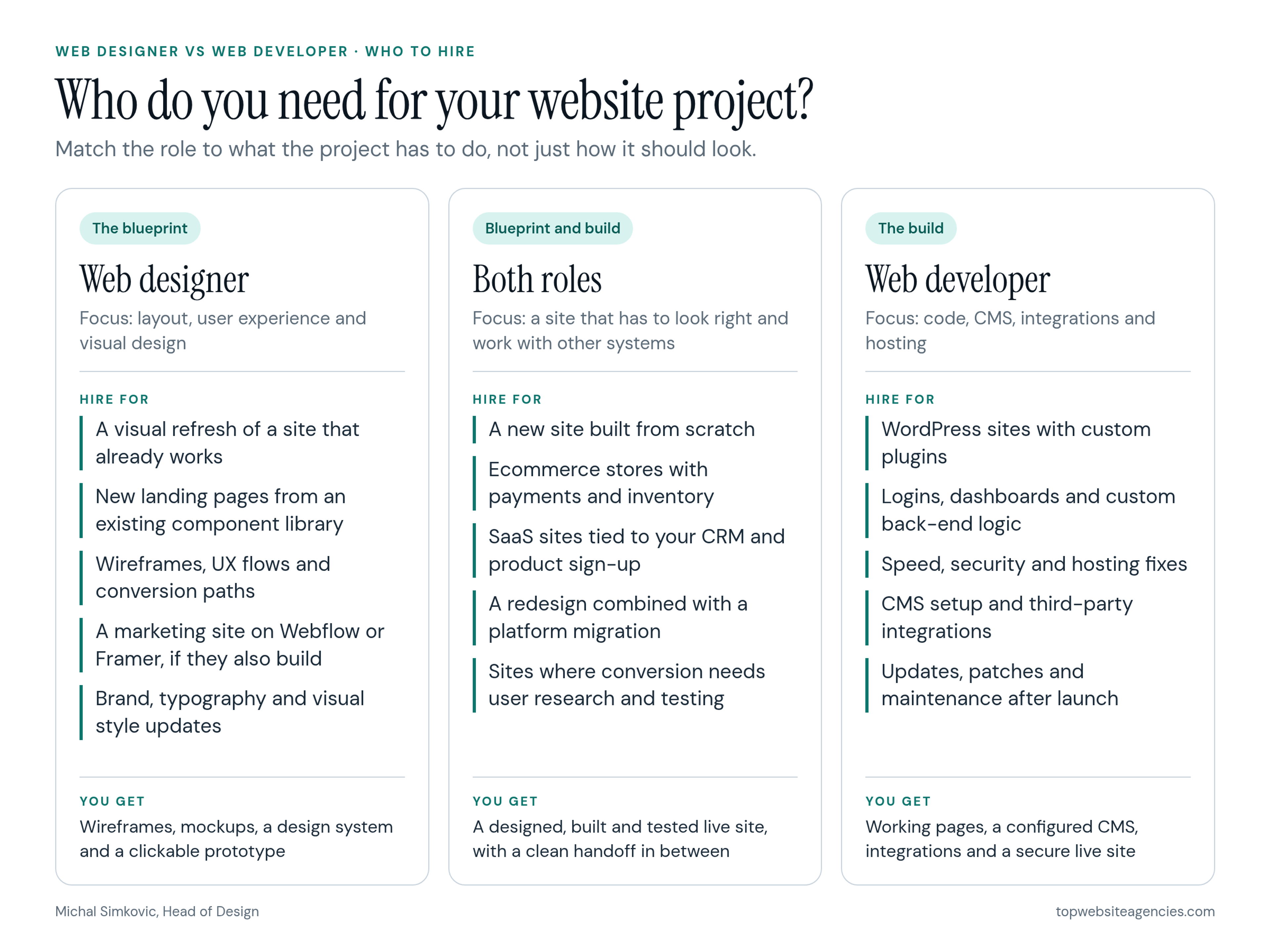
Many buyers struggle with this decision because they describe the project by how it should look, while the real cost sits in what it has to do. Here is who you need for the most common website projects.
- Visual refresh of an existing site: a web designer. If the underlying platform works, a designer can produce new layouts and styles for your current developer or in-house team to apply.
- New marketing site on Webflow or Framer: a designer who builds. One person can carry the project from wireframe to launch on a visual platform.
- WordPress site with custom plugins: a web developer. Custom PHP and database work needs dedicated engineering, with a designer for any new layouts.
- Ecommerce store: both. The designer shapes product pages and checkout for conversion, while the developer integrates payments, inventory, shipping and tax tools.
- SaaS marketing site with product integrations: both. The brand needs to look sharp, but the site also has to pass data to your CRM, analytics and product sign-up flow.
- Site with logins, dashboards or custom back-end logic: a back-end or full-stack developer first, with a UX designer for the logged-in flows. Security and data architecture come before visuals here.
- Ongoing landing pages and content updates: a web designer. Once a component library and CMS exist, a designer can assemble new pages without new code.
- Performance, security or hosting fixes: a web developer. Speed, vulnerabilities and server issues are code-level problems.
When You Need Both
You need a designer and a developer, or a team that provides both, when any of these are true:
- You are building a new site from scratch, not refreshing an existing one.
- The site has to integrate with other systems: CRM, payments, product sign-up, a customer portal or a custom database.
- You are moving to a new platform, for example from WordPress to a headless CMS, while also changing the design.
- Conversion matters enough that layout decisions need user research and testing, not just good taste.
- Your internal team has no one who can own technical decisions after launch.
In these cases, hiring one role and hoping it stretches to cover the other usually costs more than hiring both from the start. You either pay a second specialist to redo work, or you launch a site that looks right but breaks, or works but looks generic.
Common Buyer Mistakes
Most wasted website budgets I have seen come from putting the right person in the wrong role.
- Hiring a developer and expecting brand and UX decisions. Developers build what you specify. Hand them a loose idea instead of a finished design and they will fall back on framework defaults. The site will work and look like everyone else's.
- Hiring a visual designer and expecting a working site. Unless they explicitly build, a designer hands you design files. You then need to find and pay a developer to bring them to life, often after the budget is gone.
- Assuming someone owns the non-visual work. Designers and developers focus on their own deliverables. If no one is named as the owner of SEO, accessibility, copywriting and analytics, those tasks fall through the gap between the two roles.
- Skipping the developer's review of the design. When a developer first sees the design after it has been approved, every feasibility problem becomes a change request.
If you decide to hire an outside team that covers both roles, our guide to evaluating a design and development partner walks through how to compare proposals and portfolios.
Frequently Asked Questions (FAQ)
Do web designers code?
Many web designers understand HTML and CSS, which helps them design layouts that can actually be built. Most do not write production code, configure servers or handle databases. Designers who build in Webflow or Framer are the exception for standard marketing sites.
Can one person be both a web designer and a web developer?
Yes. Designers who build and full-stack developers with strong design skills both exist. They work well for marketing sites with standard functionality. For complex web applications, large ecommerce builds or heavy integrations, separate specialists usually produce better results.
Who handles SEO and accessibility?
Both roles share them. The designer sets heading structure, readable contrast and logical layouts. The developer delivers semantic HTML, fast load times, clean URLs and keyboard and screen reader support. Name one owner so the shared tasks do not fall between them.
Who maintains the website after launch?
A web developer handles technical maintenance: platform and plugin updates, security patches, backups and bug fixes. You need a designer after launch only for new page types, campaign pages or a visual refresh.
Conclusion
The difference between a web designer and a web developer comes down to the question each one answers. The designer decides what the site should be and how it should feel. The developer makes it work, reliably and securely, on every device.
Use the project-type matrix to match the role to your scope. A visual refresh or new landing pages call for a designer. Fixes, integrations and custom functionality call for a developer. A new site with real business requirements calls for both. Whichever you choose, get the two roles talking before the design is approved, and agree on who owns SEO, accessibility and content before work starts.